cancel
Showing results for 
Search instead for 
Did you mean: 

We've captured the moments from FabCon & SQLCon that everyone is talking about, and we are bringing them to the community, live and on-demand. Starts on April 14th. Register now

Reply
rjsidek
Helper II
Helper II

Getting DateDiff based on same column

Hi everyone,

I have a sample dataset that looks like this,

Excel dataset test.png

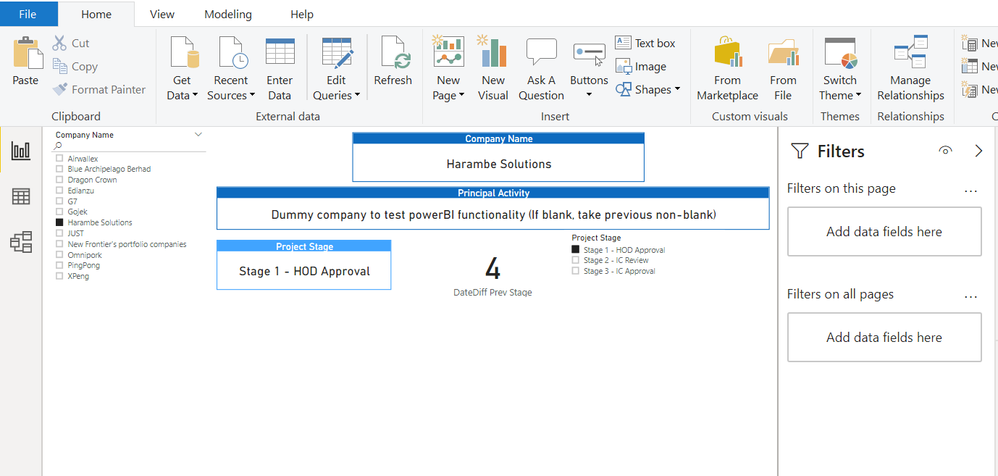
 and a sample pbi template that looks like this:


Picture question.png


And here is what I am trying to achieve:


As you can see in the pbi template, there is a slicer for Project Stage and multiple cards to show different information. The cards that are most relevant to this question is Project Stage, DateDiff Prev Stage, and the Stage slicer. 

For the DateDiff Prev Stage, currently it is showing the DateDiff between Stage 2 and Stage 1. I did that by creating a variable for each of the stages and then simply returning the datediff between the 2 to be displayed in the card.

What I ultimately want to do is make this change dynamic. I want to create a measure that when I choose a stage on the slicer, the measure calculates the datediff between my current selection stage and whatever directly previous stage relative to the current selection is. As of now, I have no idea how I can achieve that. 

Any help is appreciated. Thanks in advance

1 ACCEPTED SOLUTION
dax
Community Support
Community Support

Hi rjsidek, 

I want to check the logic with you, when you choose stage 1, which previous date of it?Shouls it show blank? When you choose 2, it should compare 1 and 2 . You could refer to my sample for details to see whether it work or not.

Best Regards,
Zoe Zhi

If this post helps, then please consider Accept it as the solution to help the other members find it more quickly.

View solution in original post

4 REPLIES 4
danextian
Super User
Super User

Hi @rjsidek ,


Please try this:

  1.  Add a column in Query Editor that would extract the stage number. Name it Stage Number. You can use Text Before Delimiter or First Characters. Set the data type to whole number.
  2.  Create these calculated columns in DAX:


Previous Date =
IF (
    'Table'[Stage Number] > 1,
    CALCULATE (
        MAX ( 'Table'[Date] ),
        ALLEXCEPT ( 'Table', 'Table'[Company] ),
        'Table'[Stage Number]
            = EARLIER ( 'Table'[Stage Number] ) - 1
    )
)

Datediff = 
DATEDIFF ( 'Table'[Previous Date], 'Table'[Date], DAY )


Dane Belarmino | Microsoft MVP | Proud to be a Super User!

Did I answer your question? Mark my post as a solution!


"Tell me and I’ll forget; show me and I may remember; involve me and I’ll understand."
Need Power BI consultation, get in touch with me on LinkedIn or hire me on UpWork.
Learn with me on YouTube @DAXJutsu or follow my page on Facebook @DAXJutsuPBI.

Hi @danextian , 


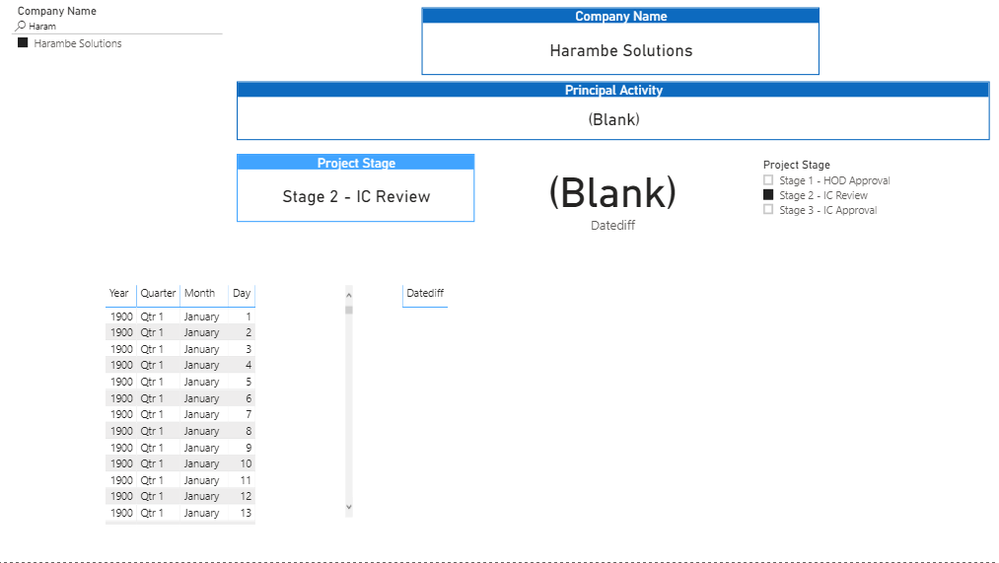
I tried doing it how you suggested but it does not seem to be working. This is what it shows currently:

Follow up pbi.png

 I provided the tables visualization to show what the measure currently shows. As you can see, the datediff is just showing blanks, and I am not quite sure why.

These are the codes I used to create the 2 calculated columns

Previous Date = 
IF (
    Table1[Stage Number] > 1,
    CALCULATE (
        MAX ( Table1[Date of Event] ),
        ALLEXCEPT ( Table1, Table1[Company Name] ),
        Table1[Stage Number]
            = EARLIER ( Table1[Stage Number] ) - 1
    )
)

Datediff = 
DATEDIFF ( Table1[Previous Date], Table1[Date of Event], MONTH )


Any ideas how to correct this? 

dax
Community Support
Community Support

Hi rjsidek, 

I want to check the logic with you, when you choose stage 1, which previous date of it?Shouls it show blank? When you choose 2, it should compare 1 and 2 . You could refer to my sample for details to see whether it work or not.

Best Regards,
Zoe Zhi

If this post helps, then please consider Accept it as the solution to help the other members find it more quickly.

Can you please post a screenshot of the data view filtered to the stage and company in your screenshot similar to image below?

datediff.png


Dane Belarmino | Microsoft MVP | Proud to be a Super User!

Did I answer your question? Mark my post as a solution!


"Tell me and I’ll forget; show me and I may remember; involve me and I’ll understand."
Need Power BI consultation, get in touch with me on LinkedIn or hire me on UpWork.
Learn with me on YouTube @DAXJutsu or follow my page on Facebook @DAXJutsuPBI.

Helpful resources

Announcements
New to Fabric survey Carousel

New to Fabric Survey

If you have recently started exploring Fabric, we'd love to hear how it's going. Your feedback can help with product improvements.

Power BI DataViz World Championships carousel

Power BI DataViz World Championships - June 2026

A new Power BI DataViz World Championship is coming this June! Don't miss out on submitting your entry.

Join our Fabric User Panel

Join our Fabric User Panel

Share feedback directly with Fabric product managers, participate in targeted research studies and influence the Fabric roadmap.

March Power BI Update Carousel

Power BI Community Update - March 2026

Check out the March 2026 Power BI update to learn about new features.