cancel
Showing results for 
Search instead for 
Did you mean: 

The Power BI Data Visualization World Championships is back! Get ahead of the game and start preparing now! Learn more

Reply
summer18
Helper III
Helper III

Get value based from max date

Hi,

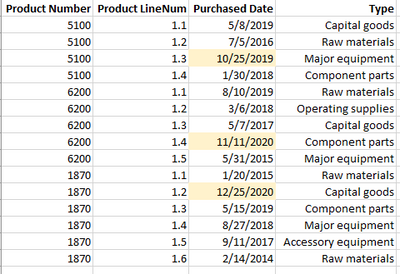
I need help on how can I get the value from "Type" column based from max Purchased Date per Product Number and ProductLineNum.  For example, for Product Number 5100, the max Purchased Date is 10/25/2019 so it should return the value of "Major equipment".


summer18_0-1634634363452.png


Expected output:

summer18_1-1634634499954.png


I'm trying VAR and RETURN formula but I could not get it right.


Thank you in advance


1 ACCEPTED SOLUTION
goncalogeraldes
Super User
Super User

Hello there @summer18 ! Try this:

Latest Type =
CALCULATE (
    MAX ( Table[Type] ),
    FILTER (
        'Table',
        'Table'[Purchased Date]
            = CALCULATE (
                MAX ( 'Table'[Purchased Date] ),
                FILTER ( Table, 'Table'[Product Number] = EARLIER ( 'Table'[Product Number] ) )
            )
            && [Product Number] = EARLIER ( [Product Number] )
    )
)

Hope this answer solves your problem!
If you need any additional help please @ me in your reply.
If my reply provided you with a solution, please consider marking it as a solution ✔️ or giving it a kudoe 👍
Thanks!

You can also check out my LinkedIn!

Best regards,
Gonçalo Geraldes


View solution in original post

2 REPLIES 2
goncalogeraldes
Super User
Super User

Hello there @summer18 ! Try this:

Latest Type =
CALCULATE (
    MAX ( Table[Type] ),
    FILTER (
        'Table',
        'Table'[Purchased Date]
            = CALCULATE (
                MAX ( 'Table'[Purchased Date] ),
                FILTER ( Table, 'Table'[Product Number] = EARLIER ( 'Table'[Product Number] ) )
            )
            && [Product Number] = EARLIER ( [Product Number] )
    )
)

Hope this answer solves your problem!
If you need any additional help please @ me in your reply.
If my reply provided you with a solution, please consider marking it as a solution ✔️ or giving it a kudoe 👍
Thanks!

You can also check out my LinkedIn!

Best regards,
Gonçalo Geraldes


Thank you very much @goncalogeraldes !  It works!

Helpful resources

Announcements
Power BI DataViz World Championships

Power BI Dataviz World Championships

The Power BI Data Visualization World Championships is back! Get ahead of the game and start preparing now!

December 2025 Power BI Update Carousel

Power BI Monthly Update - December 2025

Check out the December 2025 Power BI Holiday Recap!

FabCon Atlanta 2026 carousel

FabCon Atlanta 2026

Join us at FabCon Atlanta, March 16-20, for the ultimate Fabric, Power BI, AI and SQL community-led event. Save $200 with code FABCOMM.