cancel
Showing results for 
Search instead for 
Did you mean: 

Get Fabric Certified for FREE during Fabric Data Days. Don't miss your chance! Request now

Reply
Anonymous
Not applicable

Get total sum per month from cumulative value

Hi everyone,


I've been struggeling with something. I want a calculated column that calculates the sales of that month based on the cumulitive sales.


ID      Month Year   CumAmount      Sales

1484   2019-jan      120000               -

1484   2019-feb      130000               10000

1484   2019-mar     135000               5000


Unfortunately I don't have a datevalue in the same row, but I do have "2019-jan", "2019-feb" etc. that I have connected with the same data format in a calendar table.

Can someone help me out?


1 ACCEPTED SOLUTION
v-piga-msft
Resident Rockstar
Resident Rockstar

Hi @Anonymous ,

For your requirement, please create an index column in Query Editor firstly and then create the calculated column with the formula below.

Column =
VAR a =
    CALCULATE (
        MAX ( 'Table1'[CumAmount] ),
        FILTER ( ALL ( 'Table1' ), 'Table1'[Index] = EARLIER ( Table1[Index] ) - 1 )
    )
RETURN
    IF ( ISBLANK ( a ), BLANK (), 'Table1'[CumAmount] - a )

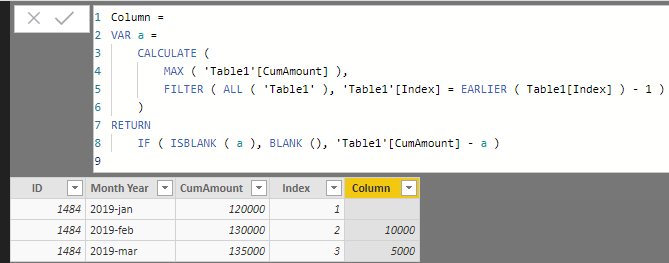
Here is the output.

ou.PNG

You also could have a reference of my attachement.

Best Regards,

Cherry

Community Support Team _ Cherry Gao
If this post helps, then please consider Accept it as the solution to help the other members find it more quickly.

View solution in original post

3 REPLIES 3
v-piga-msft
Resident Rockstar
Resident Rockstar

Hi @Anonymous ,

For your requirement, please create an index column in Query Editor firstly and then create the calculated column with the formula below.

Column =
VAR a =
    CALCULATE (
        MAX ( 'Table1'[CumAmount] ),
        FILTER ( ALL ( 'Table1' ), 'Table1'[Index] = EARLIER ( Table1[Index] ) - 1 )
    )
RETURN
    IF ( ISBLANK ( a ), BLANK (), 'Table1'[CumAmount] - a )

Here is the output.

ou.PNG

You also could have a reference of my attachement.

Best Regards,

Cherry

Community Support Team _ Cherry Gao
If this post helps, then please consider Accept it as the solution to help the other members find it more quickly.

Hello,

I have the same problem but the other way round...

I have the sales amount per month and would like to show on graph the cumulative.

For exemple :

Feb=Jan+Feb

March=Jan+Feb+March

... and so on.

Could you please help me ?


Thanks,

Anonymous
Not applicable

Hi,


You can create a calculated column for that;

Running Total COLUMN =
CALCULATE (
    SUM ( 'TableName'[Value] ),
    ALL ( 'Tablename' ),
    'TableName'[Date] <= EARLIER ( 'TableName'[Date] )
)

Helpful resources

Announcements
November Power BI Update Carousel

Power BI Monthly Update - November 2025

Check out the November 2025 Power BI update to learn about new features.

Fabric Data Days Carousel

Fabric Data Days

Advance your Data & AI career with 50 days of live learning, contests, hands-on challenges, study groups & certifications and more!

FabCon Atlanta 2026 carousel

FabCon Atlanta 2026

Join us at FabCon Atlanta, March 16-20, for the ultimate Fabric, Power BI, AI and SQL community-led event. Save $200 with code FABCOMM.

Top Solution Authors
Top Kudoed Authors