FabCon is coming to Atlanta
Join us at FabCon Atlanta from March 16 - 20, 2026, for the ultimate Fabric, Power BI, AI and SQL community-led event. Save $200 with code FABCOMM.
Register now!- Power BI forums
- Get Help with Power BI
- Desktop
- Service
- Report Server
- Power Query
- Mobile Apps
- Developer
- DAX Commands and Tips
- Custom Visuals Development Discussion
- Health and Life Sciences
- Power BI Spanish forums
- Translated Spanish Desktop
- Training and Consulting
- Instructor Led Training
- Dashboard in a Day for Women, by Women
- Galleries
- Data Stories Gallery
- Themes Gallery
- Contests Gallery
- QuickViz Gallery
- Quick Measures Gallery
- Visual Calculations Gallery
- Notebook Gallery
- Translytical Task Flow Gallery
- TMDL Gallery
- R Script Showcase
- Webinars and Video Gallery
- Ideas
- Custom Visuals Ideas (read-only)
- Issues
- Issues
- Events
- Upcoming Events
The Power BI Data Visualization World Championships is back! Get ahead of the game and start preparing now! Learn more
- Power BI forums
- Forums
- Get Help with Power BI
- Desktop
- Re: Get the exploded calculation of a waterfall ch...
- Subscribe to RSS Feed
- Mark Topic as New
- Mark Topic as Read
- Float this Topic for Current User
- Bookmark
- Subscribe
- Printer Friendly Page


- Mark as New
- Bookmark
- Subscribe
- Mute
- Subscribe to RSS Feed
- Permalink
- Report Inappropriate Content
Get the exploded calculation of a waterfall chart
Hello,
How can I get the values shown in the breakdown of this waterfall chart?
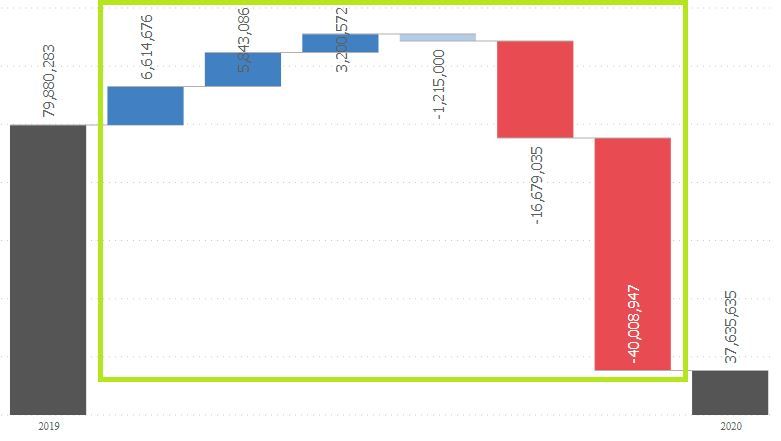
Those values obtained I will put them in a bar graph separated by the value they have (positive or negative).
Thank you!
Reggards,
DC


- Mark as New
- Bookmark
- Subscribe
- Mute
- Subscribe to RSS Feed
- Permalink
- Report Inappropriate Content
actually this would work more as a new table dax rather them a measure unleas you do some modification to it depending on your final objective, to use it as its to see what table returns for you you can delete from la row saying evaluate to last, and first 2 rows, instead of evaluate put
"return _DS0PrimaryWindowed"
Did I answer your question? Mark my post as a solution! / Did it help? Give some Kudos!
Proud to be a Super User!
- Mark as New
- Bookmark
- Subscribe
- Mute
- Subscribe to RSS Feed
- Permalink
- Report Inappropriate Content
Hello @StefanoGrimaldi ,
I have generated the table based on the code provided by the parser, I have another question:
How can I make the values I highlight not fixed? I have tried for the year to put a MIN and MAX on it, but there seems to be no change in the results.
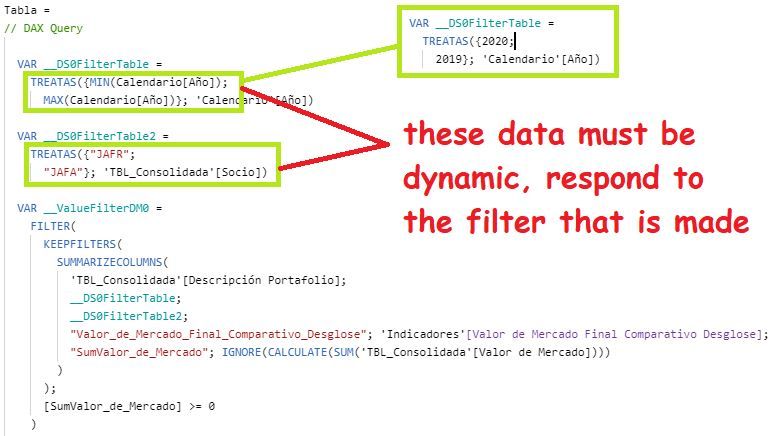
Again, thanks for the help!
DC
- Mark as New
- Bookmark
- Subscribe
- Mute
- Subscribe to RSS Feed
- Permalink
- Report Inappropriate Content
what you did should woirk reference to calendar year min and max, make sure the calendar table have the correct relantionship on the model with the other tables refering to.
Did I answer your question? Mark my post as a solution! / Did it help? Give some Kudos!
Proud to be a Super User!
- Mark as New
- Bookmark
- Subscribe
- Mute
- Subscribe to RSS Feed
- Permalink
- Report Inappropriate Content
Relationships are correct, I really don't know what could be happening.

- Mark as New
- Bookmark
- Subscribe
- Mute
- Subscribe to RSS Feed
- Permalink
- Report Inappropriate Content
umm and when you run that dax what results its showing? or its giving a error?
Did I answer your question? Mark my post as a solution! / Did it help? Give some Kudos!
Proud to be a Super User!


- Mark as New
- Bookmark
- Subscribe
- Mute
- Subscribe to RSS Feed
- Permalink
- Report Inappropriate Content
- Mark as New
- Bookmark
- Subscribe
- Mute
- Subscribe to RSS Feed
- Permalink
- Report Inappropriate Content
hey you can get the visual query expresion for the dax formula:
go to the view panels, activate the performace analyzer panel, them start recording and refresh all the visual, them you can copy the visual query to a word, or dax studio program to get the formula from it.
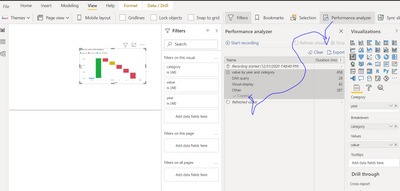
thats the complex way, the easy way would be making a dax formula that sums by category (complex from this dax formula would be to make the negative values based on the category before them without setting a historical of that category data)
Did I answer your question? Mark my post as a solution! / Did it help? Give some Kudos!
Proud to be a Super User!
- Mark as New
- Bookmark
- Subscribe
- Mute
- Subscribe to RSS Feed
- Permalink
- Report Inappropriate Content
Hello @StefanoGrimaldi
Thanks for your help, but how could I put as a measure? The code that the parser throws at me is the following:
// DAX Query increase
DEFINE
  VAR __DS0FilterTable =
    TREATAS({"JAFR",
      "JAFA"}, 'TBL_Consolidada'[Socio])

  VAR __ValueFilterDM0 =
    FILTER(
      KEEPFILTERS(
        SUMMARIZECOLUMNS(
          'TBL_Consolidada'[Descripción Portafolio],
          __DS0FilterTable,
          "Valor_de_Mercado_Final_Comparativo_Desglose", 'Indicadores'[Valor de Mercado Final Comparativo Desglose],
          "SumValor_de_Mercado", IGNORE(CALCULATE(SUM('TBL_Consolidada'[Valor de Mercado])))
        )
      ),
      [SumValor_de_Mercado] >= 0
    )

  VAR __DS0Core =
    SUMMARIZECOLUMNS(
      'TBL_Consolidada'[Descripción Portafolio],
      __DS0FilterTable,
      __ValueFilterDM0,
      "Valor_de_Mercado_Final_Comparativo_Desglose", 'Indicadores'[Valor de Mercado Final Comparativo Desglose]
    )

  VAR __DS0PrimaryWindowed =
    TOPN(
      1001,
      __DS0Core,
      [Valor_de_Mercado_Final_Comparativo_Desglose],
      0,
      'TBL_Consolidada'[Descripción Portafolio],
      1
    )

EVALUATE
  __DS0PrimaryWindowed

ORDER BY
  [Valor_de_Mercado_Final_Comparativo_Desglose] DESC,
  'TBL_Consolidada'[Descripción Portafolio]
Reggards,
DC

Helpful resources

Power BI Dataviz World Championships
The Power BI Data Visualization World Championships is back! Get ahead of the game and start preparing now!

Power BI Monthly Update - December 2025
Check out the December 2025 Power BI Holiday Recap!

FabCon Atlanta 2026
Join us at FabCon Atlanta, March 16-20, for the ultimate Fabric, Power BI, AI and SQL community-led event. Save $200 with code FABCOMM.

| User | Count |
|---|---|
| 38 | |
| 36 | |
| 33 | |
| 30 | |
| 28 |


| User | Count |
|---|---|
| 127 | |
| 88 | |
| 78 | |
| 66 | |
| 65 |


