Join us at FabCon Atlanta from March 16 - 20, 2026, for the ultimate Fabric, Power BI, AI and SQL community-led event. Save $200 with code FABCOMM.
Register now!The Power BI Data Visualization World Championships is back! Get ahead of the game and start preparing now! Learn more
Hi,
Trying to find a way to use rank and have it change by month selected and the ndynamically give that sum of the top 5 projects each month, preferably showing it in matrix with months as columns.
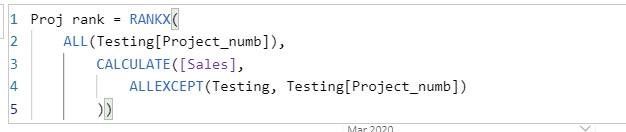
I have created this rank measure:
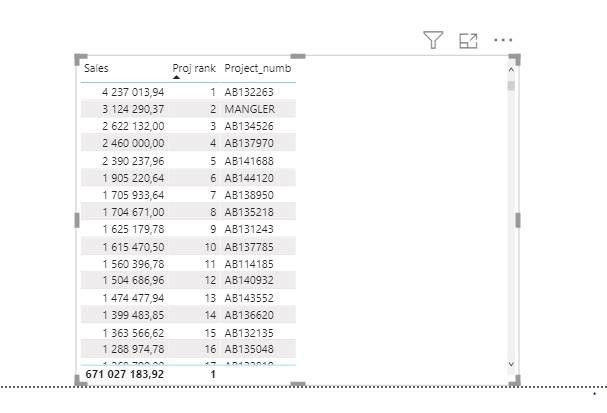
This works when I'm not selecting any month as shown here:
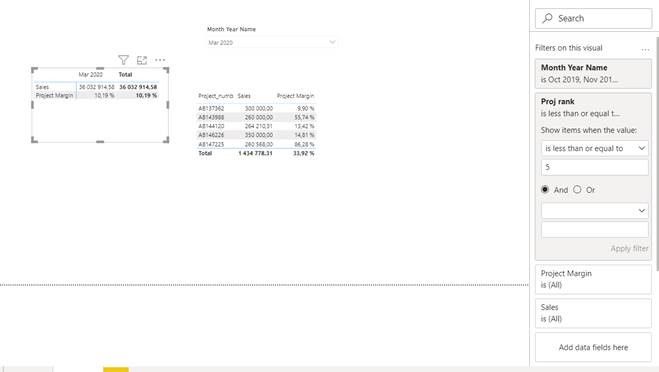
As soon as i select a month, the ranking won't change.
Any ideas to fix this would be greatly appreciated.
Thanks!
Solved! Go to Solution.
Found a solution to my problem, maybe not the most clever way, but worked fairly well for me.
I first created a new table with Project number, month and those to merged, then I removed duplicates from the merged column in order to have only one project in each month. Created a one-to-many reletionship between my new table with Testing on the merged column, which I also made in my 'testing' table.
From there I added Sales (and margin measures) as new columns. After that I created a ranking based on the new column as calculated columns. by using:
Rank Proj_month by Sales =
RANKX(FILTER('New_table', 'New_table'[YYY-MM] = EARLIER('New_table'[YYY-MM])
),
'New_table'[Sales])
From there the measures with month as column returned the correct answer for top 5.
Later I also added location as a column in my new table and added a new ranking by location (added Location in my filter in addition to year/month).
I have location as a filter in my report, and I'm now using is filtered to return top 5 sales based on if a filter for location is applied or not.
Found a solution to my problem, maybe not the most clever way, but worked fairly well for me.
I first created a new table with Project number, month and those to merged, then I removed duplicates from the merged column in order to have only one project in each month. Created a one-to-many reletionship between my new table with Testing on the merged column, which I also made in my 'testing' table.
From there I added Sales (and margin measures) as new columns. After that I created a ranking based on the new column as calculated columns. by using:
Rank Proj_month by Sales =
RANKX(FILTER('New_table', 'New_table'[YYY-MM] = EARLIER('New_table'[YYY-MM])
),
'New_table'[Sales])
From there the measures with month as column returned the correct answer for top 5.
Later I also added location as a column in my new table and added a new ranking by location (added Location in my filter in addition to year/month).
I have location as a filter in my report, and I'm now using is filtered to return top 5 sales based on if a filter for location is applied or not.
Hi @Anonymous ,
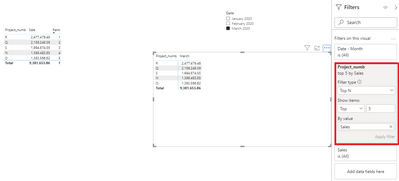
I think you don't need to create a rank measure if you want to show the top 5 sales based on each month, just set filters in the visual like this:
The rank measure like @ harshnathani mentioned can be used as a reference.
Best Regards,
Yingjie Li
If this post helps then please consider Accept it as the solution to help the other members find it more quickly.
Hi @Anonymous ,
You can try these measures
Measure =
RANKX (
ALLSELECTED ( Testing[Project_numb] ),
CALCULATE (
[Sales],
ALLEXCEPT (
Testing,
Testing[Project_numb]
)
)
)
Regards,
Harsh Nathani
Did I answer your question? Mark my post as a solution! Appreciate with a Kudos!! (Click the Thumbs Up Button)
@Anonymous ,For Rank Refer these links
https://radacad.com/how-to-use-rankx-in-dax-part-2-of-3-calculated-measures
https://radacad.com/how-to-use-rankx-in-dax-part-1-of-3-calculated-columns
https://radacad.com/how-to-use-rankx-in-dax-part-3-of-3-the-finale
https://community.powerbi.com/t5/Community-Blog/Dynamic-TopN-made-easy-with-What-If-Parameter/ba-p/367415
The Power BI Data Visualization World Championships is back! Get ahead of the game and start preparing now!
Check out the November 2025 Power BI update to learn about new features.
| User | Count |
|---|---|
| 59 | |
| 46 | |
| 42 | |
| 23 | |
| 18 |
| User | Count |
|---|---|
| 193 | |
| 123 | |
| 99 | |
| 67 | |
| 49 |