I have 3 tables: courses_dim, enrollments_dim, and users_dim.
courses_dim & users_dim are related by enrollments:
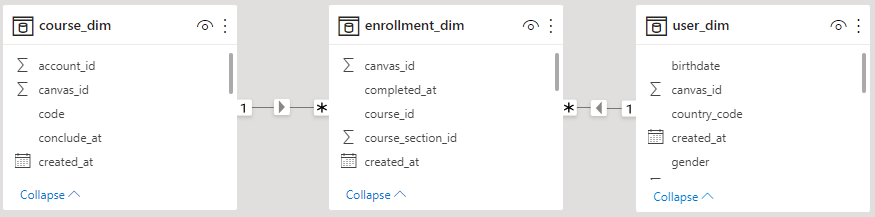
I am attempting to create a table that shows how many courses each instructor has.
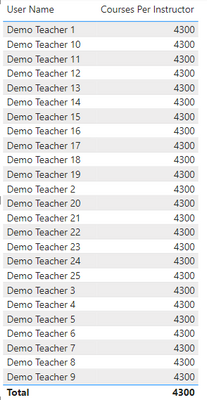
I added the instructor's name and a measure of Courses Per Instructor = COUNTROWS(course_dim). Additionally, I added a filter for the enrollment type of "TeacherEnrollment", which should remove all student names. However, this filter DOES NOT remove the students, they still show up in the list.
Here is the table that shows my results in PowerBI. Notice Courses Per Instructor shows the sum of all courses in the system as opposed to the actual courses per instructor. Note: I have filtered this also based on name (Contains Demo) to remove any personal identifying information:
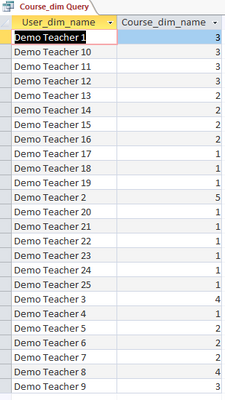
Here are the results if I try the same thing in Microsoft Access (these results are correct):
This is the visual design of the query in Access:
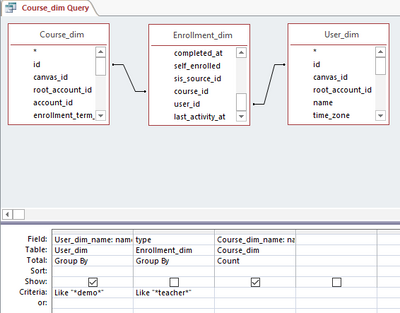
Here is the SQL query:
SELECT User_dim.name AS User_dim_name, Count(Course_dim.name) AS Course_dim_name
FROM User_dim INNER JOIN (Course_dim INNER JOIN Enrollment_dim ON Course_dim.[id] = Enrollment_dim.[course_id]) ON User_dim.[id] = Enrollment_dim.[user_id]
GROUP BY User_dim.name, Enrollment_dim.type
HAVING (((User_dim.name) Like "*demo*") AND ((Enrollment_dim.type) Like "*teacher*"));
How can I recreate this result in PowerBI?


