cancel
Showing results for 
Search instead for 
Did you mean: 

The Power BI Data Visualization World Championships is back! Get ahead of the game and start preparing now! Learn more

Reply
kwats
Frequent Visitor

Get monthly rent for each tenant based on date selection

Hi, I've got another problem here that I know probably has some simple solution but I just can't figure out the logic on this. I'm trying to get the monthly rent for each tenant based on selected month in a date slicer. So when I click on a month, it will show the rent charged for that month because some tenants have rent increases during the year. The date slicer is month/year from a separate date table. I also have a separate measure called Total Monthly Rent.


Here is my DAX code but I just keep getting the same rent amount for every tenant. The total is also the same value. 


Total Monthly Rent = SUM( 'Rent Roll'[Monthly Rent]


Tenant Rent =
MAXX(
DISTINCT( 'Rent Roll'[Tenant] ),
MAXX(
FILTER(
DISTINCT( 'Rent Roll'[Date] ),
'Rent Roll'[Date] = CALCULATE( MAX( 'Date'[Date] ) )
),
[Total Monthly Rent]
)
)


Date Tenant Monthly Rent
5/31/2019 Tenant One $10,000
6/30/2019 Tenant One $10,000
7/31/2019 Tenant One $10,000
8/31/2019 Tenant One $10,000
9/30/2019 Tenant One $10,000
10/31/2019 Tenant One $11,000
11/30/2019 Tenant One $11,000
12/31/2019 Tenant One $11,000
1/31/2020 Tenant One $11,000
2/29/2020 Tenant One $11,000
3/31/2019 Tenant Two $5,000
4/30/2019 Tenant Two $5,000
5/31/2019 Tenant Two $5,000
6/30/2019 Tenant Two $5,000
7/31/2019 Tenant Two $5,000
8/31/2019 Tenant Two $5,000
9/30/2019 Tenant Two $5,000
10/31/2019 Tenant Two $5,000
11/30/2019 Tenant Two $5,000
12/31/2019 Tenant Two $5,000
1/31/2020 Tenant Two $5,000
2/29/2020 Tenant Two $5,000
5/31/2019 Tenant Three $7,000
6/30/2019 Tenant Three $7,500
7/31/2019 Tenant Three $7,500
8/31/2019 Tenant Three $7,500
9/30/2019 Tenant Three $7,500
10/31/2019 Tenant Three $7,500
11/30/2019 Tenant Three $7,500
12/31/2019 Tenant Three $7,500
1/31/2020 Tenant Three $7,500


Thanks again!

1 ACCEPTED SOLUTION
v-robertq-msft
Community Support
Community Support

Hi, @kwats 

According to your requirement, I created a test pbix file based on your sample data, you can download from here:

https://qiuyunus-my.sharepoint.com/:u:/g/personal/xiaoxin_qiuyunus_onmicrosoft_com/EYtpBNbDENdFk4XVY...


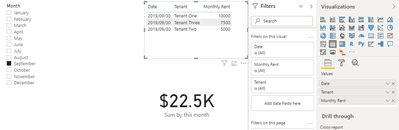
And you can get what you want, like this:

v-robertq-msft_0-1603242966260.png


Best Regards,

Community Support Team _Robert Qin

If this post helps, then please consider Accept it as the solution to help the other members find it more quickly.

View solution in original post

2 REPLIES 2
v-robertq-msft
Community Support
Community Support

Hi, @kwats 

According to your requirement, I created a test pbix file based on your sample data, you can download from here:

https://qiuyunus-my.sharepoint.com/:u:/g/personal/xiaoxin_qiuyunus_onmicrosoft_com/EYtpBNbDENdFk4XVY...


And you can get what you want, like this:

v-robertq-msft_0-1603242966260.png


Best Regards,

Community Support Team _Robert Qin

If this post helps, then please consider Accept it as the solution to help the other members find it more quickly.

amitchandak
Super User
Super User

@kwats , if your date is joined with the date table and you are filtering month from there and you want to see monthly rent. Simple sum should do?


sum(Table[Monthly Rent])

Share with Power BI Enthusiasts: Full Power BI Video (20 Hours) YouTube
Microsoft Fabric Series 60+ Videos YouTube
Microsoft Fabric Hindi End to End YouTube

Helpful resources

Announcements
Power BI DataViz World Championships

Power BI Dataviz World Championships

The Power BI Data Visualization World Championships is back! Get ahead of the game and start preparing now!

December 2025 Power BI Update Carousel

Power BI Monthly Update - December 2025

Check out the December 2025 Power BI Holiday Recap!

FabCon Atlanta 2026 carousel

FabCon Atlanta 2026

Join us at FabCon Atlanta, March 16-20, for the ultimate Fabric, Power BI, AI and SQL community-led event. Save $200 with code FABCOMM.