FabCon is coming to Atlanta
Join us at FabCon Atlanta from March 16 - 20, 2026, for the ultimate Fabric, Power BI, AI and SQL community-led event. Save $200 with code FABCOMM.
Register now!- Power BI forums
- Get Help with Power BI
- Desktop
- Service
- Report Server
- Power Query
- Mobile Apps
- Developer
- DAX Commands and Tips
- Custom Visuals Development Discussion
- Health and Life Sciences
- Power BI Spanish forums
- Translated Spanish Desktop
- Training and Consulting
- Instructor Led Training
- Dashboard in a Day for Women, by Women
- Galleries
- Data Stories Gallery
- Themes Gallery
- Contests Gallery
- QuickViz Gallery
- Quick Measures Gallery
- Visual Calculations Gallery
- Notebook Gallery
- Translytical Task Flow Gallery
- TMDL Gallery
- R Script Showcase
- Webinars and Video Gallery
- Ideas
- Custom Visuals Ideas (read-only)
- Issues
- Issues
- Events
- Upcoming Events
The Power BI Data Visualization World Championships is back! Get ahead of the game and start preparing now! Learn more
- Power BI forums
- Forums
- Get Help with Power BI
- Desktop
- Re: Get max value out of a table in measure
- Subscribe to RSS Feed
- Mark Topic as New
- Mark Topic as Read
- Float this Topic for Current User
- Bookmark
- Subscribe
- Printer Friendly Page


- Mark as New
- Bookmark
- Subscribe
- Mute
- Subscribe to RSS Feed
- Permalink
- Report Inappropriate Content
Get max value out of a table in measure
Hello,
I need to create measure which retrive max value of "Change" from the table like down below but for females - so by gender and location. It would be 233.3% ( Location 77 and Female) or if not possible - from entire table so 371.4%
I assume this table needs to be constructed within a measure by for instance ADDCOLUMNS, but I really struggle to do that
Can anybody help me with that? I think its kind of advanced DAX

Solved! Go to Solution.
- Mark as New
- Bookmark
- Subscribe
- Mute
- Subscribe to RSS Feed
- Permalink
- Report Inappropriate Content
The solution I made is

- Mark as New
- Bookmark
- Subscribe
- Mute
- Subscribe to RSS Feed
- Permalink
- Report Inappropriate Content
Hi @Pbiuserr ,
According to your description, here's my solution.
Create a measure.
Top = MAXX(FILTER(ALL('Table'),'Table'[Gendar]="Female"),'Table'[Change])Get the correct result.
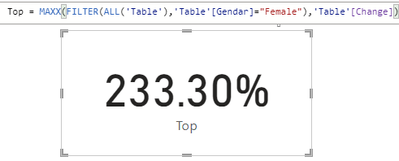
I attach my sample below for reference.
Best Regards,
Community Support Team _ kalyj
If this post helps, then please consider Accept it as the solution to help the other members find it more quickly.
- Mark as New
- Bookmark
- Subscribe
- Mute
- Subscribe to RSS Feed
- Permalink
- Report Inappropriate Content
The solution I made is


- Mark as New
- Bookmark
- Subscribe
- Mute
- Subscribe to RSS Feed
- Permalink
- Report Inappropriate Content
Maybe you should try using SUMMARIZECOLUMNS and ROLLUPADDISSUBTOTAL to make your temp table and then look for the max in it with a filter.
SUMMARIZECOLUMNS ( Table[Gender], Table[Location], "Change value" , [Change] )
- Mark as New
- Bookmark
- Subscribe
- Mute
- Subscribe to RSS Feed
- Permalink
- Report Inappropriate Content
I got an error that SummarizedColumns() and AddMissingItems() may not be used in that context
- Mark as New
- Bookmark
- Subscribe
- Mute
- Subscribe to RSS Feed
- Permalink
- Report Inappropriate Content
Hi,
I don't know if your source is structured the same as your visual but if it's the case this shloud do the job with a measure like :
CALCULATE ( MAX( [Change] ) , [Gender] = "Female" )
Tell us if it works.
If not can you show the source structure or even copy psate some dummy datas.
- Mark as New
- Bookmark
- Subscribe
- Mute
- Subscribe to RSS Feed
- Permalink
- Report Inappropriate Content
Hi,
My aim is to create KPI card which includes maximum change value of female out of all location (and name of location but can be on separated card). If I do what you've presented I dont have filter context by location I guess, also "Change" is a measure so I can't put it into MAX I guess as I need a column reference
Basically I got columns
Gender
Location
Measures
ValueThisYear (let it be some count, even count of ID)
Value previous year
Change so thisperiod-lastperiod/lastperiod
and I want to retrive max value of change split by gender and location (but in reality only for Female)
I dont yet have permission to insert a pbix/xlsx file here
Was thinking myself about
VALUES(Fct_tbl[Gender]),
but somehow I can't structure the table this way


- Mark as New
- Bookmark
- Subscribe
- Mute
- Subscribe to RSS Feed
- Permalink
- Report Inappropriate Content
@Pbiuserr , How about having a rank column and using that as visual level filter
Rankx(allselected(Fct_tbl[Gender],Fct_tbl[Location]),[Change],,desc,dense)
- Mark as New
- Bookmark
- Subscribe
- Mute
- Subscribe to RSS Feed
- Permalink
- Report Inappropriate Content
Hi @amitchandak
I don't use it on visual, it supposed to be KPI card with only 1 value. What your measure did was ranked it by location and gender. I want retrive only one value - max, out of all [Change] values in Gender and Location context

Helpful resources

Power BI Monthly Update - November 2025
Check out the November 2025 Power BI update to learn about new features.

Fabric Data Days
Advance your Data & AI career with 50 days of live learning, contests, hands-on challenges, study groups & certifications and more!

FabCon Atlanta 2026
Join us at FabCon Atlanta, March 16-20, for the ultimate Fabric, Power BI, AI and SQL community-led event. Save $200 with code FABCOMM.

| User | Count |
|---|---|
| 58 | |
| 45 | |
| 41 | |
| 20 | |
| 18 |


