cancel
Showing results for 
Search instead for 
Did you mean: 

Get Fabric Certified for FREE during Fabric Data Days. Don't miss your chance! Request now

Reply
wmcintosh
Frequent Visitor

Get matrix total as a filtered measure

I have Project cost data for Month 1 and Month 2 in a single table.

I have a table visual with a Column [Project Name] and a Measure [forecastVariance].

My calculation for the [forecastVariance] Measure is:

forecastVariance =

VAR Month1 = MIN(Plan[Period])

VAR Month2 = MAX(Plan[Period])

VAR SUM_Month1 = CALCULATE(SUM(Plan[ForecastTotal]),FILTER(Plan,Plan[Period]=Month1))

VAR SUM_Month2 = CALCULATE(SUM(Plan[ForecastTotal]),FILTER(Plan,Plan[Period]=Month2))


Return

SUM_ Month1 - SUM_Month2


To list only the Projects where the Forecast has increased, I have a filter on the table visual of [forecastVariance] Measure is < 0.
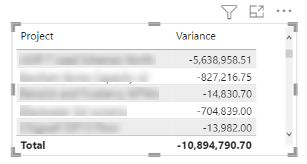
wmcintosh_0-1674746949926.png


This works perfectly well in a Table or Matrix visual as above, however my problem is that I need the total value from the table/ matrix above (i.e. -10.8m) as a measure. This is so that I can refer to the total value dynamically within a text visual, e.g. Text = “The sum of all Forecast Increases is “ & [Measure]. 


Is this achievable and if so, with which function(s)?

Thanks

1 ACCEPTED SOLUTION
Greg_Deckler
Community Champion
Community Champion

@wmcintosh You *should* just be able to use the measure just like you reference assuming that there are no filters acting on the text visual. Otherwise, you can potentially do this:

forecastVariance All = CALCULATE([forecastVariance], ALL('Plan'))


Follow on LinkedIn
@ me in replies or I'll lose your thread!!!
Instead of a Kudo, please vote for this idea
Become an expert!: Enterprise DNA
External Tools: MSHGQM
YouTube Channel!: Microsoft Hates Greg
Latest book!:
DAX For Humans

DAX is easy, CALCULATE makes DAX hard...

View solution in original post

2 REPLIES 2
Greg_Deckler
Community Champion
Community Champion

@wmcintosh You *should* just be able to use the measure just like you reference assuming that there are no filters acting on the text visual. Otherwise, you can potentially do this:

forecastVariance All = CALCULATE([forecastVariance], ALL('Plan'))


Follow on LinkedIn
@ me in replies or I'll lose your thread!!!
Instead of a Kudo, please vote for this idea
Become an expert!: Enterprise DNA
External Tools: MSHGQM
YouTube Channel!: Microsoft Hates Greg
Latest book!:
DAX For Humans

DAX is easy, CALCULATE makes DAX hard...

I do have filters but the above worked once I replicated the Filter before the All.  Perfect, thanks @Greg_Deckler

Helpful resources

Announcements
November Power BI Update Carousel

Power BI Monthly Update - November 2025

Check out the November 2025 Power BI update to learn about new features.

Fabric Data Days Carousel

Fabric Data Days

Advance your Data & AI career with 50 days of live learning, contests, hands-on challenges, study groups & certifications and more!

FabCon Atlanta 2026 carousel

FabCon Atlanta 2026

Join us at FabCon Atlanta, March 16-20, for the ultimate Fabric, Power BI, AI and SQL community-led event. Save $200 with code FABCOMM.

Top Solution Authors
Top Kudoed Authors