Join us at FabCon Atlanta from March 16 - 20, 2026, for the ultimate Fabric, Power BI, AI and SQL community-led event. Save $200 with code FABCOMM.
Register now!The Power BI Data Visualization World Championships is back! Get ahead of the game and start preparing now! Learn more
Hi all,
I want to filter a table by Table[latest_send_date] where this column only contains dates from the last 3 months. In another table I want to apply the same filter but then these months 1 year ago. Anyone have an idea how to do this in DAX? Don't get it done..
Thanks!
Solved! Go to Solution.
Hi @Anonymous
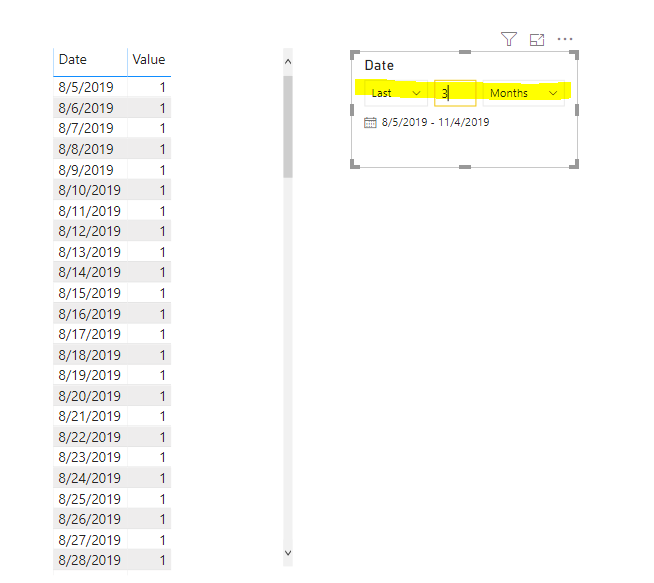
1. I 'd like to suggest you use the slicer rather than Dax to achieve this:
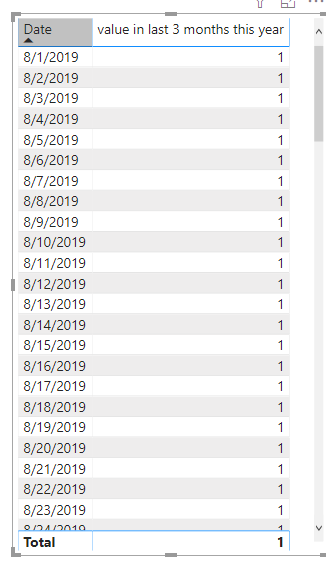
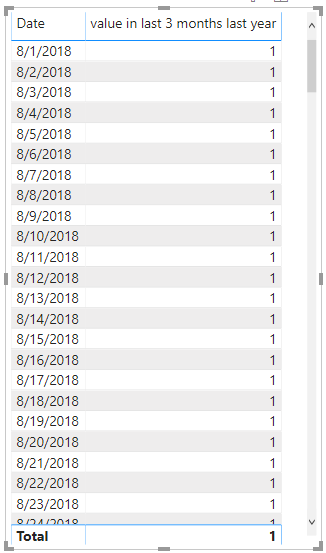
2. Alternatively, you can use the DAX formula as below:(Create a calendar table and manage the relationship with your fact table)
value in last 3 months this year = CALCULATE(MAX('Table 4'[Value]),FILTER('Table 4',[Date].[MonthNo]>=MONTH(TODAY())-3&&[Date].[Year]=YEAR(TODAY())))
value in last 3 months last year = CALCULATE(MAX('Table 4'[Value]),FILTER('Table 4',[Date].[MonthNo]>=MONTH(TODAY())-3&&[Date].[Year]=YEAR(TODAY())-1))
Hi @Anonymous
1. I 'd like to suggest you use the slicer rather than Dax to achieve this:
2. Alternatively, you can use the DAX formula as below:(Create a calendar table and manage the relationship with your fact table)
value in last 3 months this year = CALCULATE(MAX('Table 4'[Value]),FILTER('Table 4',[Date].[MonthNo]>=MONTH(TODAY())-3&&[Date].[Year]=YEAR(TODAY())))
value in last 3 months last year = CALCULATE(MAX('Table 4'[Value]),FILTER('Table 4',[Date].[MonthNo]>=MONTH(TODAY())-3&&[Date].[Year]=YEAR(TODAY())-1))
How did you build that slicer with "Last" and designating number of months? Is that a non-standard slicer? Thanks
Hi @Anonymous
The below article describes how to create a calendar table / date dimension, that will allow you to achieve your requirement.
https://community.powerbi.com/t5/Community-Blog/Relative-Date-Dimension/ba-p/779039
The Power BI Data Visualization World Championships is back! Get ahead of the game and start preparing now!
Check out the November 2025 Power BI update to learn about new features.
| User | Count |
|---|---|
| 59 | |
| 43 | |
| 42 | |
| 23 | |
| 17 |
| User | Count |
|---|---|
| 190 | |
| 122 | |
| 96 | |
| 66 | |
| 47 |