FabCon is coming to Atlanta
Join us at FabCon Atlanta from March 16 - 20, 2026, for the ultimate Fabric, Power BI, AI and SQL community-led event. Save $200 with code FABCOMM.
Register now!- Power BI forums
- Get Help with Power BI
- Desktop
- Service
- Report Server
- Power Query
- Mobile Apps
- Developer
- DAX Commands and Tips
- Custom Visuals Development Discussion
- Health and Life Sciences
- Power BI Spanish forums
- Translated Spanish Desktop
- Training and Consulting
- Instructor Led Training
- Dashboard in a Day for Women, by Women
- Galleries
- Data Stories Gallery
- Themes Gallery
- Contests Gallery
- QuickViz Gallery
- Quick Measures Gallery
- Visual Calculations Gallery
- Notebook Gallery
- Translytical Task Flow Gallery
- TMDL Gallery
- R Script Showcase
- Webinars and Video Gallery
- Ideas
- Custom Visuals Ideas (read-only)
- Issues
- Issues
- Events
- Upcoming Events
The Power BI Data Visualization World Championships is back! Get ahead of the game and start preparing now! Learn more
- Power BI forums
- Forums
- Get Help with Power BI
- Desktop
- Re: Get data from SharePoint Online
- Subscribe to RSS Feed
- Mark Topic as New
- Mark Topic as Read
- Float this Topic for Current User
- Bookmark
- Subscribe
- Printer Friendly Page

- Mark as New
- Bookmark
- Subscribe
- Mute
- Subscribe to RSS Feed
- Permalink
- Report Inappropriate Content
Get data from SharePoint Online
I have an excel online file stored in a sharepoint 365 document library.
I had tried get data from a Sharepoint Folder and also from Odata and enter the Sharepoint site URL However when I do this by entering https://xxxx.sharepoint.com/site/sitename I do not get a box asking for authorisation details and instead get "Access to the resource is forbidden".
Then I read some posts that told me to add the _vti_bin/listdata.svc at the end of the URL.
However when I use the _vti_bin/listdata.svc behind https://xxxx.sharepoint.com/site/sitename/Lists/list01 by Odata,the message is like below:
Details: "Microsoft.Mashup.Engine1.Library.Resources.HttpResource: Request failed:
OData Version: 3 and 4, Error: The remote server returned an error: (400) Bad Request. (Bad Request)
OData Version: 4, Error: The remote server returned an error: (400) Bad Request. (Bad Request)
OData Version: 3, Error: The remote server returned an error: (400) Bad Request. (Bad Request)"
And if I use this behind https://xxxx.sharepoint.com/site/sitename/ the message still showing "Access to the resource is forbidden."
Is it because that I didn't signin to the PowerBI Desktop or is there something I had done wrong?
Thanks.
- Mark as New
- Bookmark
- Subscribe
- Mute
- Subscribe to RSS Feed
- Permalink
- Report Inappropriate Content
Hi,
Please try the below steps,
Power Bi Desktop-Go to-File-Options & Settings-Datasource Setting.
First remove sharepoint credential from the list and again add share point site with below settings,
Credentials:Organizational Account
Privacy Level:none
Thanks
- Mark as New
- Bookmark
- Subscribe
- Mute
- Subscribe to RSS Feed
- Permalink
- Report Inappropriate Content
Hello,
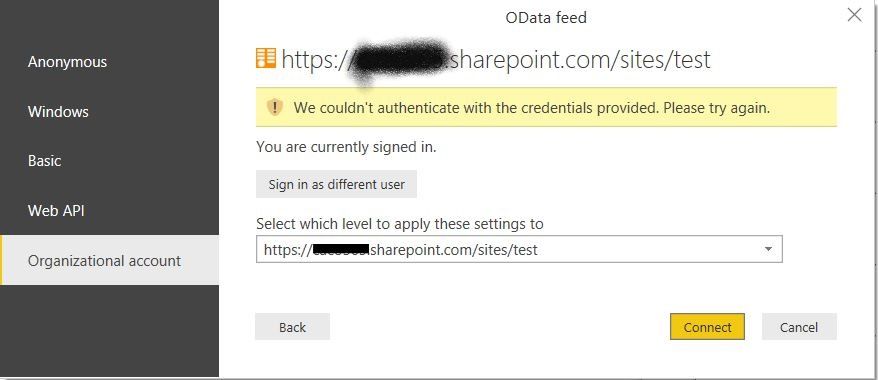
I had reset the data source as you said but the error message is as below.
I am sure that I signed in in the same ID of the sharepoint, is there any possibility that the reason is because of the sharepoint permission?
- Mark as New
- Bookmark
- Subscribe
- Mute
- Subscribe to RSS Feed
- Permalink
- Report Inappropriate Content
Hi,
Please click on "sign in as diffrent user" and try it or use WINDOWS (second options) authorization.
- Mark as New
- Bookmark
- Subscribe
- Mute
- Subscribe to RSS Feed
- Permalink
- Report Inappropriate Content
I had tried both of the suggestions but I only have one ID so that I can only signin by the same Identity.
eventhough I use the "sign in as diffrent user", the same result come out with the same ID.
Thank you for your reply but unfortunately none of them can solve this...


- Mark as New
- Bookmark
- Subscribe
- Mute
- Subscribe to RSS Feed
- Permalink
- Report Inappropriate Content
Hi @Anonymous
I would value the answer by djerro123.
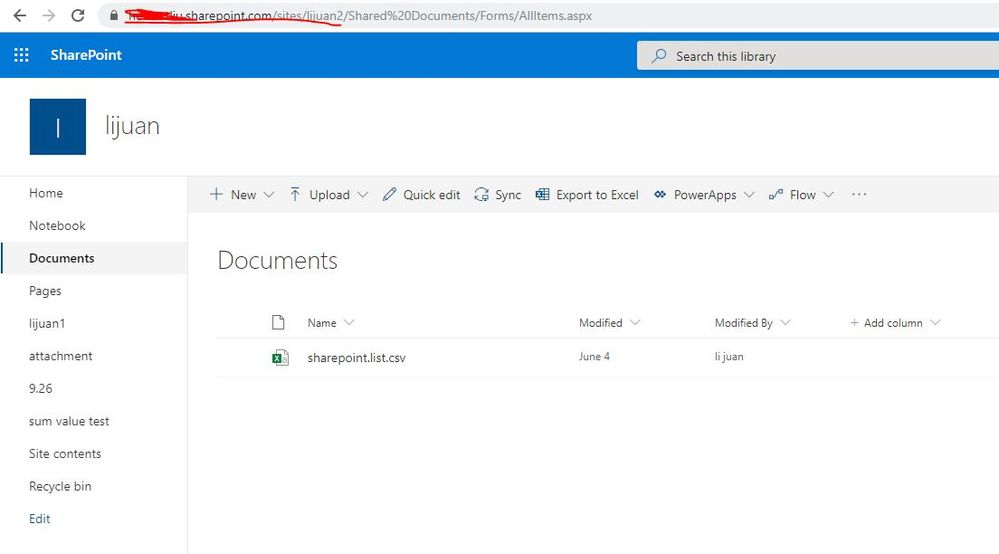
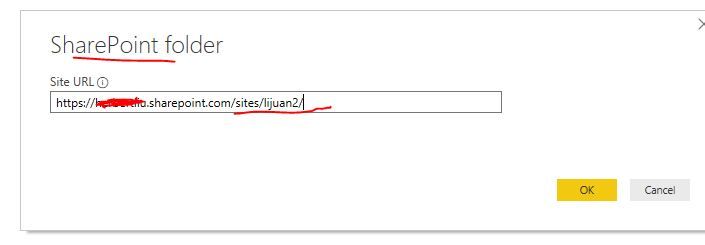
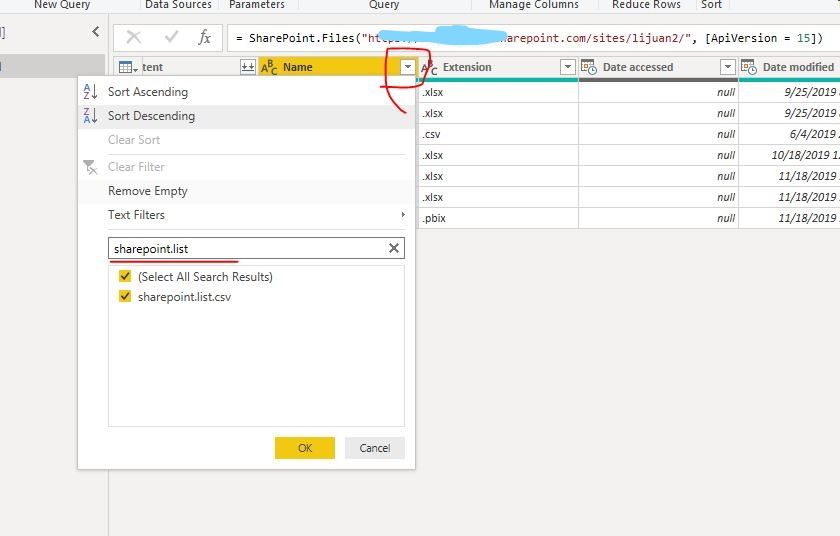
Please look at my test example:

Best Regards
Maggie
Community Support Team _ Maggie Li
If this post helps, then please consider Accept it as the solution to help the other members find it more quickly.


- Mark as New
- Bookmark
- Subscribe
- Mute
- Subscribe to RSS Feed
- Permalink
- Report Inappropriate Content
I noticed you have a URL containing '......com/site/...' while typically there should be something like this:
"https://<company>.sharepoint.com/sites/site/"
Without the qoutes and with the trailing slash ( / )
Let me know if that works
Kind regards
Djerro123
-------------------------------
If this answered your question, please mark it as the Solution. This also helps others to find what they are looking for.
Keep those thumbs up coming! 🙂
Did I answer your question? Mark my post as a solution!
Proud to be a Super User!
- Mark as New
- Bookmark
- Subscribe
- Mute
- Subscribe to RSS Feed
- Permalink
- Report Inappropriate Content
Thank you for you and @v-juanli-msft `s reply.
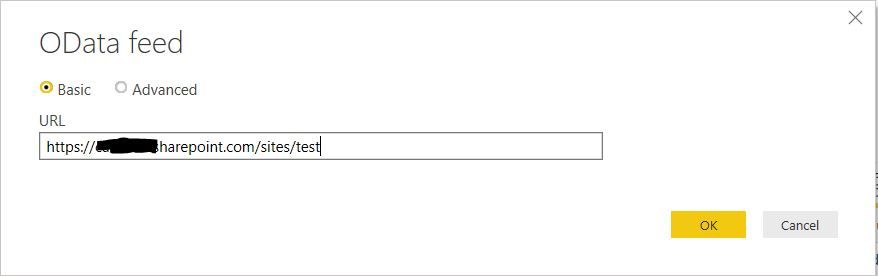
I am so sorry that it`s my typing miss and I do enter the URL as `sites`.

Helpful resources

Power BI Dataviz World Championships
The Power BI Data Visualization World Championships is back! Get ahead of the game and start preparing now!

Power BI Monthly Update - December 2025
Check out the December 2025 Power BI Holiday Recap!

FabCon Atlanta 2026
Join us at FabCon Atlanta, March 16-20, for the ultimate Fabric, Power BI, AI and SQL community-led event. Save $200 with code FABCOMM.

| User | Count |
|---|---|
| 38 | |
| 36 | |
| 33 | |
| 33 | |
| 29 |


| User | Count |
|---|---|
| 132 | |
| 90 | |
| 81 | |
| 66 | |
| 65 |


