FabCon is coming to Atlanta
Join us at FabCon Atlanta from March 16 - 20, 2026, for the ultimate Fabric, Power BI, AI and SQL community-led event. Save $200 with code FABCOMM.
Register now!- Power BI forums
- Get Help with Power BI
- Desktop
- Service
- Report Server
- Power Query
- Mobile Apps
- Developer
- DAX Commands and Tips
- Custom Visuals Development Discussion
- Health and Life Sciences
- Power BI Spanish forums
- Translated Spanish Desktop
- Training and Consulting
- Instructor Led Training
- Dashboard in a Day for Women, by Women
- Galleries
- Data Stories Gallery
- Themes Gallery
- Contests Gallery
- QuickViz Gallery
- Quick Measures Gallery
- Visual Calculations Gallery
- Notebook Gallery
- Translytical Task Flow Gallery
- TMDL Gallery
- R Script Showcase
- Webinars and Video Gallery
- Ideas
- Custom Visuals Ideas (read-only)
- Issues
- Issues
- Events
- Upcoming Events
The Power BI Data Visualization World Championships is back! Get ahead of the game and start preparing now! Learn more
- Power BI forums
- Forums
- Get Help with Power BI
- Desktop
- Get all values in new columns from duplicate ids
- Subscribe to RSS Feed
- Mark Topic as New
- Mark Topic as Read
- Float this Topic for Current User
- Bookmark
- Subscribe
- Printer Friendly Page

- Mark as New
- Bookmark
- Subscribe
- Mute
- Subscribe to RSS Feed
- Permalink
- Report Inappropriate Content
Get all values in new columns from duplicate ids
Hey
I have a table that has ID that has up to 5 duplicates. It looks like this
| ID | Location | Cancelled | No show | Rescheduled | Title | Date |
| 1 | Location 1 | Yes | No | Yes | Title 1 | 1/1/23 |
| 2 | Location 2 | No | No | No | Title 2 | 1/3/23 |
| 1 | Location 2 | No | Yes | No | Title 3 | 12/2/23 |
| 1 | Location 1 | No | No | No | Title 4 | 13/3/23 |
| 2 | Location 1 | No | No | No | Title 5 | 2/3/23 |
In my matrix I want to be able to see
| Location | Unique(by earliest) | Visited again | Cancelled | No show | Rescheduled | |
| Location 1 | 1 | 1 | 1 | 0 | 1 | |
| Location 2 | 1 | 0 | 0 | 1 | 0 |
I'm having trouble doing this in Power Query or Dax. Any help is appreciated
Solved! Go to Solution.

- Mark as New
- Bookmark
- Subscribe
- Mute
- Subscribe to RSS Feed
- Permalink
- Report Inappropriate Content
maybe you can try this
Measure =
var tbl= FILTER(ADDCOLUMNS('Table',"check",if('Table'[Date]=CALCULATE(min('Table'[Date]),ALLEXCEPT('Table','Table'[ID])),1,0)),[check]=1)
return countx(tbl,[ID])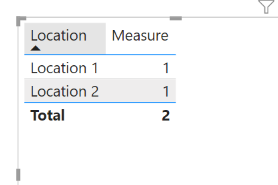
Did I answer your question? Mark my post as a solution!
Proud to be a Super User!
- Mark as New
- Bookmark
- Subscribe
- Mute
- Subscribe to RSS Feed
- Permalink
- Report Inappropriate Content
what's the logic of calculation?
why unique is 2 for location 1 and 1 for location 2?
what do you mean by visit again? how many ID visit the same location more than once?
Did I answer your question? Mark my post as a solution!
Proud to be a Super User!
- Mark as New
- Bookmark
- Subscribe
- Mute
- Subscribe to RSS Feed
- Permalink
- Report Inappropriate Content
Sorry Unique should be First visit, wrong naming scheme. Clients will could visit the same venue more than once. I've figured out a very work around way to do this now.
I've made a bunch of calculated columns for what I need then do a measure to only count the earliest create date from each id.
- Mark as New
- Bookmark
- Subscribe
- Mute
- Subscribe to RSS Feed
- Permalink
- Report Inappropriate Content
you only have 2 ID, how locaition 1 is 2 and locaion 2 is 1, totally 3?
Did I answer your question? Mark my post as a solution!
Proud to be a Super User!
- Mark as New
- Bookmark
- Subscribe
- Mute
- Subscribe to RSS Feed
- Permalink
- Report Inappropriate Content
I made a mistake. I've fixed it. I'd be happy to hear if you have a solution?
- Mark as New
- Bookmark
- Subscribe
- Mute
- Subscribe to RSS Feed
- Permalink
- Report Inappropriate Content
maybe you can try this
Measure =
var tbl= FILTER(ADDCOLUMNS('Table',"check",if('Table'[Date]=CALCULATE(min('Table'[Date]),ALLEXCEPT('Table','Table'[ID])),1,0)),[check]=1)
return countx(tbl,[ID])
Did I answer your question? Mark my post as a solution!
Proud to be a Super User!
- Mark as New
- Bookmark
- Subscribe
- Mute
- Subscribe to RSS Feed
- Permalink
- Report Inappropriate Content
Yea this is the solution I came up with as well. Just with more steps. Thanks
- Mark as New
- Bookmark
- Subscribe
- Mute
- Subscribe to RSS Feed
- Permalink
- Report Inappropriate Content
you are welcome
Did I answer your question? Mark my post as a solution!
Proud to be a Super User!

Helpful resources

Power BI Dataviz World Championships
The Power BI Data Visualization World Championships is back! Get ahead of the game and start preparing now!

Power BI Monthly Update - December 2025
Check out the December 2025 Power BI Holiday Recap!

FabCon Atlanta 2026
Join us at FabCon Atlanta, March 16-20, for the ultimate Fabric, Power BI, AI and SQL community-led event. Save $200 with code FABCOMM.

| User | Count |
|---|---|
| 60 | |
| 43 | |
| 40 | |
| 36 | |
| 21 |


| User | Count |
|---|---|
| 177 | |
| 123 | |
| 110 | |
| 77 | |
| 51 |


