Join us at FabCon Atlanta from March 16 - 20, 2026, for the ultimate Fabric, Power BI, AI and SQL community-led event. Save $200 with code FABCOMM.
Register now!The Power BI Data Visualization World Championships is back! Get ahead of the game and start preparing now! Learn more
Hi all,
I am currently working on a PBI report in which there is a line graph depicting the cost of goods sold (COGS) trend across 2 years. The x-axis should feature all 12 months, and the y-axis should feature two distinct lines -- one for the previous year and one for the current year. How this should look (using Excel as an example) is something like...
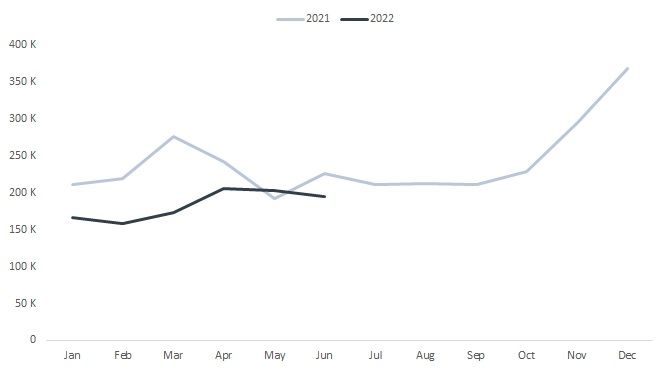
Now for the issue....
My fact table in my data model has COGS data through June 2022. I have computed current year (CY) and prior year (PY) measures as follows:
CY-TotalShippedCOGS = SUM ( FactCOGSSummary[ShippedCOGS] )
PY-TotalShippedCOGS =
CALCULATE (
SUM ( FactCOGSSummary[ShippedCOGS] ),
DATEADD ( DimCalendar[Date], -1, YEAR )
)
Now...when attempting to use these measures in my line graph -- and selecting the option to "Show items with no data" -- this is as close as I can get:
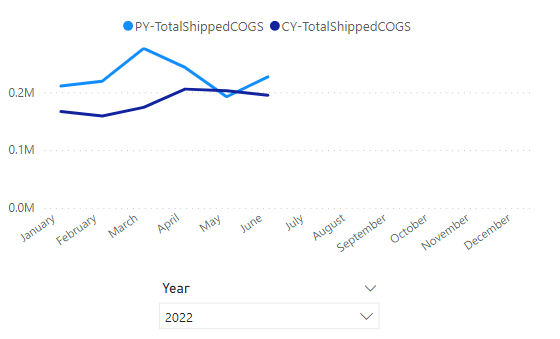
Does anyone know of a way to get the PY measure to compute for the months July-December as is depicted in the example? Any help would be greatly appreciated on this!
Thanks in advance!
Hi @MJ_BI
Thanks for reaching out to us.
>> to compute for the months July-December
Could you share some sample data of fact table? Thanks.
Best Regards,
Community Support Team _Tang
If this post helps, please consider Accept it as the solution to help the other members find it more quickly.
If you could send your model so we can take a look, that'll be great.
That being said, I worked with a test model and followed your measures. I could just simply use the line chart visual and put my 'Date'[Month] (from the date table) on the x-axis, the two measures on y-axis (Sales Amount and PY Sales Amount) using the 'Date'[Year] as the single select filter and I think I got your intended result. Again, would be better if we can see how you've built your model / visual.
The Power BI Data Visualization World Championships is back! Get ahead of the game and start preparing now!
Check out the November 2025 Power BI update to learn about new features.
| User | Count |
|---|---|
| 59 | |
| 46 | |
| 42 | |
| 23 | |
| 18 |
| User | Count |
|---|---|
| 193 | |
| 124 | |
| 101 | |
| 67 | |
| 49 |