Join us at FabCon Atlanta from March 16 - 20, 2026, for the ultimate Fabric, Power BI, AI and SQL community-led event. Save $200 with code FABCOMM.
Register now!The Power BI Data Visualization World Championships is back! Get ahead of the game and start preparing now! Learn more
Hi Guys,
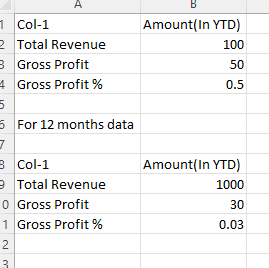
Below is the matrix in Power BI. As you can see it brings Total Revenue & Gross Profit from database. We want to calculate Gross Profit %.
Formula is GP % (cell B4) = Total Revenue (B2) / Gross profit (B3)
The amount column is YTD column and the formula should preserve when user selects 12 months of data (amount in YTD)
hence for 12 months daata (row 8-11) also calculates GP% as given.
My Question is how to calcuate GP %?
Hi @ryan_mayu ,thanks for the quick reply, I'll add further.
Hi @romilv1 ,
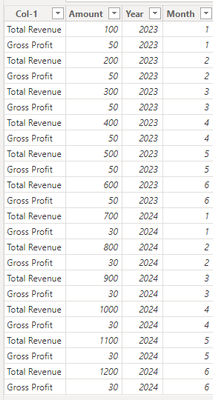
I've assumed some data.
Please follow these steps:
1. Use the following DAX expression to create a column
Amount(In YTD) =
IF('Table'[Col-1] = "Gross Profit",[Amount],SUMX(FILTER('Table','Table'[Col-1] = "Total Revenue" && 'Table'[Year] = EARLIER('Table'[Year]) && 'Table'[Month] <= EARLIER('Table'[Month])),'Table'[Amount]))
2.Use the following DAX expression to create a column
GP % = IF([Col-1] = "Total Revenue",BLANK(),
DIVIDE(MAXX(FILTER('Table','Table'[Year] = EARLIER('Table'[Year]) && 'Table'[Month] = EARLIER('Table'[Month]) && 'Table'[Col-1] = "Gross Profit"),'Table'[Amount]),
MAXX(FILTER('Table','Table'[Year] = EARLIER('Table'[Year]) && 'Table'[Month] = EARLIER('Table'[Month]) && 'Table'[Col-1] = "Total Revenue"),'Table'[Amount(In YTD)])
))
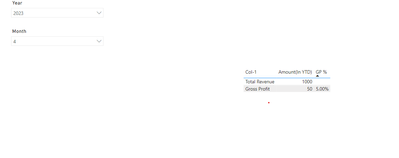
3.Final output
could you pls provide some sample data?
Proud to be a Super User!
Check out the November 2025 Power BI update to learn about new features.
Advance your Data & AI career with 50 days of live learning, contests, hands-on challenges, study groups & certifications and more!
| User | Count |
|---|---|
| 58 | |
| 45 | |
| 40 | |
| 21 | |
| 18 |