
cancel
Showing results for 
Search instead for 
Did you mean: 

The Power BI Data Visualization World Championships is back! Get ahead of the game and start preparing now! Learn more

Reply
TheKnall
Frequent Visitor

Get HTML code in textfile into 1 row in data model

Hi

I have a text file that I have loaded into Power BI. The text file contains a HTML code. 
file01.PNG
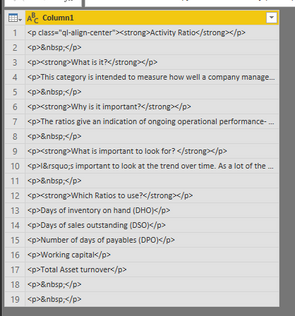
When loaded into Power BI the text is devided into seperate rows. I want to use the html code in the custom visual.
But need all code in the same row, not devided by some sort of delimiter.

Here is some of the the HTML code:
<p class="ql-align-center"><strong>Activity Ratio</strong></p>
<p>&nbsp;</p>
<p><strong>What is it?</strong></p>
<p>This category is intended to measure how well a company manages various activities, particularly how efficiently it manages its various assets.</p>
<p>&nbsp;</p>
<p><strong>Why is it important?</strong></p>
<p>The ratios give an indication of ongoing operational performance- how effectively assets are used by the company.</p>

any tips on how to handle this with a clean approach, without doing many transformation steps ?

Thx!


1 ACCEPTED SOLUTION
v-danhe-msft
Microsoft Employee
Microsoft Employee

Hi @TheKnall ,

Based on my test, you could use below functions:

In query editor, you could use text.combine function(https://docs.microsoft.com/en-us/powerquery-m/text-combine😞

let
    Query1 = Text.Combine(#"Table1"[Column1]),
    #"Converted to List" = {Query1},
    #"Converted to Table" = Table.FromList(#"Converted to List", Splitter.SplitByNothing(), null, null, ExtraValues.Error)
in
    #"Converted to Table"

Result:

1.PNG

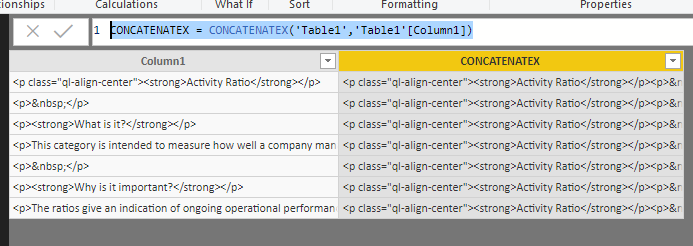
In dax, you could use CONCATENATEX function:

https://docs.microsoft.com/en-us/dax/concatenatex-function-dax

CONCATENATEX = CONCATENATEX('Table1','Table1'[Column1])

Result:

2.PNG

You could also download the pbix file to have a view.


Regards,

Daniel He


Community Support Team _ Daniel He
If this post helps, then please consider Accept it as the solution to help the other members find it more quickly.

View solution in original post

1 REPLY 1
v-danhe-msft
Microsoft Employee
Microsoft Employee

Hi @TheKnall ,

Based on my test, you could use below functions:

In query editor, you could use text.combine function(https://docs.microsoft.com/en-us/powerquery-m/text-combine😞

let
    Query1 = Text.Combine(#"Table1"[Column1]),
    #"Converted to List" = {Query1},
    #"Converted to Table" = Table.FromList(#"Converted to List", Splitter.SplitByNothing(), null, null, ExtraValues.Error)
in
    #"Converted to Table"

Result:

1.PNG

In dax, you could use CONCATENATEX function:

https://docs.microsoft.com/en-us/dax/concatenatex-function-dax

CONCATENATEX = CONCATENATEX('Table1','Table1'[Column1])

Result:

2.PNG

You could also download the pbix file to have a view.


Regards,

Daniel He


Community Support Team _ Daniel He
If this post helps, then please consider Accept it as the solution to help the other members find it more quickly.

Helpful resources

Announcements
Power BI DataViz World Championships

Power BI Dataviz World Championships

The Power BI Data Visualization World Championships is back! Get ahead of the game and start preparing now!

December 2025 Power BI Update Carousel

Power BI Monthly Update - December 2025

Check out the December 2025 Power BI Holiday Recap!

FabCon Atlanta 2026 carousel

FabCon Atlanta 2026

Join us at FabCon Atlanta, March 16-20, for the ultimate Fabric, Power BI, AI and SQL community-led event. Save $200 with code FABCOMM.