
Don't miss your chance to take the Fabric Data Engineer (DP-600) exam for FREE! Find out how by watching the DP-600 session on-demand now through April 28th.
Learn moreJoin the FabCon + SQLCon recap series. Up next: Power BI, Real-Time Intelligence, IQ and AI, and Data Factory take center stage. All sessions are available on-demand after the live show. Register now
Hi
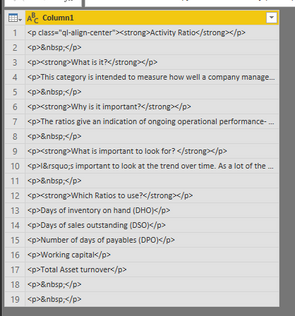
I have a text file that I have loaded into Power BI. The text file contains a HTML code.
When loaded into Power BI the text is devided into seperate rows. I want to use the html code in the custom visual.
But need all code in the same row, not devided by some sort of delimiter.
Here is some of the the HTML code:
<p class="ql-align-center"><strong>Activity Ratio</strong></p>
<p> </p>
<p><strong>What is it?</strong></p>
<p>This category is intended to measure how well a company manages various activities, particularly how efficiently it manages its various assets.</p>
<p> </p>
<p><strong>Why is it important?</strong></p>
<p>The ratios give an indication of ongoing operational performance- how effectively assets are used by the company.</p>
any tips on how to handle this with a clean approach, without doing many transformation steps ?
Thx!
Solved! Go to Solution.
Hi @TheKnall ,
Based on my test, you could use below functions:
In query editor, you could use text.combine function(https://docs.microsoft.com/en-us/powerquery-m/text-combine😞
let
Query1 = Text.Combine(#"Table1"[Column1]),
#"Converted to List" = {Query1},
#"Converted to Table" = Table.FromList(#"Converted to List", Splitter.SplitByNothing(), null, null, ExtraValues.Error)
in
#"Converted to Table"
Result:
In dax, you could use CONCATENATEX function:
https://docs.microsoft.com/en-us/dax/concatenatex-function-dax
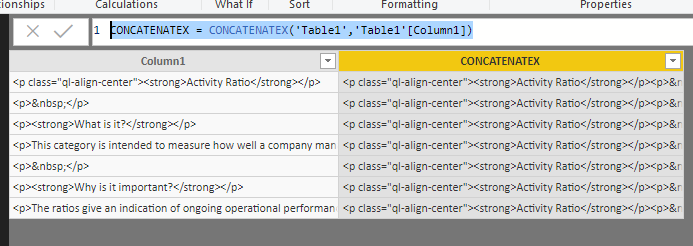
CONCATENATEX = CONCATENATEX('Table1','Table1'[Column1])
Result:
You could also download the pbix file to have a view.
Regards,
Daniel He
Hi @TheKnall ,
Based on my test, you could use below functions:
In query editor, you could use text.combine function(https://docs.microsoft.com/en-us/powerquery-m/text-combine😞
let
Query1 = Text.Combine(#"Table1"[Column1]),
#"Converted to List" = {Query1},
#"Converted to Table" = Table.FromList(#"Converted to List", Splitter.SplitByNothing(), null, null, ExtraValues.Error)
in
#"Converted to Table"
Result:
In dax, you could use CONCATENATEX function:
https://docs.microsoft.com/en-us/dax/concatenatex-function-dax
CONCATENATEX = CONCATENATEX('Table1','Table1'[Column1])
Result:
You could also download the pbix file to have a view.
Regards,
Daniel He
Check out the April 2026 Power BI update to learn about new features.
If you have recently started exploring Fabric, we'd love to hear how it's going. Your feedback can help with product improvements.
A new Power BI DataViz World Championship is coming this June! Don't miss out on submitting your entry.
| User | Count |
|---|---|
| 45 | |
| 38 | |
| 34 | |
| 21 | |
| 17 |
| User | Count |
|---|---|
| 66 | |
| 65 | |
| 31 | |
| 26 | |
| 26 |