cancel
Showing results for 
Search instead for 
Did you mean: 

July 7 - July 17 | Round 2 of the Power BI Dataviz World Championships. Don't miss your chance! Learn more

Reply
amaleranda
Post Patron
Post Patron

Get Data from WEB LIKE JSON string

Hi Gurus,


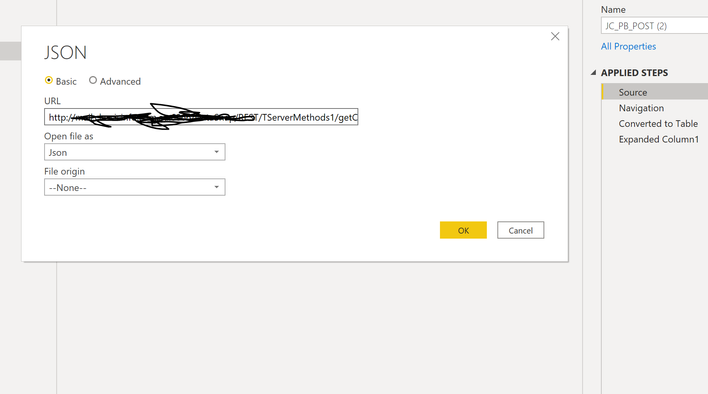
Did you happen to know what get data method should I use to get below image. I tried Get Data -> JSON but seems I do not get the drop down option open file as. Any help would be highly appriciated.GetDataFromJSON.PNG

1 ACCEPTED SOLUTION

Is this a public API?  If so, you can provide it and the community can provide the needed M code.


Does the Source step of your query look like this?  (check by clicking on Advanced Editor or viewing the Formula Bar in the query editor)


let
    Source = Json.Document(Web.Contents("http://mywebapi"))
in
    Source

Pasted this from here - https://www.edureka.co/community/26876/how-can-i-connect-my-web-api-with-power-bi-reports


If this works for you, please mark it as solution.  Kudos are appreciated too.  Please let me know if not.

Regards,

Pat


Did I answer your question? Mark my post as a solution! Kudos are also appreciated!

To learn more about Power BI, follow me on Twitter or subscribe on YouTube.


@mahoneypa HoosierBI on YouTube


View solution in original post

3 REPLIES 3
mahoneypat
Microsoft Employee
Microsoft Employee

If you are trying to connect to a Web API that gives a JSON response, use the Web connector instead.  It will recoginize the response as JSON and you navigate/extract your data from there.


If this works for you, please mark it as solution.  Kudos are appreciated too.  Please let me know if not.

Regards,

Pat


Did I answer your question? Mark my post as a solution! Kudos are also appreciated!

To learn more about Power BI, follow me on Twitter or subscribe on YouTube.


@mahoneypa HoosierBI on YouTube


@mahoneypat  it did not give me that option.

Is this a public API?  If so, you can provide it and the community can provide the needed M code.


Does the Source step of your query look like this?  (check by clicking on Advanced Editor or viewing the Formula Bar in the query editor)


let
    Source = Json.Document(Web.Contents("http://mywebapi"))
in
    Source

Pasted this from here - https://www.edureka.co/community/26876/how-can-i-connect-my-web-api-with-power-bi-reports


If this works for you, please mark it as solution.  Kudos are appreciated too.  Please let me know if not.

Regards,

Pat


Did I answer your question? Mark my post as a solution! Kudos are also appreciated!

To learn more about Power BI, follow me on Twitter or subscribe on YouTube.


@mahoneypa HoosierBI on YouTube


Helpful resources

Announcements
FabCon and SQLCon Barcelona 2026

FabCon & SQLCon – Barcelona 2026

Join us in Barcelona for FabCon and SQLCon, the Fabric, Power BI, SQL, and AI community event. Save €200 with code FABCMTY200.

60 days of Data Days Carousel

Data Days 2026

Join Fabric Data Days 2026: 60 days of free live/on-demand sessions, challenges, study groups, and certification opportunities.

Power BI DataViz World Championships carousel

Power BI DataViz World Championships - June 2026

A new Power BI DataViz World Championship is coming this June! Don't miss out on submitting your entry.