FabCon is coming to Atlanta
Join us at FabCon Atlanta from March 16 - 20, 2026, for the ultimate Fabric, Power BI, AI and SQL community-led event. Save $200 with code FABCOMM.
Register now!- Power BI forums
- Get Help with Power BI
- Desktop
- Service
- Report Server
- Power Query
- Mobile Apps
- Developer
- DAX Commands and Tips
- Custom Visuals Development Discussion
- Health and Life Sciences
- Power BI Spanish forums
- Translated Spanish Desktop
- Training and Consulting
- Instructor Led Training
- Dashboard in a Day for Women, by Women
- Galleries
- Data Stories Gallery
- Themes Gallery
- Contests Gallery
- QuickViz Gallery
- Quick Measures Gallery
- Visual Calculations Gallery
- Notebook Gallery
- Translytical Task Flow Gallery
- TMDL Gallery
- R Script Showcase
- Webinars and Video Gallery
- Ideas
- Custom Visuals Ideas (read-only)
- Issues
- Issues
- Events
- Upcoming Events
The Power BI Data Visualization World Championships is back! Get ahead of the game and start preparing now! Learn more
- Power BI forums
- Forums
- Get Help with Power BI
- Desktop
- Get Beginning of the Month (earliest date with val...
- Subscribe to RSS Feed
- Mark Topic as New
- Mark Topic as Read
- Float this Topic for Current User
- Bookmark
- Subscribe
- Printer Friendly Page


- Mark as New
- Bookmark
- Subscribe
- Mute
- Subscribe to RSS Feed
- Permalink
- Report Inappropriate Content
Get Beginning of the Month (earliest date with value) inventory and display current inventory
Hi. I am currently having trouble on creating a measure to be able to show the beginning of the month inventory. The objective is that the table would show the existing inventory based on the date selected (ex. Jan 28) as well as the beginning of the month inventory based on the earliest date (with values), which is based on the month selected.
Need help on how to create a working measure 'Beg of the Month Inventory". It should show inventory for 1/7/2020 which is 38K and ignore the Date Slicer. Image below
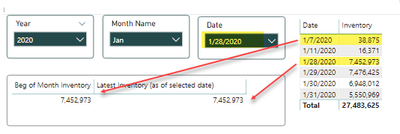
Thanks in advance!
Solved! Go to Solution.
- Mark as New
- Bookmark
- Subscribe
- Mute
- Subscribe to RSS Feed
- Permalink
- Report Inappropriate Content
Thank you for everyone's help! I took some pieces from the advise and came up with this
Beg of Month Inventory =
VAR starting = CALCULATE(FIRSTDATE('Table'[Date]), ALL('DATE TABLE'[Date]))
RETURN
CALCULATE(SUM('Table'[Inventory Qty]),FILTER(ALL('DATE TABLE'[Date]),'DATE TABLE'[Date]=starting))
Works now. Thank you!


- Mark as New
- Bookmark
- Subscribe
- Mute
- Subscribe to RSS Feed
- Permalink
- Report Inappropriate Content
Hi @e9801591 ,
First off, how do you compute for the inventory amount? And please post a sample data.
If Inventory was a balance sheet account, I would compute for its cumulative total from the earliest transaction date so in DAX it would be something like
nventory Balance =
CALCULATE (
    SUM ( JournalsTable[Amount] ),
    FILTER (
        ALL ( DatesTable[Date] ),
        DatesTable[Date] <= MAX ( DatesTable[Date] )
    )
)
then the beginning inventory would be the cumulative total prior to the current period/date
Beginning Inventory Balance =
CALCULATE (
    SUM ( JournalsTable[Amount] ),
    FILTER (
        ALL ( DatesTable[Date] ),
        DatesTable[Date] < MIN ( DatesTable[Date] )
    )
)
But this may not be the case for you.
Dane Belarmino | Microsoft MVP | Proud to be a Super User!
Did I answer your question? Mark my post as a solution!
"Tell me and I’ll forget; show me and I may remember; involve me and I’ll understand."
Need Power BI consultation, get in touch with me on LinkedIn or hire me on UpWork.
Learn with me on YouTube @DAXJutsu or follow my page on Facebook @DAXJutsuPBI.
- Mark as New
- Bookmark
- Subscribe
- Mute
- Subscribe to RSS Feed
- Permalink
- Report Inappropriate Content
Thank you for the quick reply @danextian . My source table contains Inventory count per day so my Beginning of the month Inventory would just be a sum of Inventory Qty for that day (earliest date with value) for the month.
Example data
| Date | Item | Inventory Qty |
| 1/7/2020 | Item A | 100 |
| 1/7/2020 | Item B | 20 |
| 1/28/2020 | Item A | 50 |
| 1/28/2020 | Item B | 10 |

- Mark as New
- Bookmark
- Subscribe
- Mute
- Subscribe to RSS Feed
- Permalink
- Report Inappropriate Content
I hope the above solution would have solved it. If not try
Start of month =calculate(sum(Table[Qty]),Filter('Date',Date[Date] = startofmonth(Date[Date] )))
End of month =calculate(sum(Table[Qty]),Filter('Date',Date[Date] = endofmonth(Date[Date] )))- Mark as New
- Bookmark
- Subscribe
- Mute
- Subscribe to RSS Feed
- Permalink
- Report Inappropriate Content
Thank you for everyone's help! I took some pieces from the advise and came up with this
Beg of Month Inventory =
VAR starting = CALCULATE(FIRSTDATE('Table'[Date]), ALL('DATE TABLE'[Date]))
RETURN
CALCULATE(SUM('Table'[Inventory Qty]),FILTER(ALL('DATE TABLE'[Date]),'DATE TABLE'[Date]=starting))
Works now. Thank you!
- Mark as New
- Bookmark
- Subscribe
- Mute
- Subscribe to RSS Feed
- Permalink
- Report Inappropriate Content
Hi @e9801591 ,
Some other users might have another takes on this but here's mine:
First, create a calculated column to index the dates per inventory item.
Date Index Per Item =
RANKX (
    VALUES ( Inventory[Date] ),
    CALCULATE (
        MIN ( 'Inventory'[Date] ),
        ALLEXCEPT ( 'Inventory', 'Inventory'[Date] ),
        Inventory[Item] = EARLIER ( Inventory[Item] )
    ),
    ,
    ASC,
    DENSE
)
Second, you may either create a calculated column for the inventory value the immediately preceding day in the table or create a measure
Inventory Qty Prev Day Column =
CALCULATE (
    SUM ( Inventory[Inventory Qty] ),
    FILTER (
        ALL ( Inventory ),
        Inventory[Item] = EARLIER ( Inventory[Item] )
            && Inventory[Date Index Per Item]
                = EARLIER ( Inventory[Date Index Per Item] ) - 1
    )
)

Inventory Qty Prev Day Measure =
SUMX (
    SUMMARIZE (
        Inventory,
        Inventory[Item],
        Inventory[Date Index Per Item],
        "Value", CALCULATE (
            SUM ( Inventory[Inventory Qty] ),
            FILTER (
                ALL ( Inventory ),
                Inventory[Item] = EARLIER ( Inventory[Item] )
                    && Inventory[Date Index Per Item]
                        = EARLIER ( Inventory[Date Index Per Item] ) - 1
            )
        )
    ),
    [Value]
)
Dane Belarmino | Microsoft MVP | Proud to be a Super User!
Did I answer your question? Mark my post as a solution!
"Tell me and I’ll forget; show me and I may remember; involve me and I’ll understand."
Need Power BI consultation, get in touch with me on LinkedIn or hire me on UpWork.
Learn with me on YouTube @DAXJutsu or follow my page on Facebook @DAXJutsuPBI.

Helpful resources

Power BI Dataviz World Championships
The Power BI Data Visualization World Championships is back! Get ahead of the game and start preparing now!

Power BI Monthly Update - December 2025
Check out the December 2025 Power BI Holiday Recap!

FabCon Atlanta 2026
Join us at FabCon Atlanta, March 16-20, for the ultimate Fabric, Power BI, AI and SQL community-led event. Save $200 with code FABCOMM.

| User | Count |
|---|---|
| 41 | |
| 38 | |
| 36 | |
| 30 | |
| 28 |


| User | Count |
|---|---|
| 128 | |
| 88 | |
| 79 | |
| 67 | |
| 62 |


