This is best Fabric, Power BI, SQL and AI community event. How do we know? The last event sold out! Save €200 with code FABCMTY200.
Register nowA new Data Days event is coming soon! This time we’re going bigger than ever. Fabric, Power BI, SQL, AI and more. Don't miss out.
Hi Community,
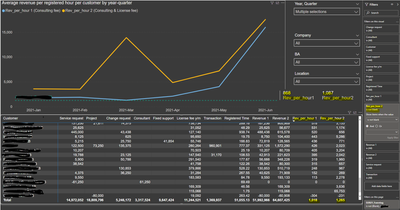
I have a table visual that has two measures called Rev per hour 1 and Rev per hour 2. As seen below in the last line of the table it gives a total average of 1018 for Rev_per_hour 1 and 1265 for Rev_per_hour_2. But I also have a filter applied to this table visual, Rev_per_hour 2 is not blank, which reduces the number of customers, and changes the outcome.
I have also created a multiple card using the same measures Rev_per_hour 1 and Rev_per_hour 2, unfortunately, you cannot filter the card on Rev_per_hour 2 to get the same result as you did in the table visual.
If you don't use the filter on Rev_per_hour 2, then both the card visual and the table visual would have the same result.
Is there a way to change both measures so that you can add a filter inside both measures where it says Rev_per_hour 2 is not blank?
Here are both measures:
Solved! Go to Solution.
Hi @darko86
Have you tried creating two cards one for each measure and then make the filter on the correct visual?
If that is not a solution can you please share a mockup data or sample of your PBIX file. You can use a onedrive, google drive, we transfer or similar link to upload your files.
If the information is sensitive please share it trough private message.
If this is not possible you need to make a new measure that
Regards
Miguel Félix
Proud to be a Super User!
Check out my blog: Power BI em PortuguêsHi @darko86
Have you tried creating two cards one for each measure and then make the filter on the correct visual?
If that is not a solution can you please share a mockup data or sample of your PBIX file. You can use a onedrive, google drive, we transfer or similar link to upload your files.
If the information is sensitive please share it trough private message.
If this is not possible you need to make a new measure that
Regards
Miguel Félix
Proud to be a Super User!
Check out my blog: Power BI em PortuguêsHi,
I have tried creating two cards one for each measure, unfortunately, it doesn't work.
Yes, a measure needs to be created where it says Rev_per_hour 2 is not blank? Can you create a measure that will give me the desired result and will match the table visual, if so how can I write this measure?
Here is a sample file:
https://www.dropbox.com/s/avku655e9ocn8h9/xxx-%20Test%20-%202%20-%20Copy.pbix?dl=0
Check out the May 2026 Power BI update to learn about new features.
Sign up to receive a private message when registration opens and key events begin.
If you have recently started exploring Fabric, we'd love to hear how it's going. Your feedback can help with product improvements.
| User | Count |
|---|---|
| 26 | |
| 25 | |
| 22 | |
| 19 | |
| 17 |
| User | Count |
|---|---|
| 42 | |
| 41 | |
| 40 | |
| 21 | |
| 20 |