- Power BI forums
- Get Help with Power BI
- Desktop
- Service
- Report Server
- Power Query
- Mobile Apps
- Developer
- DAX Commands and Tips
- Custom Visuals Development Discussion
- Health and Life Sciences
- Power BI Spanish forums
- Translated Spanish Desktop
- Training and Consulting
- Instructor Led Training
- Dashboard in a Day for Women, by Women
- Galleries
- Data Stories Gallery
- Themes Gallery
- Contests Gallery
- QuickViz Gallery
- Quick Measures Gallery
- Visual Calculations Gallery
- Notebook Gallery
- Translytical Task Flow Gallery
- TMDL Gallery
- R Script Showcase
- Webinars and Video Gallery
- Ideas
- Custom Visuals Ideas (read-only)
- Issues
- Issues
- Events
- Upcoming Events
Learn from the best! Meet the four finalists headed to the FINALS of the Power BI Dataviz World Championships! Register now
- Power BI forums
- Forums
- Get Help with Power BI
- Desktop
- Re: Generating table from exiting table
- Subscribe to RSS Feed
- Mark Topic as New
- Mark Topic as Read
- Float this Topic for Current User
- Bookmark
- Subscribe
- Printer Friendly Page

- Mark as New
- Bookmark
- Subscribe
- Mute
- Subscribe to RSS Feed
- Permalink
- Report Inappropriate Content
Generating table from exiting table
Hi
I have a dataset like the below one:
| Accounting Month | Name | Service | Sales |
| 01-08-2020 | Amit | IT | 1000 |
| 01-01-2021 | Saranya | Call Center | 4000 |
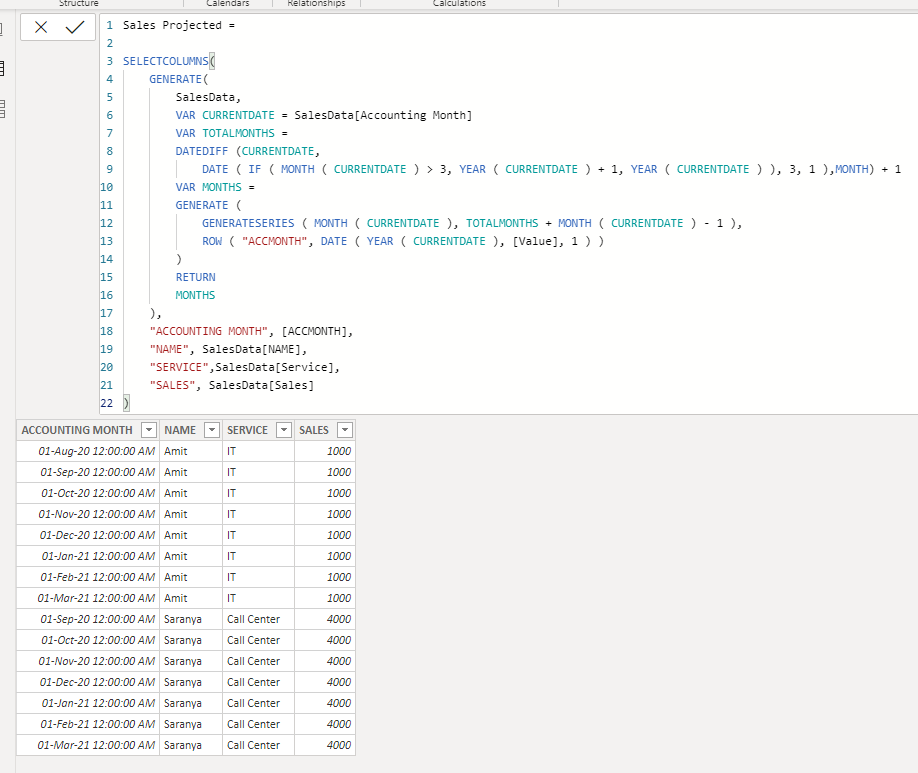
I need to generate the table with projected numbers for Sales till the financial year end and the resulted table should like the below one.
| Accounting Month | Name | Service | Sales |
| 01-08-2020 | Amit | IT | 1000 |
| 01-09-2020 | Amit | IT | 1000 |
| 01-10-2020 | Amit | IT | 1000 |
| 01-11-2020 | Amit | IT | 1000 |
| 01-12-2020 | Amit | IT | 1000 |
| 01-01-2021 | Amit | IT | 1000 |
| 01-02-2021 | Amit | IT | 1000 |
| 01-03-2021 | Amit | IT | 1000 |
| 01-01-2021 | Saranya | Call Center | 4000 |
| 01-02-2021 | Saranya | Call Center | 4000 |
| 01-03-2021 | Saranya | Call Center | 4000 |
Is this possible in power BI?
Solved! Go to Solution.


- Mark as New
- Bookmark
- Subscribe
- Mute
- Subscribe to RSS Feed
- Permalink
- Report Inappropriate Content
Hi @soniajs
with your dataset and your explanation - end of fiscal year is march - I get the following result with M-Code:
// Table
let
    Source = Table.FromRows(Json.Document(Binary.Decompress(Binary.FromText("i45WMjDUNbDQNTIwMlDSUXLMzSwBUp4hQMLQwMBAKVYHosISpiI4sSgxrzIRyHJOzMlRcE7NK0ktAvJMwKpjAQ==", BinaryEncoding.Base64), Compression.Deflate)), let _t = ((type nullable text) meta [Serialized.Text = true]) in type table [#"Accounting Month" = _t, Name = _t, Service = _t, Sales = _t]),
    #"Changed Type" = Table.TransformColumnTypes(Source,{{"Accounting Month", type date}, {"Name", type text}, {"Service", type text}, {"Sales", Int64.Type}}),
    #"Inserted End of Year" = Table.AddColumn(#"Changed Type", "End of Year", each if Date.Month([Accounting Month]) > 3 then #date(Date.Year([Accounting Month]) + 1,3,1) else #date(Date.Year([Accounting Month]),3,1), type date),
    #"Added Custom" = Table.AddColumn(#"Inserted End of Year", "Custom", each {Number.From([Accounting Month])..Number.From([End of Year])}),
    #"Expanded Custom" = Table.ExpandListColumn(#"Added Custom", "Custom"),
    #"Changed Type1" = Table.TransformColumnTypes(#"Expanded Custom",{{"Custom", type date}}),
    #"Filtered Rows" = Table.SelectRows(#"Changed Type1", each (Date.Day([Custom])= 1)),
    #"Removed Columns" = Table.RemoveColumns(#"Filtered Rows",{"Accounting Month", "End of Year"}),
    #"Reordered Columns" = Table.ReorderColumns(#"Removed Columns",{"Custom", "Name", "Service", "Sales"}),
    #"Renamed Columns" = Table.RenameColumns(#"Reordered Columns",{{"Custom", "Accounting"}})
in
    #"Renamed Columns"

With kind regards from the town where the legend of the 'Pied Piper of Hamelin' is at home
FrankAT (Proud to be a Datanaut)


- Mark as New
- Bookmark
- Subscribe
- Mute
- Subscribe to RSS Feed
- Permalink
- Report Inappropriate Content
@soniajs
In Power BI, go to Modeling Tab > New Table and paste below code:
One clarification: In your example, Saranya should start from 1/9/2020 but you showed from 1/1/2021, any reason?
Sales Projected =

SELECTCOLUMNS(
	GENERATE(
		SalesData,
		VAR CURRENTDATE = SalesData[Accounting Month]
		VAR TOTALMONTHS =
	    DATEDIFF (CURRENTDATE,
	        DATE ( IF ( MONTH ( CURRENTDATE ) > 3, YEAR ( CURRENTDATE ) + 1, YEAR ( CURRENTDATE ) ), 3, 1 ),MONTH) + 1
	    VAR MONTHS =
	    GENERATE (
	        GENERATESERIES ( MONTH ( CURRENTDATE ), TOTALMONTHS + MONTH ( CURRENTDATE ) - 1 ),
	        ROW ( "ACCMONTH", DATE ( YEAR ( CURRENTDATE ), [Value], 1 ) )
	    )
	    RETURN
	    MONTHS
	),
	"ACCOUNTING MONTH", [ACCMONTH],
	"NAME", SalesData[NAME],
	"SERVICE",SalesData[Service],
	"SALES", SalesData[Sales]
)
________________________
If my answer was helpful, please consider Accept it as the solution to help the other members find it
Click on the Thumbs-Up icon if you like this reply 🙂
⭕ Subscribe and learn Power BI from these videos
⚪ Website ⚪ LinkedIn ⚪ PBI User Group
- Mark as New
- Bookmark
- Subscribe
- Mute
- Subscribe to RSS Feed
- Permalink
- Report Inappropriate Content
@soniajs
In Power BI, go to Modeling Tab > New Table and paste below code:
One clarification: In your example, Saranya should start from 1/9/2020 but you showed from 1/1/2021, any reason?
Sales Projected =

SELECTCOLUMNS(
	GENERATE(
		SalesData,
		VAR CURRENTDATE = SalesData[Accounting Month]
		VAR TOTALMONTHS =
	    DATEDIFF (CURRENTDATE,
	        DATE ( IF ( MONTH ( CURRENTDATE ) > 3, YEAR ( CURRENTDATE ) + 1, YEAR ( CURRENTDATE ) ), 3, 1 ),MONTH) + 1
	    VAR MONTHS =
	    GENERATE (
	        GENERATESERIES ( MONTH ( CURRENTDATE ), TOTALMONTHS + MONTH ( CURRENTDATE ) - 1 ),
	        ROW ( "ACCMONTH", DATE ( YEAR ( CURRENTDATE ), [Value], 1 ) )
	    )
	    RETURN
	    MONTHS
	),
	"ACCOUNTING MONTH", [ACCMONTH],
	"NAME", SalesData[NAME],
	"SERVICE",SalesData[Service],
	"SALES", SalesData[Sales]
)
________________________
If my answer was helpful, please consider Accept it as the solution to help the other members find it
Click on the Thumbs-Up icon if you like this reply 🙂
⭕ Subscribe and learn Power BI from these videos
⚪ Website ⚪ LinkedIn ⚪ PBI User Group
- Mark as New
- Bookmark
- Subscribe
- Mute
- Subscribe to RSS Feed
- Permalink
- Report Inappropriate Content
- Mark as New
- Bookmark
- Subscribe
- Mute
- Subscribe to RSS Feed
- Permalink
- Report Inappropriate Content
You are welcome!
⭕ Subscribe and learn Power BI from these videos
⚪ Website ⚪ LinkedIn ⚪ PBI User Group
- Mark as New
- Bookmark
- Subscribe
- Mute
- Subscribe to RSS Feed
- Permalink
- Report Inappropriate Content
Hi @soniajs
with your dataset and your explanation - end of fiscal year is march - I get the following result with M-Code:
// Table
let
    Source = Table.FromRows(Json.Document(Binary.Decompress(Binary.FromText("i45WMjDUNbDQNTIwMlDSUXLMzSwBUp4hQMLQwMBAKVYHosISpiI4sSgxrzIRyHJOzMlRcE7NK0ktAvJMwKpjAQ==", BinaryEncoding.Base64), Compression.Deflate)), let _t = ((type nullable text) meta [Serialized.Text = true]) in type table [#"Accounting Month" = _t, Name = _t, Service = _t, Sales = _t]),
    #"Changed Type" = Table.TransformColumnTypes(Source,{{"Accounting Month", type date}, {"Name", type text}, {"Service", type text}, {"Sales", Int64.Type}}),
    #"Inserted End of Year" = Table.AddColumn(#"Changed Type", "End of Year", each if Date.Month([Accounting Month]) > 3 then #date(Date.Year([Accounting Month]) + 1,3,1) else #date(Date.Year([Accounting Month]),3,1), type date),
    #"Added Custom" = Table.AddColumn(#"Inserted End of Year", "Custom", each {Number.From([Accounting Month])..Number.From([End of Year])}),
    #"Expanded Custom" = Table.ExpandListColumn(#"Added Custom", "Custom"),
    #"Changed Type1" = Table.TransformColumnTypes(#"Expanded Custom",{{"Custom", type date}}),
    #"Filtered Rows" = Table.SelectRows(#"Changed Type1", each (Date.Day([Custom])= 1)),
    #"Removed Columns" = Table.RemoveColumns(#"Filtered Rows",{"Accounting Month", "End of Year"}),
    #"Reordered Columns" = Table.ReorderColumns(#"Removed Columns",{"Custom", "Name", "Service", "Sales"}),
    #"Renamed Columns" = Table.RenameColumns(#"Reordered Columns",{{"Custom", "Accounting"}})
in
    #"Renamed Columns"
With kind regards from the town where the legend of the 'Pied Piper of Hamelin' is at home
FrankAT (Proud to be a Datanaut)
- Mark as New
- Bookmark
- Subscribe
- Mute
- Subscribe to RSS Feed
- Permalink
- Report Inappropriate Content

- Mark as New
- Bookmark
- Subscribe
- Mute
- Subscribe to RSS Feed
- Permalink
- Report Inappropriate Content
@soniajs , one way - YTD should to for you
YTD Sales = CALCULATE(SUM(Sales[Sales]),DATESYTD('Date'[Date],"3/31"))
To get the best of the time intelligence function. Make sure you have a date calendar and it has been marked as the date in model view. Also, join it with the date column of your fact/s. Refer :
https://radacad.com/creating-calendar-table-in-power-bi-using-dax-functions
https://www.archerpoint.com/blog/Posts/creating-date-table-power-bi
https://www.sqlbi.com/articles/creating-a-simple-date-table-in-dax/
See if my webinar on Time Intelligence can help: https://community.powerbi.com/t5/Webinars-and-Video-Gallery/PowerBI-Time-Intelligence-Calendar-WTD-Y...
Appreciate your Kudos.

Helpful resources

Join our Fabric User Panel
Share feedback directly with Fabric product managers, participate in targeted research studies and influence the Fabric roadmap.

Power BI Community Update - March 2026
Check out the March 2026 Power BI update to learn about new features.

| User | Count |
|---|---|
| 55 | |
| 37 | |
| 23 | |
| 17 | |
| 17 |


| User | Count |
|---|---|
| 69 | |
| 58 | |
| 39 | |
| 21 | |
| 21 |


