cancel
Showing results for 
Search instead for 
Did you mean: 

The Power BI Data Visualization World Championships is back! Get ahead of the game and start preparing now! Learn more

Reply
Anonymous
Not applicable

Gauge visual Maximum value not affected by ALL()

Hello everybody,


I thought this was a simple thing, but for some reason, it just isn't.


I have a Gauge visual with a sum of [BUD] as Maximum value.
I want this number to be affected by all the slicers and filters except one - month.

I thought this measure would work:

MAX BUD = CALCULATE(sum(Master[BUD]), ALL(Master[Month]))
Master is the name of the table
BUD is the name of the column I'm summing.

For some reason, if I filter in a slicer with the month I have, it still affects the Maximum value.

Can somebody, please, tell me why?
 
 
1 ACCEPTED SOLUTION
Anonymous
Not applicable

Hello,

I managed to find a solution.


I have 4 different slicers on the page. One of them is month and it's the only Slicer I didn't want to affect the Max Value in the Gauge visual.

MAX BUD = CALCULATE(sum(Master[BUD]),ALLEXCEPT(Master, Master[Slicer1Value], Master[Slicer2Value],Master[Slicer3Value))

Month is the only one that is not included in the slicer and it works.

For some reason I thought ALL() and ALLEXCEPT() were inverse function therefore the ...ALL(Master[Month])) function should work, but it doesn't.

Anyway, it's solved and working now. Not an ideal solution, but more of a workaround.

View solution in original post

5 REPLIES 5
Anonymous
Not applicable

Hello,

I managed to find a solution.


I have 4 different slicers on the page. One of them is month and it's the only Slicer I didn't want to affect the Max Value in the Gauge visual.

MAX BUD = CALCULATE(sum(Master[BUD]),ALLEXCEPT(Master, Master[Slicer1Value], Master[Slicer2Value],Master[Slicer3Value))

Month is the only one that is not included in the slicer and it works.

For some reason I thought ALL() and ALLEXCEPT() were inverse function therefore the ...ALL(Master[Month])) function should work, but it doesn't.

Anyway, it's solved and working now. Not an ideal solution, but more of a workaround.
Ashish_Mathur
Super User
Super User

Hi,

Share the download link of the PBI file.


Regards,
Ashish Mathur
http://www.ashishmathur.com
https://www.linkedin.com/in/excelenthusiasts/
Anonymous
Not applicable

Hi @v-zhangti  and @amitchandak ,

Thanks for your tips, unfortunately, none of the solutions is working.
I tried both but the Max Value is still affected by the Slicer with Months.

I want the Max value to display the year's 100 % target value.

I want the Month slicer to affect the Callout value but the Max value should be fixed. (but affected by other slicers than month slicer)

Any other ideas?

v-zhangti
Community Support
Community Support

Hi, @Anonymous 


You can try the following methods.

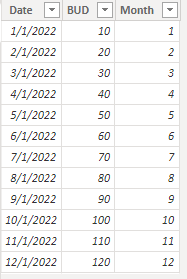
vzhangti_0-1673334453285.png

MAX BUD = CALCULATE(sum(Master[BUD]),ALLEXCEPT(Master,Master[Date]))

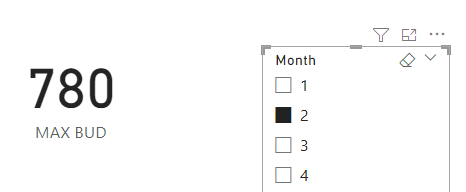
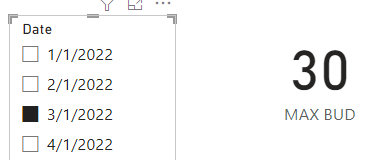
vzhangti_1-1673334482225.pngvzhangti_2-1673334500590.png

The maximum value is not affected by the month slicer, it is affected by other slicers. Is this the result you expect?


Best Regards,

Community Support Team _Charlotte

If this post helps, then please consider Accept it as the solution to help the other members find it more quickly.

amitchandak
Super User
Super User

@Anonymous , Based on what I got, Try like


MAX BUD = CALCULATE(sumX(values(Master[Month]) , calculate(Sum(Master[BUD]))) , ALL(Master[Month]))

Share with Power BI Enthusiasts: Full Power BI Video (20 Hours) YouTube
Microsoft Fabric Series 60+ Videos YouTube
Microsoft Fabric Hindi End to End YouTube

Helpful resources

Announcements
Power BI DataViz World Championships

Power BI Dataviz World Championships

The Power BI Data Visualization World Championships is back! Get ahead of the game and start preparing now!

December 2025 Power BI Update Carousel

Power BI Monthly Update - December 2025

Check out the December 2025 Power BI Holiday Recap!

FabCon Atlanta 2026 carousel

FabCon Atlanta 2026

Join us at FabCon Atlanta, March 16-20, for the ultimate Fabric, Power BI, AI and SQL community-led event. Save $200 with code FABCOMM.