cancel
Showing results for 
Search instead for 
Did you mean: 

View all the Fabric Data Days sessions on demand. View schedule

Reply
lotus22
Helper III
Helper III

Gauge chart showing blank when using Measure as MAX Value

Hello, I have the following data. We have customer requirements and supplier requirements. The goal for suppliers is to meet customer requirements. I am trying to create a Gauge Chart that has Max as the Customer requirement and actuals is whatever supplier production. I created the measure for customer MAX = CALCULATE(sum(Master[Value]), Master[Station]="Customer")


When I input this value as MAX, the graph turns into something like this - showing blank for max and actual only shows as number.


lotus22_0-1627494160915.png


Prod DateStationTypeValue
7/1/2021CustomerPROD700
7/1/2021SupplierPROD680
7/1/2021SupplierTarget720
7/2/2021CustomerPROD660
7/2/2021SupplierPROD640
7/2/2021SupplierTarget720
3 REPLIES 3
Anonymous
Not applicable

hi @lotus22 


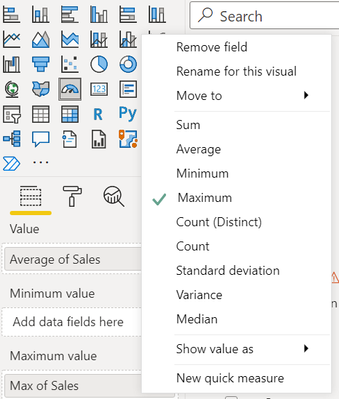
How is this 642 calculated? Secondly in order to show the maximum value, you do not necessarily have to create a measure. Add the column as shown below and select maximum.


alekhved_0-1627495677859.png


Thanks!

alekh

Hi @Anonymous , 642 is just an example that is not in the table.


I do have to filter Max by Customer as supplier has to meet customer requirements. The gauge should tell us whether we are or not meeting customer requirements.

Anonymous
Not applicable

hi @lotus22 


If you want just the Customer, can you add filter on the visual (Master[Station])? Am I missing something? If this does not help, can you clarify


1. How would the gauge value be calculated? Is it Average/Sum and Is it just for Customer or both Customer + Supplier?

2. If I understand it correctly, the Maximum value would be just for the Customer. Is that right?


Thanks!

Helpful resources

Announcements
November Power BI Update Carousel

Power BI Monthly Update - November 2025

Check out the November 2025 Power BI update to learn about new features.

Fabric Data Days Carousel

Fabric Data Days

Advance your Data & AI career with 50 days of live learning, contests, hands-on challenges, study groups & certifications and more!

FabCon Atlanta 2026 carousel

FabCon Atlanta 2026

Join us at FabCon Atlanta, March 16-20, for the ultimate Fabric, Power BI, AI and SQL community-led event. Save $200 with code FABCOMM.

Top Solution Authors
Top Kudoed Authors