Join us at FabCon Atlanta from March 16 - 20, 2026, for the ultimate Fabric, Power BI, AI and SQL community-led event. Save $200 with code FABCOMM.
Register now!Get Fabric Certified for FREE during Fabric Data Days. Don't miss your chance! Request now
Hi All
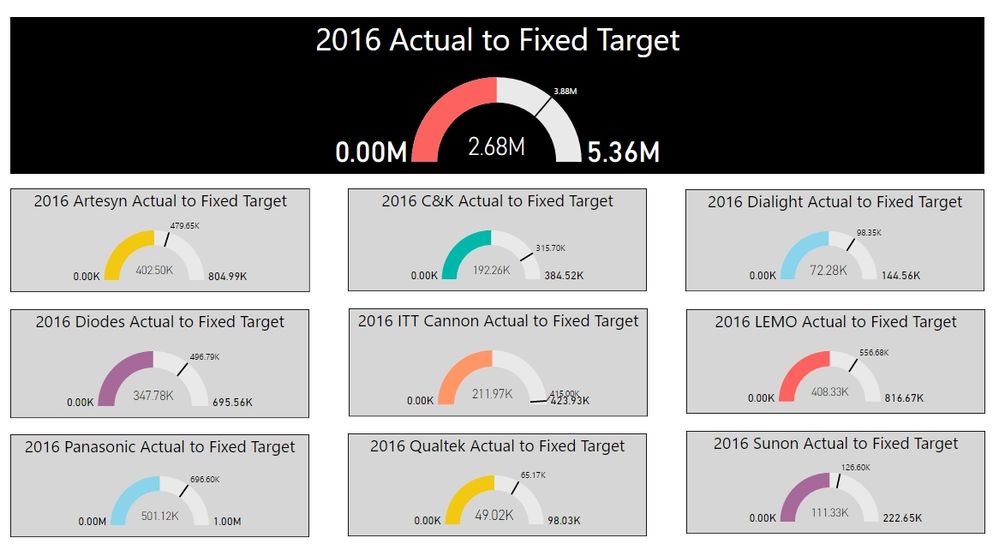
I've been working with the gauge visual and basically I want to take some customers and gauge the actual revenue compared to the forecast target value for the year. What I'm seeing looks great, but am not sure about how the right side of the gauge is plotting.
In the visual if you look at the top one - 2016 Actual to Fixed Target you will see the left is at 0 - great and the actual received to date is 2.8M (again looks good), and you see the target 3.88M, then you see on the right 5.36M....where is this number coming from? Why would the right side not be plotting my forecast target value I entered into the gauge axis Target field, so the full gauge is used?
Is the gauge supposed to plot the right side with some random number? It is doing so on all the gauge visuals?
Emma
Solved! Go to Solution.
hi @emma313823
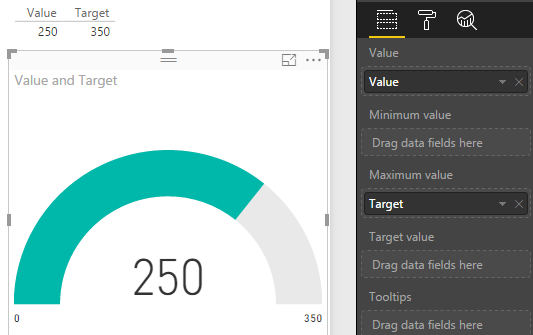
If you put the target as Maximum Value this will be the full gauge.
Gauge with Target as Maximum
@emma313823 The 5.36 is double 2.68 => notice all your visuals are this way ![]()
If you leave the Maximum Value empty it defaults to double the Value!
Also, if you leave the Maximum Value Field empty and go to the Format (Paint Brush) Menu
the top option Gauge Axis lets you control Min, Max and Target values where you can enter (hardcode) the numbers!
It really depends on your setup but I only use those controls when working with % - then I set Min to 0 (0%) and Max to 1 (100%)
when I work with amounts (numbers) I use a Measure placed in the Maximum Value field
Hope this helps!
@emma313823 The 5.36 is double 2.68 => notice all your visuals are this way ![]()
If you leave the Maximum Value empty it defaults to double the Value!
Also, if you leave the Maximum Value Field empty and go to the Format (Paint Brush) Menu
the top option Gauge Axis lets you control Min, Max and Target values where you can enter (hardcode) the numbers!
It really depends on your setup but I only use those controls when working with % - then I set Min to 0 (0%) and Max to 1 (100%)
when I work with amounts (numbers) I use a Measure placed in the Maximum Value field
Hope this helps!
hi @emma313823
If you put the target as Maximum Value this will be the full gauge.
Gauge with Target as Maximum
Check out the November 2025 Power BI update to learn about new features.
Advance your Data & AI career with 50 days of live learning, contests, hands-on challenges, study groups & certifications and more!