cancel
Showing results for 
Search instead for 
Did you mean: 

Get Fabric Certified for FREE during Fabric Data Days. Don't miss your chance! Request now

Reply
dilshadkmt
New Member

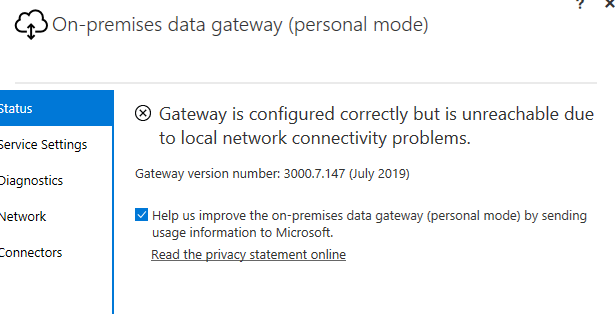
Gateway is configured correctly but is unreachable

Hi,


I have installed on-premises data gateway (personal mode) on a server of ours but i am getting the following error.


What ports would i need to open up to get this to work and is there a config file this it to be updated in? 


Below is the error i get.


image.png


I had a look through the forums and found this post.

https://community.powerbi.com/t5/Power-Query/On-premises-data-gateway-personal-mode-not-connecting/t...

I could find the string in the config file though to edit. 

1 REPLY 1
v-lili6-msft
Community Support
Community Support

hi, @dilshadkmt 

Please refer to these similar posts:

https://community.powerbi.com/t5/Service/Can-t-Sign-in-to-On-Premise-Gateway-after-reinstalling/td-p...

https://community.powerbi.com/t5/Service/Power-bi-desktop-Gateway-Issue/td-p/230366

https://community.powerbi.com/t5/Power-Query/Gateway-configured-in-PowerBI-but-unreachable-due-to-ne...


Best Regards,

Lin

Community Support Team _ Lin
If this post helps, then please consider Accept it as the solution to help the other members find it more quickly.

Helpful resources

Announcements
November Power BI Update Carousel

Power BI Monthly Update - November 2025

Check out the November 2025 Power BI update to learn about new features.

Fabric Data Days Carousel

Fabric Data Days

Advance your Data & AI career with 50 days of live learning, contests, hands-on challenges, study groups & certifications and more!

FabCon Atlanta 2026 carousel

FabCon Atlanta 2026

Join us at FabCon Atlanta, March 16-20, for the ultimate Fabric, Power BI, AI and SQL community-led event. Save $200 with code FABCOMM.

Top Solution Authors
Top Kudoed Authors