Join us at FabCon Atlanta from March 16 - 20, 2026, for the ultimate Fabric, Power BI, AI and SQL community-led event. Save $200 with code FABCOMM.
Register now!The Power BI Data Visualization World Championships is back! Get ahead of the game and start preparing now! Learn more
Hi All,
I am using a Azure SQL Server. And I am using a VPN while connecting to this server. Without a VPN we cannot connect to this Datasource. So, currently I refresh the Report manually on my desktop and then publish it on app.powerbi.com.
I want to set refresh times on app.powerbi.com for my report, but that particular section is disabled.
Do I need to setup a Gateway Connection for Azure SQL Datasource(which requres a VPN to connect) OR I can connect directly ?
If I can connect directly, then please guide me how to do it.
Solved! Go to Solution.
Hi @mohit_K ,
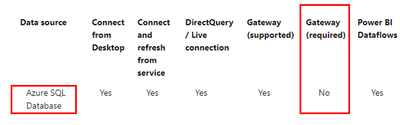
According to the official document, Gateway is not required for Azure SQL Database.
While setting up scheduled refresh for Azure SQL database, if you get an error with error code 400 when editing the credentials, try the following to set up the appropriate firewall rule:
Sign in to the Azure portal.
Go to the Azure SQL database for which you're configuring refresh.
At the top of the Overview blade, select Set server firewall.
On the Firewall settings blade, make sure that Allow Azure services and resources to access this server is set to Yes.
For more information, please refer to:
Azure SQL Database with DirectQuery - Power BI | Microsoft Docs
Azure SQL firewall settings for Power BI refresh - Dutch Data Dude
Best Regards,
Eyelyn Qin
If this post helps, then please consider Accept it as the solution to help the other members find it more quickly.
Hi @mohit_K ,
According to the official document, Gateway is not required for Azure SQL Database.
While setting up scheduled refresh for Azure SQL database, if you get an error with error code 400 when editing the credentials, try the following to set up the appropriate firewall rule:
Sign in to the Azure portal.
Go to the Azure SQL database for which you're configuring refresh.
At the top of the Overview blade, select Set server firewall.
On the Firewall settings blade, make sure that Allow Azure services and resources to access this server is set to Yes.
For more information, please refer to:
Azure SQL Database with DirectQuery - Power BI | Microsoft Docs
Azure SQL firewall settings for Power BI refresh - Dutch Data Dude
Best Regards,
Eyelyn Qin
If this post helps, then please consider Accept it as the solution to help the other members find it more quickly.
@mohit_K , There Few IPs apps.powerbi.com to be whitelisted
https://docs.microsoft.com/en-us/power-bi/admin/power-bi-whitelist-urls
or use on-prem gateway
https://docs.microsoft.com/en-us/power-bi/connect-data/service-gateway-onprem
Check out the November 2025 Power BI update to learn about new features.
Advance your Data & AI career with 50 days of live learning, contests, hands-on challenges, study groups & certifications and more!
| User | Count |
|---|---|
| 58 | |
| 45 | |
| 40 | |
| 21 | |
| 18 |