cancel
Showing results for 
Search instead for 
Did you mean: 

Level up your Power BI skills this month - build one visual each week and tell better stories with data! Get started

Reply
prepo
Regular Visitor

Gantt chart error

Hello,


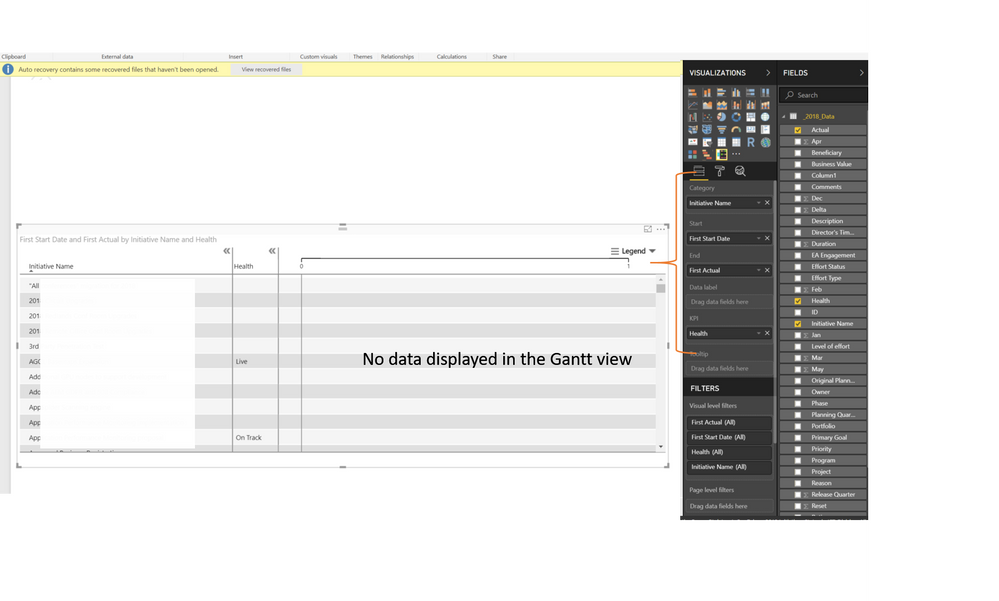
I am using Gantt chart by MAQ software, it was working well until I updated to the latest version of PowerBI (Version: 2.58.5103.501 64-bit (May 2018). Has anyone else encountered similar issues?maq.png

Thanks. 

1 ACCEPTED SOLUTION
MAQSupport
Solution Supplier
Solution Supplier

Hello, 


To display the bars in Gantt Chart using MAQ Software, please format the columns to be dragged in Start and End fields, as Date or Date/Time.


Thanks.

View solution in original post

5 REPLIES 5
MAQSupport
Solution Supplier
Solution Supplier

Hello, 


To display the bars in Gantt Chart using MAQ Software, please format the columns to be dragged in Start and End fields, as Date or Date/Time.


Thanks.

Thank you fpr your help, the error is resolved. 

Anonymous
Not applicable

HI @prepo,


Since you are not use official gantt custom visual, I also not know why they not works.(it may due to compatibility for visual code and new power bi features)


In my opinion, I'd like to suggest you contact to third party author for better support.


Regards,

XIaoxin Sheng

Hi Xlaoxin,


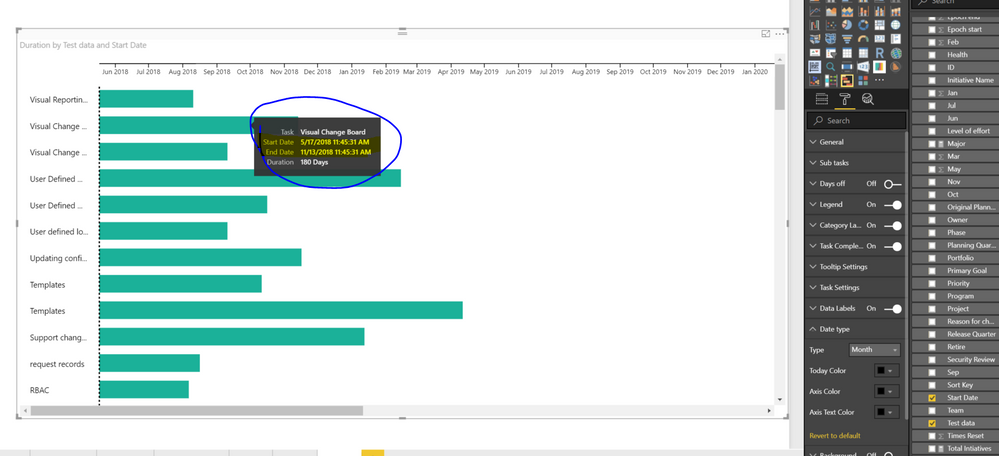
I tried the official Gantt chart visual as well and it switches all the project start dates to today’s date. I tried multiple formats of date, date and time, epoch start nothing worked. The start date of the effort highlighted in the screenshot is May 1, 2018. 


Data used


Test dataStart DateDurationActual

Change assignment & Lifecycle

2018/01/011802018-06-30

User Defined Metadata

2018/04/022732018-12-31

Visual Change Board

2018/05/011162018-08-25

Visual Reporting

2018/05/07852018-07-31

Templates

2017/11/011472018-03-28

Support change record 

2018/02/012402018-09-29
Dashboard creation2018/07/16-1622018-02-04

User defined logic and approval workflows

2018/05/071162018-08-31

Linkage to CI

2018/03/011212018-06-30

Updating configuration item 

2018/03/011832018-08-31


pbi issue.PNG


Thanks,

-P

Hi Xlaoxin,


I tried the official Gantt chart visual as well and it switches all the project start dates to today’s date. I tried multiple formats of date, date and time, epoch start nothing worked. The start date of the effort highlighted in the screenshot is May 1, 2018. 


Data used


Test dataStart DateDurationActual

Change assignment & Lifecycle

2018/01/011802018-06-30

User Defined Metadata

2018/04/022732018-12-31

Visual Change Board

2018/05/011162018-08-25

Visual Reporting

2018/05/07852018-07-31

Templates

2017/11/011472018-03-28

Support change record 

2018/02/012402018-09-29
Dashboard creation2018/07/16-1622018-02-04

User defined logic and approval workflows

2018/05/071162018-08-31

Linkage to CI

2018/03/011212018-06-30

Updating configuration item 

2018/03/011832018-08-31


pbi issue.PNG


Thanks,

-P

Helpful resources

Announcements
April Power BI Update Carousel

Power BI Monthly Update - April 2026

Check out the April 2026 Power BI update to learn about new features.

Fabric SQL PBI Data Days

Data Days 2026 coming soon!

Sign up to receive a private message when registration opens and key events begin.

New to Fabric survey Carousel

New to Fabric Survey

If you have recently started exploring Fabric, we'd love to hear how it's going. Your feedback can help with product improvements.

Power BI DataViz World Championships carousel

Power BI DataViz World Championships - June 2026

A new Power BI DataViz World Championship is coming this June! Don't miss out on submitting your entry.