Share feedback directly with Fabric product managers, participate in targeted research studies and influence the Fabric roadmap.
Sign up nowGet Fabric certified for FREE! Don't miss your chance! Learn more
Hello All
I am working on analysis of all the Projects done in our business.
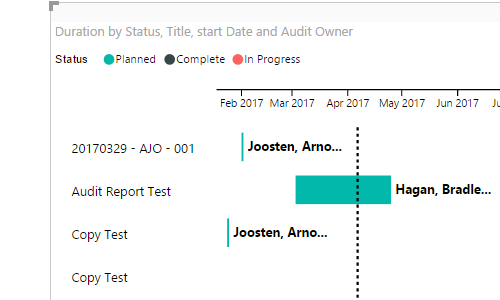
I came across the Gantt Chart - Custom Visual and it fits perfectly in the case I wanted to.
But I am facing a small difficulty to color the bars in Gantt custom visuals.
As you can see that on the top there are 3 status:
1. Completed
2. In Progress
3. Planned
All three have different color coding. What I want is that if the Status="Completed"the I want to color them by "Green"color else all other status will be "a Different color(can be any random color".
Please help me in this formatting.
Regards
Shubham Sharma
Hi @Anonymous,
I made a sample of a file and have one column with the status when I add it to the the Gant in the legend, however what I think you want is to be able to choose the colours right?
In this visual this is not possible problaby you can contact the author at pbicvsupport@microsoft.com and aks for that option.
Regards,
Mfelix
Regards
Miguel Félix
Proud to be a Super User!
Check out my blog: Power BI em PortuguêsHi
I am trying to do this also and struggling to find a way to select different colours based on the status of the project.
Any help appreciated.
Graham
If you get stuck with a visual don't forget you can get lots of flexibility from R visuals.
https://www.r-bloggers.com/gantt-charts-in-r-using-plotly/
https://davetang.org/muse/2017/02/03/gantt-chart-using-r/
https://rstudio-pubs-static.s3.amazonaws.com/106401_8efca65e9be14404b27e4779d393fb4f.html
Share feedback directly with Fabric product managers, participate in targeted research studies and influence the Fabric roadmap.
| User | Count |
|---|---|
| 63 | |
| 62 | |
| 42 | |
| 19 | |
| 16 |
| User | Count |
|---|---|
| 111 | |
| 104 | |
| 36 | |
| 28 | |
| 27 |