Good.
They have changed my computer in the domain and now they do not update the reports, it shows me the following error:
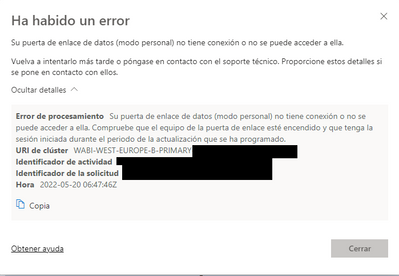
I have gone to update the GATEWAY and I can not continue, it gives me the following message:
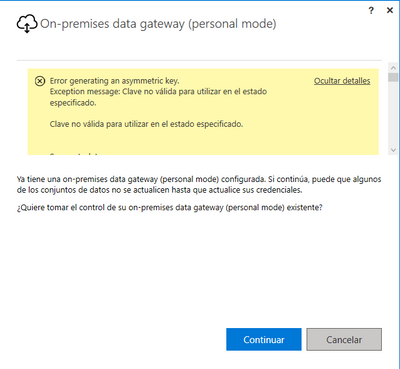
Error generating an asymmetric key.
Exception message: Invalid key to use in the specified state.
Invalid key to use in the specified state.
Server stack trace:
en System.ServiceModel.Channels.ServiceChannel.ThrowIfFaultUnderstood(Message reply, MessageFault fault, String action, MessageVersion version, FaultConverter faultConverter)
en System.ServiceModel.Channels.ServiceChannel.HandleReply(ProxyOperationRuntime operation, ProxyRpc& rpc)
en System.ServiceModel.Channels.ServiceChannel.Call(String action, Boolean oneway, ProxyOperationRuntime operation, Object[] ins, Object[] outs, TimeSpan timeout)
en System.ServiceModel.Channels.ServiceChannelProxy.InvokeService(IMethodCallMessage methodCall, ProxyOperationRuntime operation)
en System.ServiceModel.Channels.ServiceChannelProxy.Invoke(IMessage message)
Exception rethrown at [0]:
in System.Runtime.Remoting.Proxies.RealProxy.HandleReturnMessage(IMessage reqMsg, IMessage retMsg)
in System.Runtime.Remoting.Proxies.RealProxy.PrivateInvoke(MessageData& msgData, Int32 type)
at Microsoft.PowerBI.DataMovement.Pipeline.ConfigurationContracts.IGatewayConfigurationService.GenerateAsymmetricKey()
in Microsoft.PowerBI.DataMovement.Pipeline.GatewayClient.GatewayConfigurationClient.GenerateAsymmetricKey()ExceptionDetail, probably created by IncludeExceptionDetailInFaults=true, whose value is:
System.Security.Cryptography.CryptographicException: An invalid key to use in the specified state.
en System.Security.Cryptography.Utils.CreateProvHandle(CspParameters parameters, Boolean randomKeyContainer)
en System.Security.Cryptography.Utils.GetKeyPairHelper(CspAlgorithmType keyType, CspParameters parameters, Boolean randomKeyContainer, Int32 dwKeySize, SafeProvHandle& safeProvHandle, SafeKeyHandle& safeKeyHandle)
en System.Security.Cryptography.RSACryptoServiceProvider.GetKeyPair()
en System.Security.Cryptography.RSACryptoServiceProvider.. ctor(Int32 dwKeySize, CspParameters parameters, Boolean useDefaultKeySize)
en Microsoft.PowerBI.DataMovement.Pipeline.GatewayServiceHost.AsymmetricKeyGenerator.ProduceAsymmetricKey(String containerName, Boolean cleanUpOldKeys, Int32 rsaKeySize)
en Microsoft.PowerBI.DataMovement.Pipeline.GatewayPipelineTelemetry.PipelineTelemetryService.ExecuteInActivity[T](PipelineActivityType pipelineActivityType, Func`1 action)
en SyncInvokeGenerateAsymmetricKey( Object , Object[] , Object[] )
en System.ServiceModel.Dispatcher.SyncMethodInvoker.Invoke(Object instance, Object[] inputs, Object[]& outputs)
en System.ServiceModel.Dispatcher.DispatchOperationRuntime.InvokeBegin(MessageRpc& rpc)
en System.ServiceModel.Dispatcher.ImmutableDispatchRuntime.ProcessMessage5(MessageRpc& rpc)
en System.ServiceModel.Dispatcher.ImmutableDispatchRuntime.ProcessMessage11(MessageRpc& rpc)
en System.ServiceModel.Dispatcher.MessageRpc.Process(Boolean isOperationContextSet)
Some idea????
Thank you and greetings.


