Join us at FabCon Atlanta from March 16 - 20, 2026, for the ultimate Fabric, Power BI, AI and SQL community-led event. Save $200 with code FABCOMM.
Register now!The Power BI Data Visualization World Championships is back! Get ahead of the game and start preparing now! Learn more
Hi,
I'm trying to plot actual and planned data based on ID names and month.
There are no GANTT charts in Power BI that support this. I'va tested it but it doesn't display the visualization we want.
Does anyone know how we can solve this?
Please help!
Hi @Anonymous,
Have your tried with the custom visual Gantt chart?
If not, you could have a reference of this blog about creating a Gantt chart in Power BI.
If you still need help, please share some data sample and your desired output.
Best Regards,
Cherry
Hi v-piga-msft,
There are lot of custom Gantt chart in Power BI, but the problem is that after adding data, the Gantt chart doesn't display what we want.
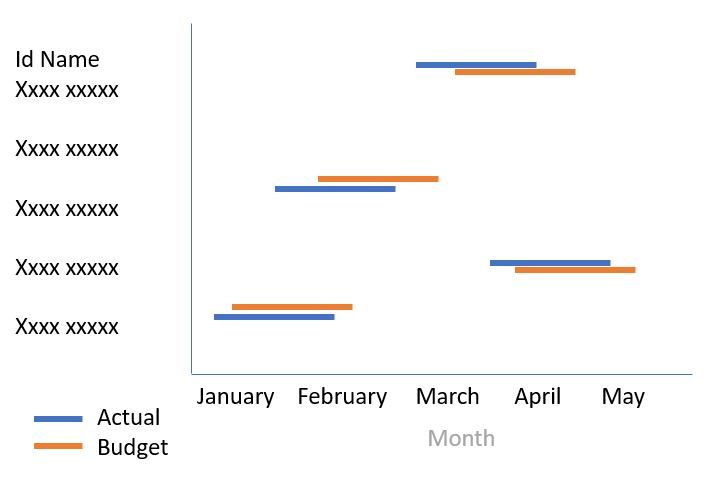
What we want is this:
We have
Actual data
This is a simple and popular visualization in other tools..
Hi @Anonymous,
For your scenario, you could create R visuals to meet your requirement.
In addition, you could refer to this bolg.
Best Regards,
Cherry
The Power BI Data Visualization World Championships is back! Get ahead of the game and start preparing now!
| User | Count |
|---|---|
| 38 | |
| 38 | |
| 36 | |
| 28 | |
| 28 |
| User | Count |
|---|---|
| 124 | |
| 88 | |
| 74 | |
| 66 | |
| 65 |