cancel
Showing results for 
Search instead for 
Did you mean: 

Learn from the best! Meet the four finalists headed to the FINALS of the Power BI Dataviz World Championships! Register now

Reply
BillyT_350
Helper V
Helper V

Functions in add Custom Column to Query (M coding)

Hi folks. I'm experimenting with using queries to filter other queries so that I don't have to use the code of some queries multiple times. However, I'm having trouble coding the columns in M.


So far, I'm looking at 3 tables:

Table A lists the assignments of trainers to trainees. Some genius decided that they would include two different types of identificaion for the trainers and drivers, respsecitively; i.e. in the same record, trainers are identified in one field using info X, and trainees in the next using info Y.

Table B is a Type 2 person dimension with data about people. This table includes info X and Y for all people.

Tables C has other event data about people. People in here are only identifiable with info X.


Capture3.jpg


Tables B and C are massive tables, and I want to cut down on them by only pulling data pertaining to the people listed in Table A.


First, I'm pulling Table A, which is a simple enough query.

Then I added Table B, but, then added two Left Outer Joins to check if the person record is one of those included in Table A, checking the trainer and trainee fields, respsectively:
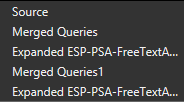
Capture.PNG


Now I need to add a columns that says, "if both of these fields are null, then do not include this record."

This is how I'm attempting to accomplish this:
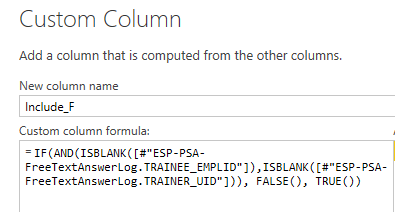
Capture2.PNG

In simpler terms:

Include_F = Table.AddColumn(#"Expanded LastQueryStep"
, "Include_F"
, each IF(AND(ISBLANK([#"TableA.TRAINEE"])
, ISBLANK([#"TableA.TRAINER"]))
, FALSE()
, TRUE()))

But I get the error: "Expression.Error: The name 'IF' wasn't recognized. Make sure it's spelled correctly."

If I can't use an if statement, want can I use?


Next, I will have to check Table C if those people are included in the filtered Table B.


Thanks!


Yes, I know I could just join all of these tables together in a single query, but I don't want to have a MASSIVE data set that will be impossible to read.

I also could also just use the queries in tables A and B multiple times, but I want to avoid versioning issues and to minimize maintenance,

1 ACCEPTED SOLUTION
BillyT_350
Helper V
Helper V

Oh. I realized that using DAX code in M code probably doesn't work. This works:

Include_F = if [#"TABLEA.TRAINEE"] is null and [#"TableA.TRAINER"] is null then false else true

Now let's see how this affects load times, and if we can make it work for Table C.

View solution in original post

2 REPLIES 2
Anonymous
Not applicable

Hi @BillyT_350 


IF is not IF in Power query, it is  "if"


Example 

Excel =IF(test, value_if_true, value_if_false)
Power Query =if test then value_if_true else value_if_false


Also you could download the

Power Query Formula Language Specification  (October 2016).pdf from dwonload.microsoft.com for handy reference.


Cheers


CheenuSing

BillyT_350
Helper V
Helper V

Oh. I realized that using DAX code in M code probably doesn't work. This works:

Include_F = if [#"TABLEA.TRAINEE"] is null and [#"TableA.TRAINER"] is null then false else true

Now let's see how this affects load times, and if we can make it work for Table C.

Helpful resources

Announcements
New to Fabric survey Carousel

New to Fabric Survey

If you have recently started exploring Fabric, we'd love to hear how it's going. Your feedback can help with product improvements.

Power BI DataViz World Championships carousel

Power BI DataViz World Championships - June 2026

A new Power BI DataViz World Championship is coming this June! Don't miss out on submitting your entry.

Join our Fabric User Panel

Join our Fabric User Panel

Share feedback directly with Fabric product managers, participate in targeted research studies and influence the Fabric roadmap.

March Power BI Update Carousel

Power BI Community Update - March 2026

Check out the March 2026 Power BI update to learn about new features.