cancel
Showing results for 
Search instead for 
Did you mean: 

The Power BI Data Visualization World Championships is back! Get ahead of the game and start preparing now! Learn more

Reply
Kathrinens
Frequent Visitor

From live connection to composite model - power bi settings

Hi everyone

I am working with a Power BI file that has a live connection. I want to change it to a direct query or composite model.

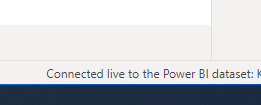
When I click on Get Data everything is greyed out as in the picture below. I know I have to change setting in the settings menu to enable composite models, but I can't find it. 

Does anyone know where I need to click? 


Best, KathrineKlip1.PNGKlip2.PNG

1 ACCEPTED SOLUTION
tex628
Community Champion
Community Champion

Hi @Kathrinens , 

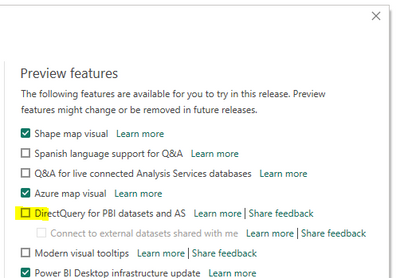
Toggle this preview feature on:

tex628_0-1675334865690.png


You should get the option to modify the model in the bottom right, unless the dataset creators have toggled to option off on their side. 

Br, 
J


Connect on LinkedIn

View solution in original post

3 REPLIES 3
mehtaworld
Frequent Visitor

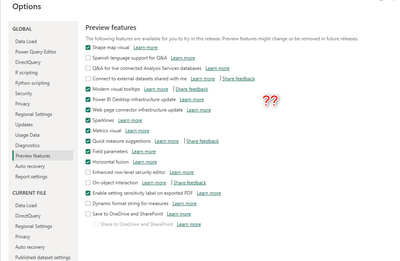
Looks like that option is gone. Any idea what's the latest way. Thanks!
No luck searching all over internet yet. 


mehtaworld_0-1685998135041.png


Kathrinens
Frequent Visitor

Thanks you, it worked! 🙂

tex628
Community Champion
Community Champion

Hi @Kathrinens , 

Toggle this preview feature on:

tex628_0-1675334865690.png


You should get the option to modify the model in the bottom right, unless the dataset creators have toggled to option off on their side. 

Br, 
J


Connect on LinkedIn

Helpful resources

Announcements
Power BI DataViz World Championships

Power BI Dataviz World Championships

The Power BI Data Visualization World Championships is back! Get ahead of the game and start preparing now!

November Power BI Update Carousel

Power BI Monthly Update - November 2025

Check out the November 2025 Power BI update to learn about new features.

FabCon Atlanta 2026 carousel

FabCon Atlanta 2026

Join us at FabCon Atlanta, March 16-20, for the ultimate Fabric, Power BI, AI and SQL community-led event. Save $200 with code FABCOMM.