cancel
Showing results for 
Search instead for 
Did you mean: 

The Power BI Data Visualization World Championships is back! It's time to submit your entry. Live now!

Reply
Kieranwood
Regular Visitor

Formula help

Hi all,


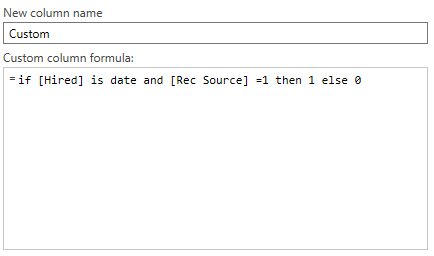
I'm building a report in which it needs to count 2 columns if certain criteria is being meant which can be seen below.


The basis of the query is if column Hired contains a date and rec source contains a 1 then enter a 1 into the "custom column" which it does however it's then meant to put a zero in those cells which has a hired date but rec source has a 0 which it doesn't and instead put's a zero in all other columns which then when doing a count/sum it's showing 9000+ cells instead of the 11 which has data in hired.


If someone can lend a hand and advise what the formula would need to be that would be fantastic!


a.png

1 ACCEPTED SOLUTION
v-chuncz-msft
Community Support
Community Support

@Kieranwood,


You may try the following Boolean expression.

(try Date.From([Hired]))[HasError] = false
Community Support Team _ Sam Zha
If this post helps, then please consider Accept it as the solution to help the other members find it more quickly.

View solution in original post

1 REPLY 1
v-chuncz-msft
Community Support
Community Support

@Kieranwood,


You may try the following Boolean expression.

(try Date.From([Hired]))[HasError] = false
Community Support Team _ Sam Zha
If this post helps, then please consider Accept it as the solution to help the other members find it more quickly.

Helpful resources

Announcements
FabCon Atlanta 2026 carousel

FabCon Atlanta 2026

Join us at FabCon Atlanta, March 16-20, for the ultimate Fabric, Power BI, AI and SQL community-led event. Save $200 with code FABCOMM.