Join us at FabCon Atlanta from March 16 - 20, 2026, for the ultimate Fabric, Power BI, AI and SQL community-led event. Save $200 with code FABCOMM.
Register now!The Power BI Data Visualization World Championships is back! It's time to submit your entry. Live now!
Hi all,
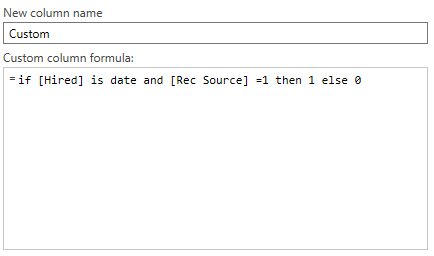
I'm building a report in which it needs to count 2 columns if certain criteria is being meant which can be seen below.
The basis of the query is if column Hired contains a date and rec source contains a 1 then enter a 1 into the "custom column" which it does however it's then meant to put a zero in those cells which has a hired date but rec source has a 0 which it doesn't and instead put's a zero in all other columns which then when doing a count/sum it's showing 9000+ cells instead of the 11 which has data in hired.
If someone can lend a hand and advise what the formula would need to be that would be fantastic!
Solved! Go to Solution.
You may try the following Boolean expression.
(try Date.From([Hired]))[HasError] = false
You may try the following Boolean expression.
(try Date.From([Hired]))[HasError] = false
| User | Count |
|---|---|
| 53 | |
| 40 | |
| 31 | |
| 24 | |
| 22 |
| User | Count |
|---|---|
| 134 | |
| 111 | |
| 57 | |
| 44 | |
| 38 |