Join us at FabCon Atlanta from March 16 - 20, 2026, for the ultimate Fabric, Power BI, AI and SQL community-led event. Save $200 with code FABCOMM.
Register now!The Power BI Data Visualization World Championships is back! It's time to submit your entry. Live now!
I am trying to write a formula based off a column named % EBITDA Discrepancy in my PowerBi (so the column is all a percent). I want the formula to include the following criteria:
Solved! Go to Solution.
Hi @Anonymous ,
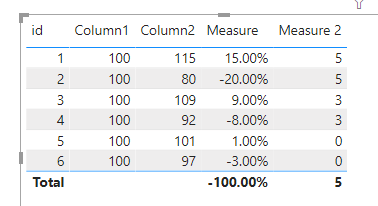
You can still use the formula above.
Measure 2 = SWITCH(TRUE(),ABS([Measure])>0.1,5,ABS([Measure])>0.05,3,0)
Best Regards,
Jay
Community Support Team _ Jay Wang
If this post helps, then please consider Accept it as the solution to help the other members find it more quickly.
Hi @Anonymous
if your % EBITDA Discrepancy is a really column, not a measure try SWITCH()
Rating =
SWITCH(TRUE(),
ABS([% EBITDA Discrepancy]) > 0.1, 5,
ABS([% EBITDA Discrepancy]) > 0.05, 3,
0
)
Thank you!
How would I do it if it was a measure then?
Hi @Anonymous ,
You can still use the formula above.
Measure 2 = SWITCH(TRUE(),ABS([Measure])>0.1,5,ABS([Measure])>0.05,3,0)
Best Regards,
Jay
Community Support Team _ Jay Wang
If this post helps, then please consider Accept it as the solution to help the other members find it more quickly.
The Power BI Data Visualization World Championships is back! It's time to submit your entry.
Check out the January 2026 Power BI update to learn about new features.
| User | Count |
|---|---|
| 57 | |
| 40 | |
| 27 | |
| 25 | |
| 23 |
| User | Count |
|---|---|
| 127 | |
| 105 | |
| 55 | |
| 39 | |
| 33 |