


Join us at FabCon Atlanta from March 16 - 20, 2026, for the ultimate Fabric, Power BI, AI and SQL community-led event. Save $200 with code FABCOMM.
Register now!The Power BI Data Visualization World Championships is back! Get ahead of the game and start preparing now! Learn more
Hi,
I'm trying to generate an API query which takes multiple webids as input from table values.
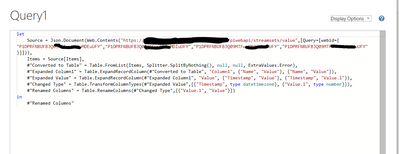
If I directly type the query as below I get the response:
The Query works as below, passing each webid seperately.
However, If I pass the webids from a table value (Custom Invoke using Json.Document(Web.Content("https:/apiserver.com/piwebapi/streamsets/value",[Query=[webid={ Column1}]])), the URL is getting passed with only webid as whole
How to make this work so that all the value from the Coloumn can be passed in the query and it considers as seperate WebIds.
Solved! Go to Solution.
Hi @prabhat_m ,
Please update the code as below and check if it can work or not...
Json.Document(
Web.Content(
"https:/apiserver.com/piwebapi/streamsets/value",
[Query = [webid = Text.Split([Column1], ",")]]
)
)
Any comment or problem, please feel free to let me know.
Best Regards
Thank Amit.
I'm using the same to form tables where cow from the example is webid.
I am trying to pass multiple query parameter for ex: Query=[q="cow","goat","dog"] which workis in the API that I'm using if I harcode it. It makes propoer query as api?q=cow&q=goat&q=dog and goes through.
However if I pass "Cow","goat","dog" from a coloum in a table, it is not working and the query becomes api?q="cow","goat","dog" which is incorrect format
Hi @prabhat_m ,
Please update the code as below and check if it can work or not...
Json.Document(
Web.Content(
"https:/apiserver.com/piwebapi/streamsets/value",
[Query = [webid = Text.Split([Column1], ",")]]
)
)
Any comment or problem, please feel free to let me know.
Best Regards
Worked like a charm!!
Thank you!
The Power BI Data Visualization World Championships is back! Get ahead of the game and start preparing now!
| User | Count |
|---|---|
| 40 | |
| 37 | |
| 33 | |
| 29 | |
| 27 |
| User | Count |
|---|---|
| 133 | |
| 104 | |
| 61 | |
| 59 | |
| 55 |