
Join us at FabCon Atlanta from March 16 - 20, 2026, for the ultimate Fabric, Power BI, AI and SQL community-led event. Save $200 with code FABCOMM.
Register now!The Power BI Data Visualization World Championships is back! Get ahead of the game and start preparing now! Learn more
Hello!!
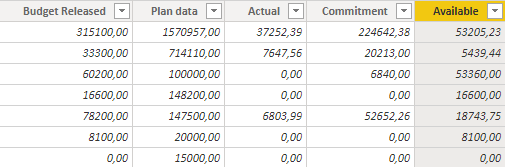
Need some help to put all the numbers in a table with the same format. As you can see in my atached print, the number format is different for the first two columns and I want to change that format to the other columns format. Any way to do that?
Thanks!!
Solved! Go to Solution.
@Anonymous
Can you check the data types in Power Query if you get your data through PQ?
⭕ Subscribe and learn Power BI from these videos
⚪ Website ⚪ LinkedIn ⚪ PBI User Group
@amitchandak I already did that, but the format doesn't change... they're all as decimal numbers, but the format doesn't change.
I want to put the first column numbers as the other ones. (Example: planned= 5.238.538 and budget released = 1.605.900)
@Anonymous
Can you check the data types in Power Query if you get your data through PQ?
⭕ Subscribe and learn Power BI from these videos
⚪ Website ⚪ LinkedIn ⚪ PBI User Group
@FowmyOh... yes, that's it! I can change the format trough that, however it still doesn't appears as the other ones. So I change the first number to decimal, but it appears as 5238538,00 instead of 5.238.538,00. Any way to do that? If not, I will have to change the other values to appears without the ".".
I have same problem now, can you share on what the solution is? Thank you
Check out the November 2025 Power BI update to learn about new features.
Advance your Data & AI career with 50 days of live learning, contests, hands-on challenges, study groups & certifications and more!