cancel
Showing results for 
Search instead for 
Did you mean: 

A new Data Days event is coming soon! This time we’re going bigger than ever. Fabric, Power BI, SQL, AI and more. Don't miss out.

Reply
Anonymous
Not applicable

Formatting date columns while preserving data type

Hello,


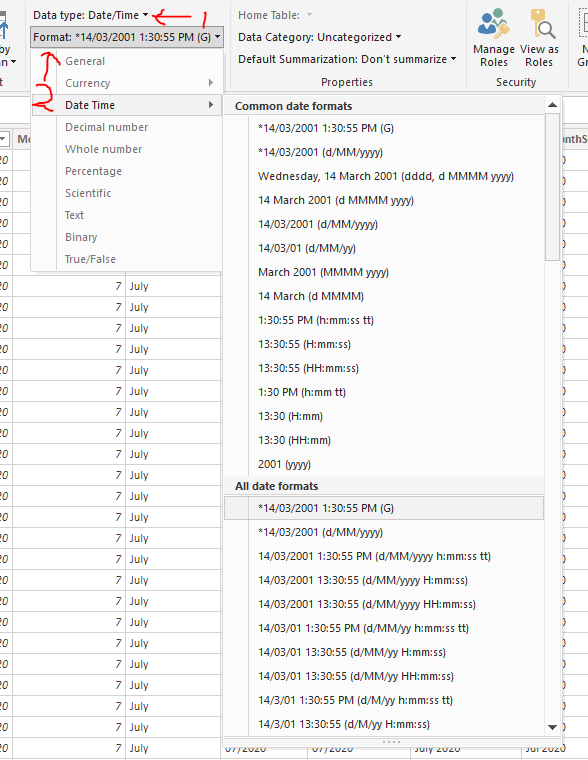
Is there a way to format datetime columns to any other formats besides the formats listed in Power BI Desktop while preserving the datatype? Please see the screenshot below. 


date format.PNG


Using the "FORMAT()" function doesn't seem to be an option because it changes the data type to "text".

1 ACCEPTED SOLUTION
TomMartens
Super User
Super User

Hey,


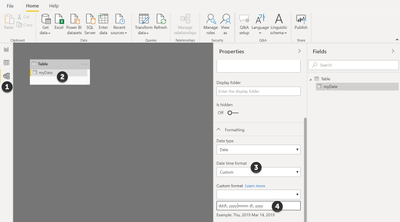
Power BI Desktop provides the possibility to create custom format while preserving the date or datetime datatype.


The picture below demonstrates how this can be achieved:image.png


It all starts with the Model view (1).

You are able to define your own format by using the available abbreviations in the text field (4).

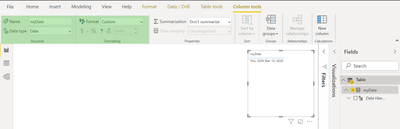
Here is a simple table visual that shows the format:

image.png


Hopefully, this provides what you are looking for.


Regards,

Tom


Did I answer your question? Mark my post as a solution, this will help others!

Proud to be a Super User!
I accept Kudos 😉
Hamburg, Germany

View solution in original post

5 REPLIES 5
TomMartens
Super User
Super User

Hey,


Power BI Desktop provides the possibility to create custom format while preserving the date or datetime datatype.


The picture below demonstrates how this can be achieved:image.png


It all starts with the Model view (1).

You are able to define your own format by using the available abbreviations in the text field (4).

Here is a simple table visual that shows the format:

image.png


Hopefully, this provides what you are looking for.


Regards,

Tom


Did I answer your question? Mark my post as a solution, this will help others!

Proud to be a Super User!
I accept Kudos 😉
Hamburg, Germany
Anonymous
Not applicable

Hi @TomMartens ,


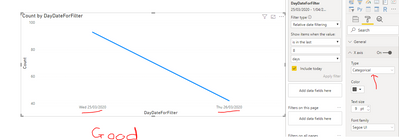
Please see the below screenshots.
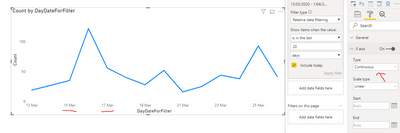
When X axis is set to "Continous", it does not obey the custom format.


Type=CategoricalType=CategoricalType=Continous (does not obey custom format)Type=Continous (does not obey custom format)

Hey @Anonymous , 


maybe you want to create an issue here: issues.powerbi.com


Regards,

Tom


Did I answer your question? Mark my post as a solution, this will help others!

Proud to be a Super User!
I accept Kudos 😉
Hamburg, Germany
amitchandak
Super User
Super User

@Anonymous 

Refer, if these can help

https://www.tutorialgateway.org/how-to-format-dates-in-power-bi/

https://docs.microsoft.com/en-us/dax/custom-date-and-time-formats-for-the-format-function

Share with Power BI Enthusiasts: Full Power BI Video (20 Hours) YouTube
Microsoft Fabric Series 60+ Videos YouTube
Microsoft Fabric Hindi End to End YouTube
Anonymous
Not applicable

Hi @amitchandak ,


How do we show a date in a custom format in visuals, say "Mon 12/03/2015" while preserving its data type to date?


I am afraid, the links you provided were not relevant to the question. I am happy to be wrong on this.

Helpful resources

Announcements
May Power BI Update Carousel

Power BI Monthly Update - May 2026

Check out the May 2026 Power BI update to learn about new features.

Fabric SQL PBI Data Days

Data Days 2026 coming soon!

Sign up to receive a private message when registration opens and key events begin.

New to Fabric survey Carousel

New to Fabric Survey

If you have recently started exploring Fabric, we'd love to hear how it's going. Your feedback can help with product improvements.

Power BI DataViz World Championships carousel

Power BI DataViz World Championships - June 2026

A new Power BI DataViz World Championship is coming this June! Don't miss out on submitting your entry.