Don't miss your chance to take exam DP-600 or DP-700 on us!
Request nowLearn from the best! Meet the four finalists headed to the FINALS of the Power BI Dataviz World Championships! Register now
Hello-
I am a little new to Power Bi. We operate a property management company. We have a data set that shows payments by source for a property. I am trying to produce the following report in Power Bi - Fig 1. The raw data set comes in shown in Fig 2.
I am thinking I need to pivot the data with the distict paytment types in to seperate columns. We want the flexablity to filter for date ranges in the visualzation.
Fig. 1
| Property Look up Code | Payments online |
| 186-0000 | 96% |
| 196-0000 | 55% |
| 187-0000 | 68% |
Fig 2.
Solved! Go to Solution.
Hi,
Drag the Property Look-up code to the visual and write these measures
Total payments = COUNTROWS(Data)
Online payments = CALCULATE([Total payments],Data[Type]="Online payment")
Online payments (%) = [Online payments]/[Total payments]
Drag the last measure to the visual.
Hope this helps.
Create a measure like this and have slicer of post date
% online = divide(calculate(count(table[lookup code]),table[type]="Online payment"),calculate(count(table[lookup code])))
Appreciate your Kudos. In case, this is the solution you are looking for, mark it as the Solution.
In case it does not help, please provide additional information and mark me with @
Thanks. My Recent Blogs -Decoding Direct Query - Time Intelligence, Winner Coloring on MAP, HR Analytics, Power BI Working with Non-Standard TimeAnd Comparing Data Across Date Ranges
Proud to be a Datanaut Connect on Linkedin
Hi,
Drag the Property Look-up code to the visual and write these measures
Total payments = COUNTROWS(Data)
Online payments = CALCULATE([Total payments],Data[Type]="Online payment")
Online payments (%) = [Online payments]/[Total payments]
Drag the last measure to the visual.
Hope this helps.
Try this measure.
Measure 2 =
VAR B = CALCULATE(COUNTROWS('Prop Fact'),ALL('Prop Fact'[Type]))
VAR A = CALCULATE(COUNTROWS('Prop Fact'),FILTER('Prop Fact','Prop Fact'[Type]="Online Payment"))
RETURN DIVIDE(A,B)
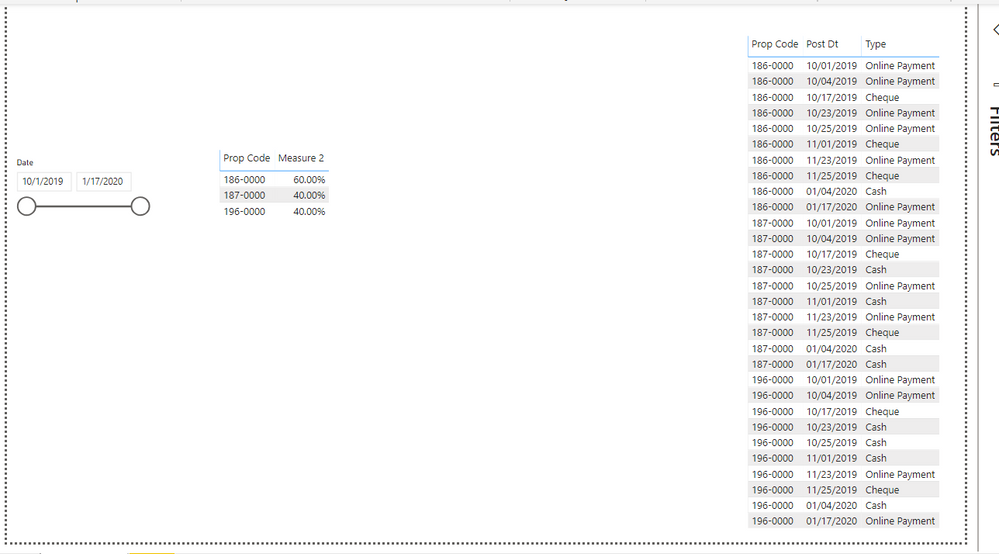
Left - Date slicer
Middle - expected output
Right - Input Property fact.
I have a seperate date dimension and Property dimensions as below and relationships are defined as 1(date and property) to M(fact)
Calendar = CALENDAR(MIN('Prop Fact'[Post Dt]),MAX('Prop Fact'[Post Dt]))
Property = DISTINCT('Prop Fact'[Prop Code])
If it helps, mark it as a solution
Kudos are nice too
Share feedback directly with Fabric product managers, participate in targeted research studies and influence the Fabric roadmap.
Check out the February 2026 Power BI update to learn about new features.
| User | Count |
|---|---|
| 55 | |
| 48 | |
| 38 | |
| 16 | |
| 15 |
| User | Count |
|---|---|
| 85 | |
| 70 | |
| 38 | |
| 28 | |
| 25 |