cancel
Showing results for 
Search instead for 
Did you mean: 

July 7 - July 17 | Round 2 of the Power BI Dataviz World Championships. Don't miss your chance! Learn more

Reply
GJUDGE
Helper II
Helper II

Formatting a Matrix

Hi, 


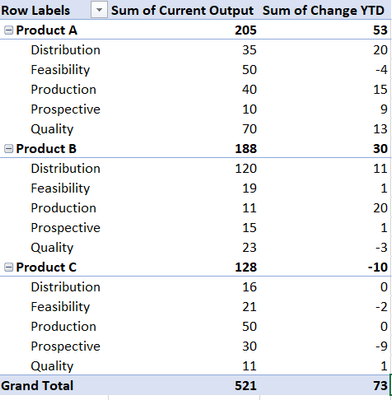
How can I format the matrix like the one below in Power BI so that all rows relating to a product have a different background and font colour?


Thanks,


GJUDGE_0-1633681873931.png


1 ACCEPTED SOLUTION

Hello there @GJUDGE ! Unfortunately Power BI does not allow us to change the backgroung colour of rows in a matrix (other than with the conditional formating). As such, the solution provided by @Anonymous  is the only work around so far. 


If this is a feature that you consider to be crucial in one of the next Power BI updates, please upvote this idea.


For additional help, please @ me in your reply!

You can also check out my LinkedIn!

Best regards,
Gonçalo Geraldes

View solution in original post

4 REPLIES 4
Anonymous
Not applicable

You could do this with a measure, though you would have to apply it to each metric within the matrix.


Colour Background =

VAR _CAT = SELECTEDVALUE(Product[Product Value])

return

IF(
_CAT="Product A","#E2EFDA",
IF(
_CAT="Product B","#FCE4D6",
"#D9E1F2"))

There may well be better ways, but off the top of my head, this would do the job.


goncalogeraldes
Super User
Super User

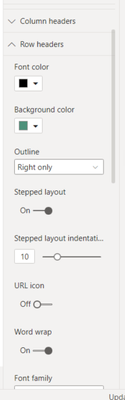
Hello there @GJUDGE ! You can format the row headers for your matrix in the "Row Headers" options on the formating pane, like in the image below:

goncalogeraldes_0-1633682731196.png

Hope this answer solves your problem!
If you need any additional help please @ me in your reply.
If my reply provided you with a solution, please consider marking it as a solution ✔️ or giving it a kudoe 👍
Thanks!

You can also check out my LinkedIn!

Best regards,
Gonçalo Geraldes


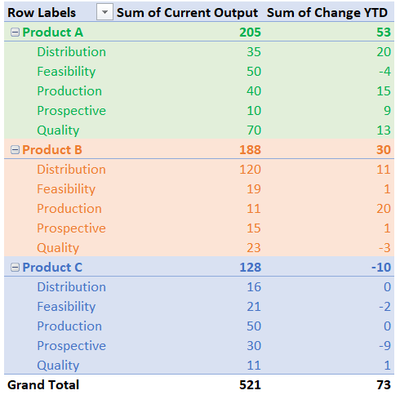
@goncalogeraldes Sorry if my original question wasn't clear, but I need it to look like the following:


GJUDGE_0-1633683217203.png


Hello there @GJUDGE ! Unfortunately Power BI does not allow us to change the backgroung colour of rows in a matrix (other than with the conditional formating). As such, the solution provided by @Anonymous  is the only work around so far. 


If this is a feature that you consider to be crucial in one of the next Power BI updates, please upvote this idea.


For additional help, please @ me in your reply!

You can also check out my LinkedIn!

Best regards,
Gonçalo Geraldes

Helpful resources

Announcements
FabCon and SQLCon Barcelona 2026

FabCon & SQLCon – Barcelona 2026

Join us in Barcelona for FabCon and SQLCon, the Fabric, Power BI, SQL, and AI community event. Save €200 with code FABCMTY200.

60 days of Data Days Carousel

Data Days 2026

Join Data Days 2026: 60 days of free live/on-demand sessions, challenges, study groups, and certification opportunities.

Power BI DataViz World Championships carousel

Power BI DataViz World Championships - June 2026

A new Power BI DataViz World Championship is coming this June! Don't miss out on submitting your entry.

Top Solution Authors