Hi,
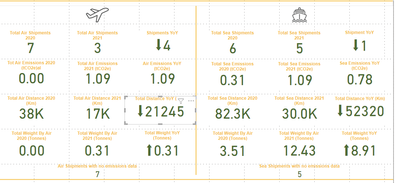
I'm trying to create a report that uses card fields to show the differance between two numbers. I want the difference instead of showing a - if its less to show a down arrow. I have this working by doing the following:
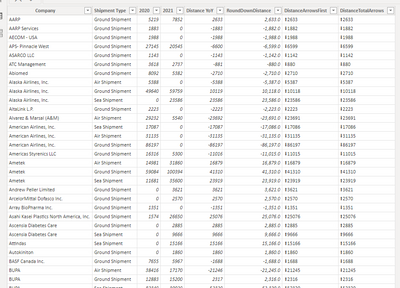
First I create a column that replaces the charater at poistion 1 which is the - with the UNICHAR arrow.
DistanceArrowsFirst = IF( 'Distance YoY'[RoundDownDistance] <= 0, REPLACE('Distance YoY'[RoundDownDistance] , 1, 1, UNICHAR(11015)), IF('Distance YoY'[RoundDownDistance] = 0, FORMAT('Distance YoY'[RoundDownDistance], 00), REPLACE('Distance YoY'[RoundDownDistance],1,0,UNICHAR(11014) )))
I think create a second column to deal with any numbers that have no difference:
DistanceTotalArrows = If('Distance YoY'[DistanceArrowsFirst] = UNICHAR(11015), "0", FORMAT('Distance YoY'[DistanceArrowsFirst],00))
Because these are using Unichars its formatting the final output as a long number when dropped into a card where as a normal number adds the K to the end if it's large. Is there anyway to convert this unichar string to a number or a better way to add the arrows that still allows me to use that column as a number field?
Thanks in advance


