cancel
Showing results for 
Search instead for 
Did you mean: 

Join the FabCon + SQLCon recap series. Up next: Power BI, Real-Time Intelligence, IQ and AI, and Data Factory take center stage. All sessions are available on-demand after the live show. Register now

Reply
prabhatnath
Advocate III
Advocate III

Formatting Table Visual Cell Background Color based on Other Column Values

Hi Friends,

I am new to PBI and working on some reports where I have below table data loaded into PBI that I am showing in a Table visual. 

IDTypeSP
1002User Story3
1003Task 
1004Task 
1005Task 
1006User Story2
1007Task 
1008Task 
1009Bug1
1010User Story 
1011Task 
1012User Story1
1013User Story 
1014User Story2
1015Task 
1016Bug 

I want the SP column in the table visual to have specific background color as per the below conditions:

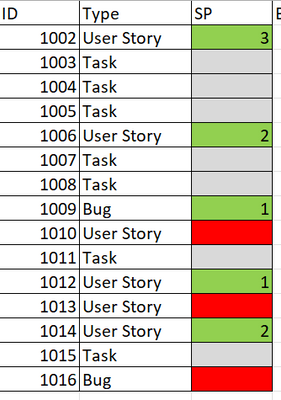
If the Type = User Story OR BUG and SP is NOT Blank (having any positive value) then the SP cell background color should be GREEN
If the Type = User Story OR BUG and SP IS Blank then the SP cell background color should be RED
if the Type <> User Story OR BUG then the SP cell background color should be a GRAY color.

Expected visual:

prabhatnath_0-1686650976407.png

Please suggest.
Thanks,
Prabhat

1 ACCEPTED SOLUTION
ddpl
Solution Sage
Solution Sage

@prabhatnath Creeate measure as per below:


Measure 2 = var _type = MIN('Table (2)'[Type])
            var _sp   = MIN('Table (2)'[SP])
            return
                IF((_type = "User Story" || _type = "Bug") && _sp >0 , 1,
                IF((_type = "User Story" || _type = "Bug") && _sp = BLANK() , 2,
                IF((_type <> "User Story" || _type <> "Bug") ,3,0)))
 
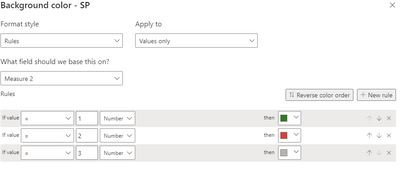
 Then assign conditional formating as per below:
 
ddpl_0-1686652909212.png

Please accept as solution if its worked.

View solution in original post

1 REPLY 1
ddpl
Solution Sage
Solution Sage

@prabhatnath Creeate measure as per below:


Measure 2 = var _type = MIN('Table (2)'[Type])
            var _sp   = MIN('Table (2)'[SP])
            return
                IF((_type = "User Story" || _type = "Bug") && _sp >0 , 1,
                IF((_type = "User Story" || _type = "Bug") && _sp = BLANK() , 2,
                IF((_type <> "User Story" || _type <> "Bug") ,3,0)))
 
 Then assign conditional formating as per below:
 
ddpl_0-1686652909212.png

Please accept as solution if its worked.

Helpful resources

Announcements
April Power BI Update Carousel

Power BI Monthly Update - April 2026

Check out the April 2026 Power BI update to learn about new features.

New to Fabric survey Carousel

New to Fabric Survey

If you have recently started exploring Fabric, we'd love to hear how it's going. Your feedback can help with product improvements.

Power BI DataViz World Championships carousel

Power BI DataViz World Championships - June 2026

A new Power BI DataViz World Championship is coming this June! Don't miss out on submitting your entry.

FabCon and SQLCon Highlights Carousel

FabCon &SQLCon Highlights

Experience the highlights from FabCon & SQLCon, available live and on-demand starting April 14th.