
cancel
Showing results for 
Search instead for 
Did you mean: 

The Power BI Data Visualization World Championships is back! Get ahead of the game and start preparing now! Learn more

Reply
Anonymous
Not applicable

Format values in Table

Hi,


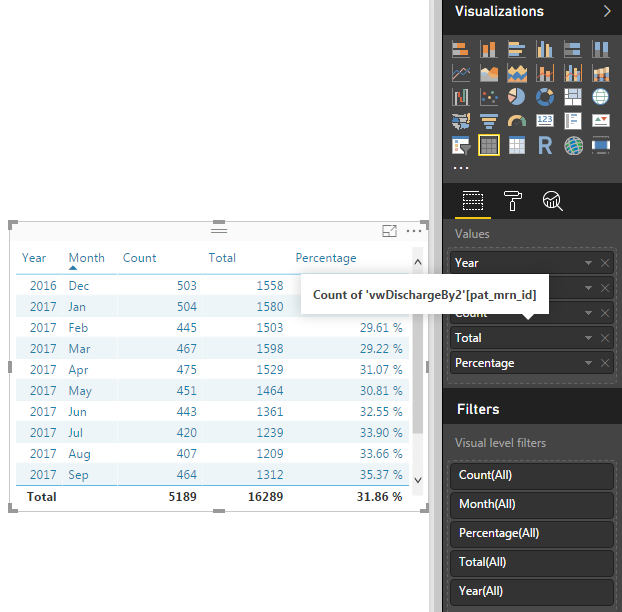
I used the <table> under visualizations to get a summary result.

I am wondering if there is a way to format the values of count, total and percentage? 

i.e. format count and total w/ a thousands separator, making 5189 = 5,189 and display percentage up to 1 decimal place.

They are not created measures; therefore, I am not able to apply the formats.


Thank you in advance for the support!


table.png

1 ACCEPTED SOLUTION
pxg08680
Resolver III
Resolver III

@Anonymous

To make the Percentage values to 1 decimal, Select the column that you are using to display in the table. Go to modelling pane on top and in formatting increase the decimal to 1 instead of auto.

a1.PNG


For other issue I did not get what you are trying exactly. Do you want the TOTAL  displayed at the end of table to be separated accordingly  or each value in column Count or Total to be separated accordingly.

View solution in original post

4 REPLIES 4
TimO1
New Member

The solution does not work for me. I clicked on the field in the table, went to modeling and select the "," and the count does not format with a "," in the field or the total row. That is 5189 should be 5,189 and it is not. What else do I need to do?

I clicked on the field in the table, went to modeling and select the "," and the count does not format with a "," in the field or the total row. That is 5189 should be 5,189 and it is not.


However when I went to Visualizations > Format and went to the Field formatting and selected the field from the drop down I changed Value decimal places to 0 the comma appears in the format.


Field formatting.JPG

v-ljerr-msft
Microsoft Employee
Microsoft Employee

Hi @Anonymous,


Have you tried the solution provided by @pxg08680 above? Does it work in your scenario? If it works, could you accept it as solution to close this thread?


If you still have any question on this issue, feel free to post here. Smiley Happy


Regards

pxg08680
Resolver III
Resolver III

@Anonymous

To make the Percentage values to 1 decimal, Select the column that you are using to display in the table. Go to modelling pane on top and in formatting increase the decimal to 1 instead of auto.

a1.PNG


For other issue I did not get what you are trying exactly. Do you want the TOTAL  displayed at the end of table to be separated accordingly  or each value in column Count or Total to be separated accordingly.

Helpful resources

Announcements
Power BI DataViz World Championships

Power BI Dataviz World Championships

The Power BI Data Visualization World Championships is back! Get ahead of the game and start preparing now!

December 2025 Power BI Update Carousel

Power BI Monthly Update - December 2025

Check out the December 2025 Power BI Holiday Recap!

FabCon Atlanta 2026 carousel

FabCon Atlanta 2026

Join us at FabCon Atlanta, March 16-20, for the ultimate Fabric, Power BI, AI and SQL community-led event. Save $200 with code FABCOMM.