

Join us at FabCon Atlanta from March 16 - 20, 2026, for the ultimate Fabric, Power BI, AI and SQL community-led event. Save $200 with code FABCOMM.
Register now!Get Fabric Certified for FREE during Fabric Data Days. Don't miss your chance! Request now
How do I create a Horizontal table like below:
| Region | US | UK | AUS | DNK |
| value1 | 1 | 1 | 1 | 1 |
| value2 | 2 | 3 | 0 | 4 |
| value 3 | 8 | 5 | 2 | 9 |
Hi @Anonymous,
How is your base data arranged?
@Anonymous,
Could you please provide us some sample data? It seems that you can use a matrix visual to achieve your requirement. You can add your country field to Column. Please refer to the link below to see the details.
https://docs.microsoft.com/en-us/power-bi/desktop-matrix-visual
Regards,
Charlie Liao
Hi @Anonymous,
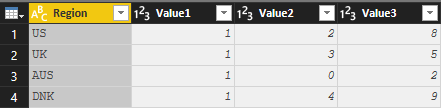
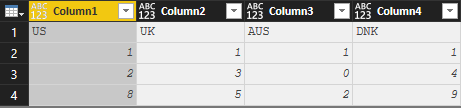
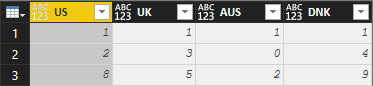
I did not known if it is the best solution and if it fits your problem. But you can transpose your table and add a custom column with the value ID ( Value1, Value2...)
Look these step-by-step images:
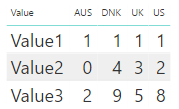
And finally you can create a table as you want:
Hope it helps!
@Anonymous
This won't solve my problem. I can not transpose my table. I have more than 50 columns and all are needed.
Check out the November 2025 Power BI update to learn about new features.
Advance your Data & AI career with 50 days of live learning, contests, hands-on challenges, study groups & certifications and more!