cancel
Showing results for 
Search instead for 
Did you mean: 

The Power BI Data Visualization World Championships is back! Get ahead of the game and start preparing now! Learn more

Reply
leandroduarte
Helper I
Helper I

Format selected row in table

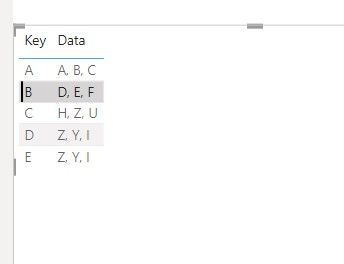
Hi, I would like to know how to format a selected row in a better way with different columns when clicking on the row from the table (not from slicers).


Does anybody knows the best way to format the selected row. In this case you can see how the "B" row looks like by default in Powerbi, other lines great a ligh gray automatically


Screenshot 2023-07-30 222839.JPG


1 ACCEPTED SOLUTION
foodd
Super User
Super User

The following is constructive criticism. By design, in Power BI, when you select a

row in a table visual, the selected row is highlighted by default to distinguish it

from other rows.  This is not and never was an indicator of a default row. 


Is your question driven by user feedback for Power BI Reports and Dashboards you support, or

are you expressing a personal opinion and favor for a different default formatting

of the Table and Matrix Visuals?


So, yes, there are ways to impact how row fill is applied, and yes there are ways through 

conditional formatting to make changes.  There are a number of Styles and Theming options,

you can try, though they tend to be set for specific reports and certain templates.   Your question

is interesting, and if you are inclined, you can add a new Idea for a new feature.

View solution in original post

1 REPLY 1
foodd
Super User
Super User

The following is constructive criticism. By design, in Power BI, when you select a

row in a table visual, the selected row is highlighted by default to distinguish it

from other rows.  This is not and never was an indicator of a default row. 


Is your question driven by user feedback for Power BI Reports and Dashboards you support, or

are you expressing a personal opinion and favor for a different default formatting

of the Table and Matrix Visuals?


So, yes, there are ways to impact how row fill is applied, and yes there are ways through 

conditional formatting to make changes.  There are a number of Styles and Theming options,

you can try, though they tend to be set for specific reports and certain templates.   Your question

is interesting, and if you are inclined, you can add a new Idea for a new feature.

Helpful resources

Announcements
Power BI DataViz World Championships

Power BI Dataviz World Championships

The Power BI Data Visualization World Championships is back! Get ahead of the game and start preparing now!

December 2025 Power BI Update Carousel

Power BI Monthly Update - December 2025

Check out the December 2025 Power BI Holiday Recap!

FabCon Atlanta 2026 carousel

FabCon Atlanta 2026

Join us at FabCon Atlanta, March 16-20, for the ultimate Fabric, Power BI, AI and SQL community-led event. Save $200 with code FABCOMM.