Don't miss your chance to take the Fabric Data Engineer (DP-600) exam for FREE! Find out how by attending the DP-600 session on April 23rd (pacific time), live or on-demand.
Learn moreNext up in the FabCon + SQLCon recap series: The roadmap for Microsoft SQL and Maximizing Developer experiences in Fabric. All sessions are available on-demand after the live show. Register now
Hi all,
I have a set of YouTube data where I'm trying to format the duration column to something usable. YouTube exports the duration values out differently, dependent on if the video is hours, minutes or seconds long. The formatting looks like this:
Hours: PT1H45M56S
(i.e. 01:45:56)
Minutes: PT2M17S
(i.e. 00:02:17)
Seconds: PT41S
(i.e. 00:00:41)
Can anyone suggest how I would convert these to a unified hh:mm:ss format. I have all three of these formats in a single dataset so need something that could do it all at once.
Hope that makes sense! Thanks in advance!
Sam
Solved! Go to Solution.
Hi @Anonymous
Do the three formats exist in three columns?
I test with the following dataset.
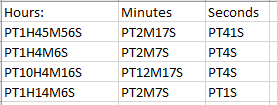
When I import it to Power BI desktop and edit it in Query Editor, it shows as below.
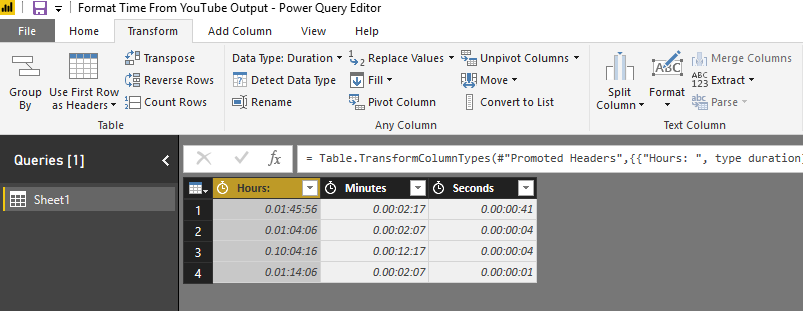
In Advanced Editor, edit code like this
let
Source = Excel.Workbook(File.Contents("C:\Users\maggiel\Desktop\case\6\6.4\Format Time From YouTube Output.xlsx"), null, true),
Sheet1_Sheet = Source{[Item="Sheet1",Kind="Sheet"]}[Data],
#"Promoted Headers" = Table.PromoteHeaders(Sheet1_Sheet, [PromoteAllScalars=true]),
#"Changed Type" = Table.TransformColumnTypes(#"Promoted Headers",{{"Hours: ", type duration}, {"Minutes", type duration}, {"Seconds", type duration}}),
#"Split Column by Delimiter" = Table.SplitColumn(Table.TransformColumnTypes(#"Changed Type", {{"Hours: ", type text}}, "en-US"), "Hours: ", Splitter.SplitTextByEachDelimiter({","}, QuoteStyle.Csv, false), {"Hours: .1", "Hours: .2"}),
#"Split Column by Delimiter1" = Table.SplitColumn(Table.TransformColumnTypes(#"Split Column by Delimiter", {{"Minutes", type text}}, "en-US"), "Minutes", Splitter.SplitTextByEachDelimiter({","}, QuoteStyle.Csv, false), {"Minutes.1", "Minutes.2"}),
#"Split Column by Delimiter2" = Table.SplitColumn(Table.TransformColumnTypes(#"Split Column by Delimiter1", {{"Seconds", type text}}, "en-US"), "Seconds", Splitter.SplitTextByEachDelimiter({","}, QuoteStyle.Csv, false), {"Seconds.1", "Seconds.2"}),
#"Changed Type1" = Table.TransformColumnTypes(#"Split Column by Delimiter2",{{"Hours: .1", type text}, {"Hours: .2", type text}, {"Minutes.1", type text}, {"Minutes.2", type text}, {"Seconds.1", type text}, {"Seconds.2", type text}}),
#"Removed Columns" = Table.RemoveColumns(#"Changed Type1",{"Hours: .2", "Minutes.2", "Seconds.2"})
in
#"Removed Columns"
Finally, I get this dataset
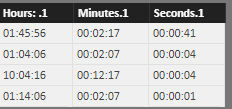
Best Regards
Maggie
Hi @Anonymous
Do the three formats exist in three columns?
I test with the following dataset.
When I import it to Power BI desktop and edit it in Query Editor, it shows as below.
In Advanced Editor, edit code like this
let
Source = Excel.Workbook(File.Contents("C:\Users\maggiel\Desktop\case\6\6.4\Format Time From YouTube Output.xlsx"), null, true),
Sheet1_Sheet = Source{[Item="Sheet1",Kind="Sheet"]}[Data],
#"Promoted Headers" = Table.PromoteHeaders(Sheet1_Sheet, [PromoteAllScalars=true]),
#"Changed Type" = Table.TransformColumnTypes(#"Promoted Headers",{{"Hours: ", type duration}, {"Minutes", type duration}, {"Seconds", type duration}}),
#"Split Column by Delimiter" = Table.SplitColumn(Table.TransformColumnTypes(#"Changed Type", {{"Hours: ", type text}}, "en-US"), "Hours: ", Splitter.SplitTextByEachDelimiter({","}, QuoteStyle.Csv, false), {"Hours: .1", "Hours: .2"}),
#"Split Column by Delimiter1" = Table.SplitColumn(Table.TransformColumnTypes(#"Split Column by Delimiter", {{"Minutes", type text}}, "en-US"), "Minutes", Splitter.SplitTextByEachDelimiter({","}, QuoteStyle.Csv, false), {"Minutes.1", "Minutes.2"}),
#"Split Column by Delimiter2" = Table.SplitColumn(Table.TransformColumnTypes(#"Split Column by Delimiter1", {{"Seconds", type text}}, "en-US"), "Seconds", Splitter.SplitTextByEachDelimiter({","}, QuoteStyle.Csv, false), {"Seconds.1", "Seconds.2"}),
#"Changed Type1" = Table.TransformColumnTypes(#"Split Column by Delimiter2",{{"Hours: .1", type text}, {"Hours: .2", type text}, {"Minutes.1", type text}, {"Minutes.2", type text}, {"Seconds.1", type text}, {"Seconds.2", type text}}),
#"Removed Columns" = Table.RemoveColumns(#"Changed Type1",{"Hours: .2", "Minutes.2", "Seconds.2"})
in
#"Removed Columns"
Finally, I get this dataset
Best Regards
Maggie
Hi there,
Thanks for your reply! I actually went about it in another way. I had to create three columns - one for each type of length - i.e. if the video is seconds, minutes or hours long.
DAX as follows:
Seconds:
ConvertSecs = IF(OR(LEN(YouTubeMainData[duration - Copy])=2,LEN(YouTubeMainData[duration - Copy])=3),"00:00:"&SUBSTITUTE(YouTubeMainData[duration - Copy],"S","")+0)
Minutes:
ConvertMins = if(FIND("M",YouTubeMainData[duration - Copy],,BLANK())=2,"00:0"&SUBSTITUTE(SUBSTITUTE(YouTubeMainData[duration - Copy],"M",":"),"S",""))+0
Hours:
ConvertHours = if(FIND("H",YouTubeMainData[duration - Copy],,BLANK())=2,"0"&SUBSTITUTE(SUBSTITUTE(SUBSTITUTE(YouTubeMainData[duration - Copy],"H",":"),"M",":"),"S",""))+0
And then a final column to bring it all together:
Duration_Calc = YouTubeMainData[ConvertSecs]+YouTubeMainData[ConvertMins]+YouTubeMainData[ConvertHours]
Thanks for your assistance anyhow!
Sam
If you have recently started exploring Fabric, we'd love to hear how it's going. Your feedback can help with product improvements.
A new Power BI DataViz World Championship is coming this June! Don't miss out on submitting your entry.
| User | Count |
|---|---|
| 46 | |
| 43 | |
| 39 | |
| 19 | |
| 15 |
| User | Count |
|---|---|
| 68 | |
| 67 | |
| 31 | |
| 27 | |
| 24 |