cancel
Showing results for 
Search instead for 
Did you mean: 

The Power BI Data Visualization World Championships is back! Get ahead of the game and start preparing now! Learn more

Reply
Anonymous
Not applicable

Format Date in Direct Query mode

Hi,


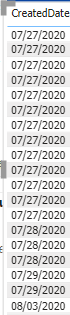
I have a date column in my metadata in simple date format.


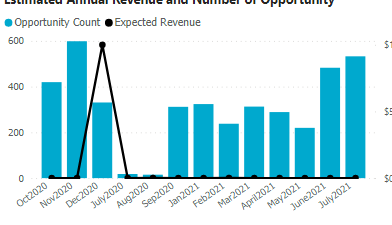
Himanshu_13_0-1627303537336.png


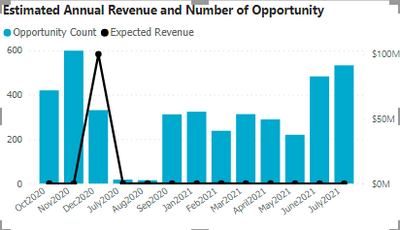
How can I format it to be shown as below. I want it to be shown as Month'Year format in sorted manner.


Please Note: I'm using direct query mode so cant use format option.


Himanshu_13_1-1627303570470.png


Regards,

Himanshu


7 REPLIES 7
Anonymous
Not applicable

Anyone has a idea how to format a simple date to"YYYYMM"

format in direct query?


This will resolve my issue.

Samarth_18
Community Champion
Community Champion

Hi @Anonymous 


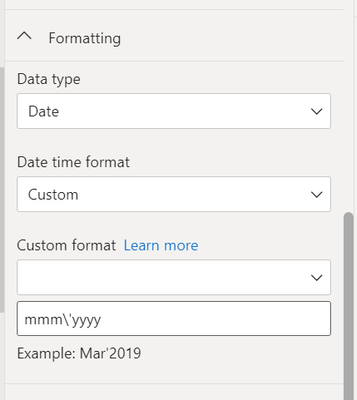
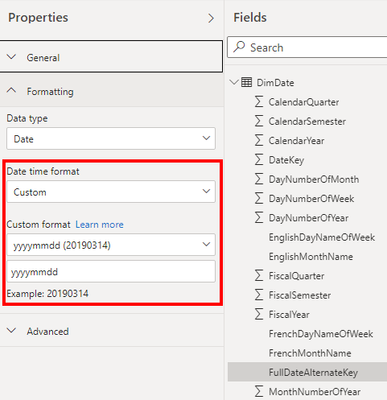
You can add below format in custom formatting to get your desired output.

Samarth_18_1-1627304690680.png


Thanks

Best Regards,
Samarth

If this post helps, please consider accepting it as the solution to help the other members find it more quickly.
Appreciate your Kudos!!
Connect on Linkedin

Anonymous
Not applicable

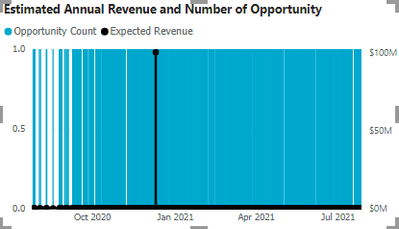
I'm getting this output


Himanshu_13_0-1627305648611.png


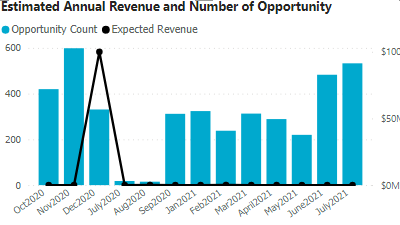
How to get month wise break up like below:


Himanshu_13_1-1627305679311.png


You can create two calculated column one for format your date and another column for sorting of your formatted date column. Below are the required code for both format and sort date column.

formatted_date = FORMAT(date_table[Date],"MMM YYYY")
Sort = FORMAT(date_table[Date], "YYYYMM")


Best Regards,
Samarth

If this post helps, please consider accepting it as the solution to help the other members find it more quickly.
Appreciate your Kudos!!
Connect on Linkedin

Anonymous
Not applicable

@Samarth_18  Yes this is easy and can be done when in import mode but format doesnt work in Direct query mode hence facing this issue. 


I have created the Month'Year using concat but sorting is the issue. Sorting is not happening correctly for me.


Himanshu_13_0-1627306380361.png


selimovd
Super User
Super User

Hey @Anonymous ,


why not? Custom format works also in DirectQuery mode, I just tried it:

selimovd_0-1627304112540.png


And the storage mode is DQ:

selimovd_1-1627304126831.png


If you need any help please let me know.
If I answered your question I would be happy if you could mark my post as a solution ✔️ and give it a thumbs up 👍
 
Best regards
Denis
 
Anonymous
Not applicable

I want to present the data in the below format, can you please help me with the steps how to use it as its not working for me at the moment.


Himanshu_13_0-1627304920873.png

Its showing me very incorrect data.


Himanshu_13_1-1627305056745.png


It should be something like below , i have created some calculated column n done concat but sorting is not working properly.


Himanshu_13_2-1627305101861.png


Helpful resources

Announcements
Power BI DataViz World Championships

Power BI Dataviz World Championships

The Power BI Data Visualization World Championships is back! Get ahead of the game and start preparing now!

December 2025 Power BI Update Carousel

Power BI Monthly Update - December 2025

Check out the December 2025 Power BI Holiday Recap!

FabCon Atlanta 2026 carousel

FabCon Atlanta 2026

Join us at FabCon Atlanta, March 16-20, for the ultimate Fabric, Power BI, AI and SQL community-led event. Save $200 with code FABCOMM.