This time we’re going bigger than ever. Fabric, Power BI, SQL, AI and more. We're covering it all. You won't want to miss it.
Learn moreDid you hear? There's a new SQL AI Developer certification (DP-800). Start preparing now and be one of the first to get certified. Register now
Data Source: Tabular Cube
Purpose: Create a new measure that is a whole number formatted as currency, i.e. no decimals. This new measure must be able to sort high to low.
Background: Microsoft knows there is a bug that doesn't allow newly created measures to be formatted using the modeling tab link. Which is why a DAX query must be used to control formatting.
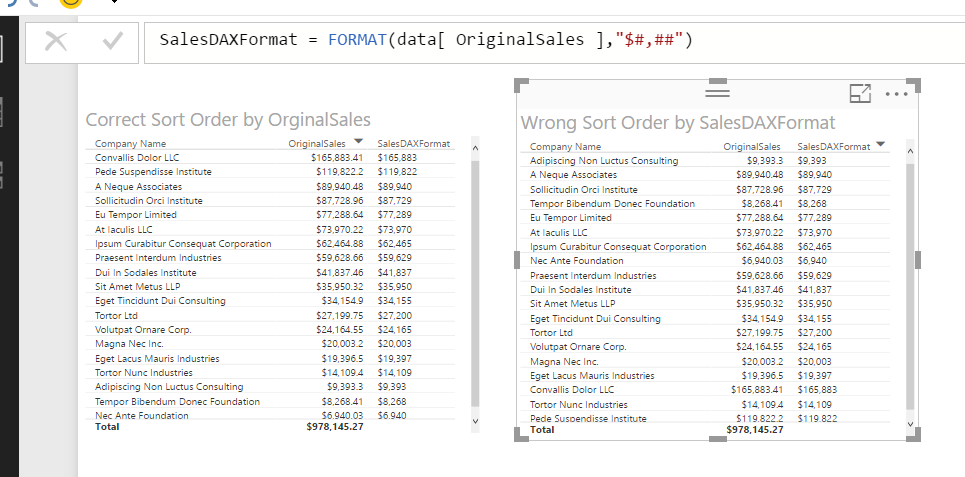
Recently Microsoft announced that you could create new measures when using a Tabular Cube data source. I've created a new measure called SalesDAXFormat (see below).
However, this new measure seems to sort alphabetically by number (right matrix). Does anyone know how I can get this measure to sort numerically from high to low (and vice versa)?
Solved! Go to Solution.
Ya, I think you are hosed until the June release. As soon as you use FORMAT( ) your measure it going to return text, and that will cause text based sorting... and not much you can do about that (outside of... don't use FORMAT, but then you hit the other bug w/ built in formatting not saving).
does anyone know if its resolved? FORMAT() is still doign Text sorting
Hi Scottsen!
Do you know, if this issue was resolved? I'm having the same problem.
I can't see any fix mentioned on the june-2017 update list.
Br, Torben
Hi,
Was this fixed?
Check out the April 2026 Power BI update to learn about new features.
Sign up to receive a private message when registration opens and key events begin.
If you have recently started exploring Fabric, we'd love to hear how it's going. Your feedback can help with product improvements.
| User | Count |
|---|---|
| 36 | |
| 33 | |
| 31 | |
| 21 | |
| 16 |
| User | Count |
|---|---|
| 66 | |
| 55 | |
| 31 | |
| 24 | |
| 23 |