Join us at FabCon Atlanta from March 16 - 20, 2026, for the ultimate Fabric, Power BI, AI and SQL community-led event. Save $200 with code FABCOMM.
Register now!The Power BI Data Visualization World Championships is back! Get ahead of the game and start preparing now! Learn more
Solved! Go to Solution.
Hi @Adzam,
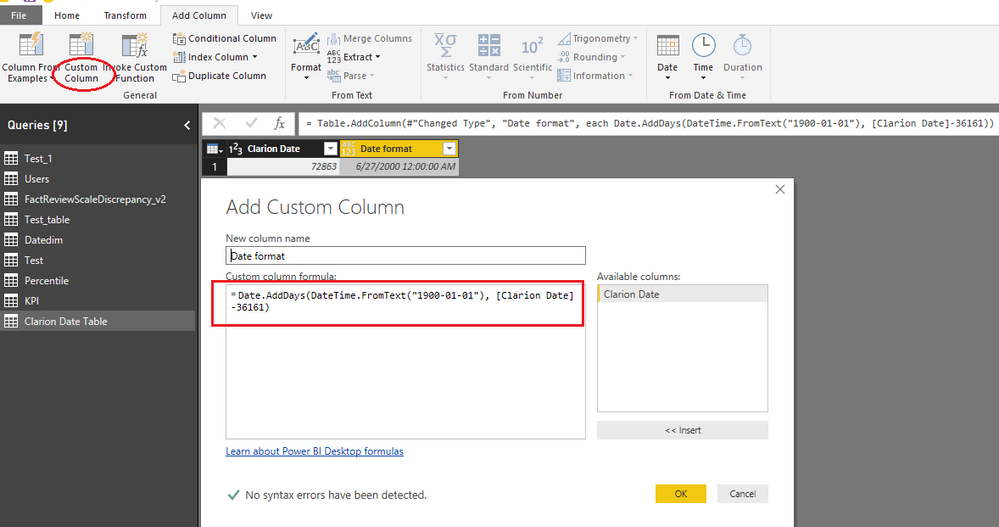
In Power BI, you can still use the same logic to clarion date, please refer to below M code. Open Query Editor mode, add a custom column:
=Date.AddDays(DateTime.FromText("1900-01-01"), [Clarion Date]-36161)
Best regards,
Yuliana Gu
Hi @Adzam,
In Power BI, you can still use the same logic to clarion date, please refer to below M code. Open Query Editor mode, add a custom column:
=Date.AddDays(DateTime.FromText("1900-01-01"), [Clarion Date]-36161)
Best regards,
Yuliana Gu
Hello guys,
I was with this same problem and I followed your advice, however, in my case when I subtracted the value of -36161 in Powerbi my dates were always two days apart from the real. So instead of subtracting -36161 I subtracted -36163 and ready worked! My question is if I made it right by making this change and if that solution could affect me in the future? I thank the attention.
Follow the code used
=Date.AddDays(DateTime.FromText("1900-01-01"), [Clarion Date]-36163)
The Power BI Data Visualization World Championships is back! Get ahead of the game and start preparing now!
| User | Count |
|---|---|
| 39 | |
| 37 | |
| 33 | |
| 32 | |
| 29 |
| User | Count |
|---|---|
| 132 | |
| 88 | |
| 82 | |
| 68 | |
| 64 |