cancel
Showing results for 
Search instead for 
Did you mean: 

Next up in the FabCon + SQLCon recap series: The roadmap for Microsoft SQL and Maximizing Developer experiences in Fabric. All sessions are available on-demand after the live show. Register now

Reply
Alicetemitope
Frequent Visitor

Forecasting using previous day value

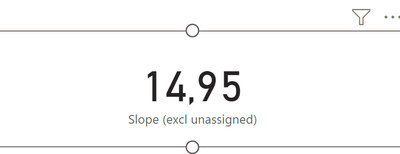
Hi Team, I hope you all are doing great. I am a newbie to DAX and PBI annd currenntly working on a task to predict cost. I had to calculate the slope(which I did using the Linest function) and add this slope to the preceeding value(where preceeding value = previous day cost). so,

cost prediction for today= actual value of previous day + slope and if there is no actual value present(in the case of future days), then 

cost prediction for future = last calculated cost prediction + slope 


so I wrote a dax formula,

cost prediction =
var _PreviousDayCost = CALCULATE([Amortized Cost(€)], PREVIOUSDAY(DIM_Date[Date]))
var _predictedcost = _PreviousDayCost + [Slope]
return
_predictedconsumption
 
evreything works fine until when I don't have any actual and it just returns the slope. is there a way to reference the previously calculated prediction so the right prediction is populated.like in excel where previous cell is referenced. 
 
Thanks in advance for your help and support
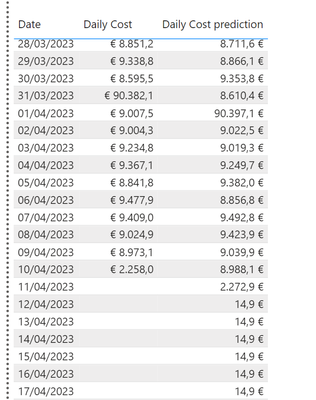
Here is a result of my current formulaHere is a result of my current formulavalue to be addedvalue to be added
1 ACCEPTED SOLUTION
Greg_Deckler
Community Champion
Community Champion

@Alicetemitope No, but you could do this potentially:

Measure = 
  VAR __Date = MAX('Table'[Date])
  VAR __Table = 
    ADDCOLUMNS(
      DISTINCT(ALLSELECTED('Table'[Date])),
      "__DailyCost",[Amortized Cost(E)
    )
  VAR __MaxDate = MAXX(FILTER(__Table, [__DailyCost] <> BLANK()), [Date])
  VAR __Value = MAXX(FILTER(__Table, [Date] = __MaxDate), [__DailyCost])
  VAR __Result = __Value * [Slope]
RETURN
  __Result


Follow on LinkedIn
@ me in replies or I'll lose your thread!!!
Instead of a Kudo, please vote for this idea
Become an expert!: Enterprise DNA
External Tools: MSHGQM
YouTube Channel!: Microsoft Hates Greg
Latest book!:
DAX For Humans

DAX is easy, CALCULATE makes DAX hard...

View solution in original post

2 REPLIES 2
Greg_Deckler
Community Champion
Community Champion

@Alicetemitope No, but you could do this potentially:

Measure = 
  VAR __Date = MAX('Table'[Date])
  VAR __Table = 
    ADDCOLUMNS(
      DISTINCT(ALLSELECTED('Table'[Date])),
      "__DailyCost",[Amortized Cost(E)
    )
  VAR __MaxDate = MAXX(FILTER(__Table, [__DailyCost] <> BLANK()), [Date])
  VAR __Value = MAXX(FILTER(__Table, [Date] = __MaxDate), [__DailyCost])
  VAR __Result = __Value * [Slope]
RETURN
  __Result


Follow on LinkedIn
@ me in replies or I'll lose your thread!!!
Instead of a Kudo, please vote for this idea
Become an expert!: Enterprise DNA
External Tools: MSHGQM
YouTube Channel!: Microsoft Hates Greg
Latest book!:
DAX For Humans

DAX is easy, CALCULATE makes DAX hard...

@Greg_Deckler thank you so much for your help. Your suggestion helped in fine tuning my calculations. In the end, we stopped this approach and decided to use OLS for the predictions. which was much easier and made more sense. 

Helpful resources

Announcements
New to Fabric survey Carousel

New to Fabric Survey

If you have recently started exploring Fabric, we'd love to hear how it's going. Your feedback can help with product improvements.

Power BI DataViz World Championships carousel

Power BI DataViz World Championships - June 2026

A new Power BI DataViz World Championship is coming this June! Don't miss out on submitting your entry.

Join our Fabric User Panel

Join our Fabric User Panel

Share feedback directly with Fabric product managers, participate in targeted research studies and influence the Fabric roadmap.

March Power BI Update Carousel

Power BI Community Update - March 2026

Check out the March 2026 Power BI update to learn about new features.