cancel
Showing results for 
Search instead for 
Did you mean: 

Get Fabric Certified for FREE during AI Skills Fest. This week only. Secure your voucher now.

Reply
Anonymous
Not applicable

Forecasting the data

Hi All,


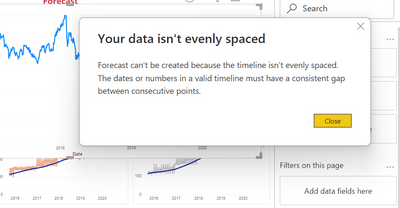
I'm getting the below error while trying to forecast data but couldnt see any anormility in my dataset.


Can someone help here?


Himanshu_13_0-1646315186331.png


1 ACCEPTED SOLUTION
Anonymous
Not applicable

Hi @Anonymous ,

Have you solved your problem? If not, please refer to the following blog.

  • Merge in another data set with all possible dates for the date range I wanted for the report, then use the dates from that 2nd data set for the X-Axis so every date in the range would have a data point.  
  • On the Merge dialog box, shown below, we select our Join/Merge key (ExcelNumericDate), and select our “Join Kind”, eg: INNER, LEFT, RIGHT etc… Be careful here to pick the correct type of join, Right or Left, depending on which order the data sets are in.

More details: when your “Data is too irregular to forecast 


Best Regards

Community Support Team _ Polly


If this post helps, then please consider Accept it as the solution to help the other members find it more quickly.

View solution in original post

2 REPLIES 2
Anonymous
Not applicable

Hi @Anonymous ,

Have you solved your problem? If not, please refer to the following blog.

  • Merge in another data set with all possible dates for the date range I wanted for the report, then use the dates from that 2nd data set for the X-Axis so every date in the range would have a data point.  
  • On the Merge dialog box, shown below, we select our Join/Merge key (ExcelNumericDate), and select our “Join Kind”, eg: INNER, LEFT, RIGHT etc… Be careful here to pick the correct type of join, Right or Left, depending on which order the data sets are in.

More details: when your “Data is too irregular to forecast 


Best Regards

Community Support Team _ Polly


If this post helps, then please consider Accept it as the solution to help the other members find it more quickly.

Pragati11
Super User
Super User

HI @Anonymous ,


I am not able to replicate this issue at my end as I can create forecasting.

There is an existing thread on the forum for this. See if it helps:

https://community.powerbi.com/t5/Desktop/Forecast-with-irregular-dates/m-p/238428


Best Regards,

Pragati Jain


MVP logo


LinkedIn | Twitter | Blog YouTube 

Did I answer your question? Mark my post as a solution! This will help others on the forum!

Appreciate your Kudos!!

Proud to be a Super User!!

Helpful resources

Announcements
May Power BI Update Carousel

Power BI Monthly Update - May 2026

Check out the May 2026 Power BI update to learn about new features.

Fabric SQL PBI Data Days

Data Days 2026 coming soon!

Sign up to receive a private message when registration opens and key events begin.

New to Fabric survey Carousel

New to Fabric Survey

If you have recently started exploring Fabric, we'd love to hear how it's going. Your feedback can help with product improvements.

Power BI DataViz World Championships carousel

Power BI DataViz World Championships - June 2026

A new Power BI DataViz World Championship is coming this June! Don't miss out on submitting your entry.